# How to append overlapping polyDatas?
**URL:** https://discourse.vtk.org/t/how-to-append-overlapping-polydatas/11799
**Category:** Support
**Tags:** python
**Created:** [June 23, 2023, 8:40am UTC](https://discourse.vtk.org/t/how-to-append-overlapping-polydatas/11799 "2023-06-23T08:40:25Z")
**Posts on this page:** 2
**Page:** 1
### Author:  [@somso2e](https://discourse.vtk.org/u/somso2e)
#### Post date: [June 23, 2023, 8:40am UTC](https://discourse.vtk.org/t/how-to-append-overlapping-polydatas/11799/1 "2023-06-23T08:40:25Z")
I have multiple polygons defined by a set of point coordinates. These polygons could be on each three axes and might overlap each other. I want to create a binary mask from these polygons and extract all the voxels that are in at least one of the polygons using a vtkImageStencil. When I tried to use vtkAppendPolyData i get weird results.
Consider these two polygons coordinates:
[(0, 200, 0), (200, 200, 0), (200, 150, 0), (0, 150, 0),]:
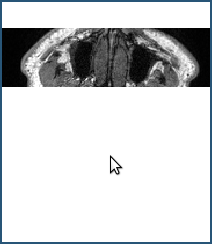
[(0, 200, 0), (100, 200, 0), (100, 0, 0), (0, 0, 0),]:
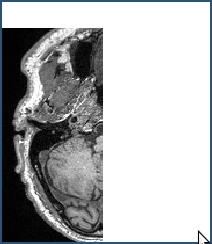
After this pipeline:
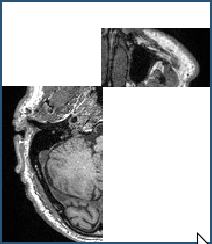
vtkAppendPolyData → vtkCleanPolyData → vtkTriangleFilter → vtkStripper,
The result is this:
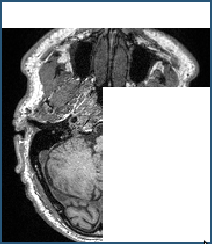
But I want something like this (basically voxel-wise OR of the polygons):
---
### Author:  [@somso2e](https://discourse.vtk.org/u/somso2e)
#### Post date: [June 25, 2023, 8:53am UTC](https://discourse.vtk.org/t/how-to-append-overlapping-polydatas/11799/2 "2023-06-25T08:53:46Z")
Turns out I was really over-complicating it. There was no need for turning the points in to polygon and polydata, I just has to use vtkLassoStencilSource and merged all the stencil sources using vtkImageStencilSource
Check out this test file:
[https://gitlab.kitware.com/vtk/vtk/-/blob/v9.2.0/Imaging/Core/Testing/Python/TestLassoStencil.py](https://gitlab.kitware.com/vtk/vtk/-/blob/v9.2.0/Imaging/Core/Testing/Python/TestLassoStencil.py)
And here’s my code snippet:
```python
...
image_data = reader.GetOutput()
points_all = [
[(50, 0, 100), (100, 0, 100), (100, 200, 100), (50, 200, 100)],
[(0, 200, 100), (200, 200, 100), (200, 150, 100), (0, 150, 100),],
]
final_stencil = vtk.vtkImageStencilData()
for point_set in points_all:
points = vtk.vtkPoints()
for p in point_set:
points.InsertNextPoint(p)
lasso_stencil = vtk.vtkLassoStencilSource()
lasso_stencil.SetPoints(points)
lasso_stencil.SetInformationInput(image_data)
lasso_stencil.Update()
final_stencil.Add(lasso_stencil.GetOutput())
stencil = vtk.vtkImageStencil()
stencil.SetInputData(image_data)
stencil.SetStencilData(final_stencil)
stencil.SetBackgroundValue(500)
```