# How to apply different textures to each face of a tetrahedron
**URL:** https://discourse.vtk.org/t/how-to-apply-different-textures-to-each-face-of-a-tetrahedron/2333
**Category:** Support
**Created:** [December 24, 2019, 7:25am UTC](https://discourse.vtk.org/t/how-to-apply-different-textures-to-each-face-of-a-tetrahedron/2333 "2019-12-24T07:25:43Z")
**Posts on this page:** 3
**Page:** 1
### Author:  [@Cheng1087](https://discourse.vtk.org/u/Cheng1087)
#### Post date: [December 24, 2019, 7:25am UTC](https://discourse.vtk.org/t/how-to-apply-different-textures-to-each-face-of-a-tetrahedron/2333/1 "2019-12-24T07:25:43Z")
Here is my code example.( **only can use one actor!** )
#include \
VTK\_MODULE\_INIT(vtkRenderingOpenGL2)
VTK\_MODULE\_INIT(vtkInteractionStyle)
#include \
#include \
#include \
#include \
#include \
#include \
#include \
#include \
#include \
int main()
{
float pts[4][3] = { {0,0,0},{1,0,0},{0,1,0},{0,0,1} };
vtkIdType ids[4][3] = { {0,2,1},{0,3,2},{0,1,3},{1,2,3} };
vtkSmartPointer vtkPts = vtkSmartPointer::New();
for (int i = 0; i \< 4; i++)
vtkPts-\>InsertPoint(i, pts[i]);
vtkSmartPointer polys = vtkSmartPointer::New();
for (int i = 0; i \< 4; i++)
{
//I have four textures here for each face of tetrahedron
//how can i achieve this function?
vtkSmartPointer poly = vtkSmartPointer::New();
poly-\>GetPointIds()-\>SetNumberOfIds(3);
for (int j = 0; j \< 3; j++)
poly-\>GetPointIds()-\>SetId(j, ids[i][j]);
polys-\>InsertNextCell(poly);
}
vtkSmartPointer polydata = vtkSmartPointer::New();
polydata-\>SetPoints(vtkPts);
polydata-\>SetPolys(polys);
vtkSmartPointer mapper = vtkSmartPointer::New();
mapper-\>SetInputData(polydata);
vtkSmartPointer actor = vtkSmartPointer::New();
actor-\>SetMapper(mapper);
vtkSmartPointer render = vtkSmartPointer::New();
render-\>AddActor(actor);
vtkSmartPointer renWin = vtkSmartPointer::New();
vtkSmartPointer Iren = vtkSmartPointer::New();
renWin-\>AddRenderer(render);
renWin-\>SetInteractor(Iren);
renWin-\>Render();
Iren-\>Start();
return 1;
}
---
### Author:  [@Paulo\_Carvalho](https://discourse.vtk.org/u/Paulo_Carvalho)
#### Post date: [December 26, 2019, 11:16am UTC](https://discourse.vtk.org/t/how-to-apply-different-textures-to-each-face-of-a-tetrahedron/2333/2 "2019-12-26T11:16:23Z")
Hello, Cheng. I’m assuming this:
> [@Cheng1087](#):
>
> vtkSmartPointer mapper = vtkSmartPointer::New();
Means this:
`vtkSmartPointer mapper = vtkTexture::New();`
Tip: use the code markdown syntax 😉.
Answering your question: No, from the design of vtkActor class.
However, you can achieve the same effect of “multiple textures” by tiling your four textures in a single larger image like this:
Then you assign different texture coordinates (2D UV coordinates) to each vertex (3D XYZ coordinates) of your actor to match each tile in your texture image to a face of your model. VTK has some ready-to-use texture mappers to save you the trouble of computing UV coordinates by hand (specially handy when it comes to curved surfaces). I suggest you to study the [vtkTexture](https://vtk.org/doc/nightly/html/classvtkTexture.html) class and googling for `vtkTextureMapTo*` classes and their examples.
Texture mapping can be visualized as unfolding a 3D polyhedron into the 2D plane of the texture image:
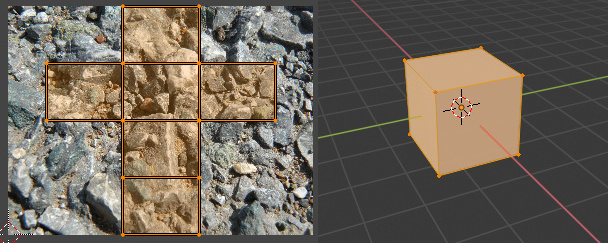
(made with Blender)
Here’s an example of someone trying to map an image into a cube (the closest thing to your problem): [c++ - Apply an image on cube faces - VTK - Stack Overflow](https://stackoverflow.com/questions/40308608/apply-an-image-on-cube-faces-vtk) . It’s in Pyton, but the API is the same.
all the best
---
### Author:  [@Cheng1087](https://discourse.vtk.org/u/Cheng1087)
#### Post date: [December 30, 2019, 10:51am UTC](https://discourse.vtk.org/t/how-to-apply-different-textures-to-each-face-of-a-tetrahedron/2333/3 "2019-12-30T10:51:44Z")
Thanks for your suggestions.The code error may have occurred during the paste process,next time I will check the code carefully. I will try the method you said.