# How to blend a gray and rgb image?
**URL:** https://discourse.vtk.org/t/how-to-blend-a-gray-and-rgb-image/5072
**Category:** Support
**Created:** [January 27, 2021, 3:01pm UTC](https://discourse.vtk.org/t/how-to-blend-a-gray-and-rgb-image/5072 "2021-01-27T15:01:58Z")
**Posts on this page:** 3
**Page:** 1
### Author:  [@zhang-qiang-github](https://discourse.vtk.org/u/zhang-qiang-github)
#### Post date: [January 27, 2021, 3:01pm UTC](https://discourse.vtk.org/t/how-to-blend-a-gray-and-rgb-image/5072/1 "2021-01-27T15:01:58Z")
I need to blend a gray and rgb image, and my code is:
```auto
import vtk
import numpy as np
from vtk.util.numpy_support import vtk_to_numpy, numpy_to_vtk
def numpyToVTK(data, multi_component=False):
if multi_component == False:
if len(data.shape) == 2:
data = data[:, :, np.newaxis]
flat_data_array = data.transpose(2,1,0).flatten()
vtk_data = numpy_to_vtk(num_array=flat_data_array, deep=True, array_type=vtk.VTK_FLOAT)
else:
assert len(data.shape)==3, 'only test for 2D RGB'
flat_data_array = data.transpose(1, 0, 2)
flat_data_array = np.reshape(flat_data_array, newshape=[-1, data.shape[2]])
vtk_data = numpy_to_vtk(num_array=flat_data_array, deep=True, array_type=vtk.VTK_FLOAT)
img = vtk.vtkImageData()
img.GetPointData().SetScalars(vtk_data)
img.SetDimensions(data.shape[0], data.shape[1], 1)
return img
x = np.linspace(start=-1000, stop=500, num=256)
y = np.linspace(start=-1000, stop=500, num=256)
xx, yy = np.meshgrid(x, y) # 为一维的矩阵
img = xx
rgb = np.zeros(shape=[256, 256, 3])
rgb[100:150, 100:150, 0] = 255
gray = numpyToVTK(img)
rgb = numpyToVTK(rgb, multi_component=True)
windowLevelColor = vtk.vtkImageMapToWindowLevelColors()
windowLevelColor.SetInputData(gray)
# windowLevelColor.SetWindow(400)
# windowLevelColor.SetLevel(0)
windowLevelColor.Update()
image_blender = vtk.vtkImageBlend()
image_blender.AddInputData(rgb)
image_blender.AddInputData(windowLevelColor.GetOutput())
image_blender.SetOpacity(0, 0.5)
image_blender.SetOpacity(1, 0.5)
image_blender.Update()
imageActor = vtk.vtkImageActor()
imageActor.GetMapper().SetInputData(image_blender.GetOutput())
# imageActor.GetMapper().SetInputData(gray)
# imageActor.GetMapper().SetInputData(windowLevelColor.GetOutput())
# imageActor.GetMapper().SetInputData(rgb)
ren = vtk.vtkRenderer()
ren.AddActor(imageActor)
ren.SetBackground(0.1, 0.2, 0.4)
renWin = vtk.vtkRenderWindow()
renWin.AddRenderer(ren)
renWin.SetSize(400, 400)
iren = vtk.vtkRenderWindowInteractor()
iren.SetRenderWindow(renWin)
renWin.Render()
iren.Start()
```
I have tested that gray/rgb is OK:
```auto
# imageActor.GetMapper().SetInputData(gray)
# imageActor.GetMapper().SetInputData(windowLevelColor.GetOutput())
# imageActor.GetMapper().SetInputData(rgb)
```
The `windlwLevelColor.GetOutput` is:
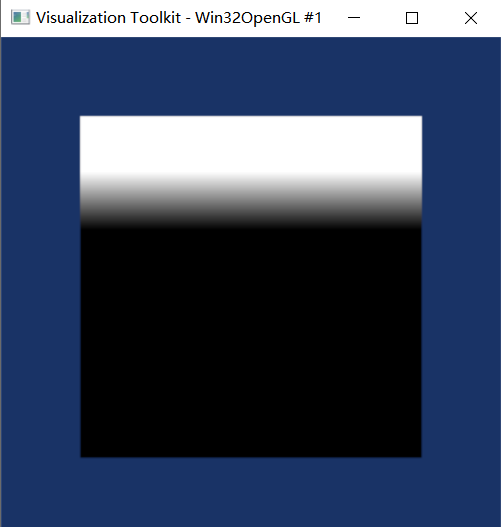
The `rgb` is:
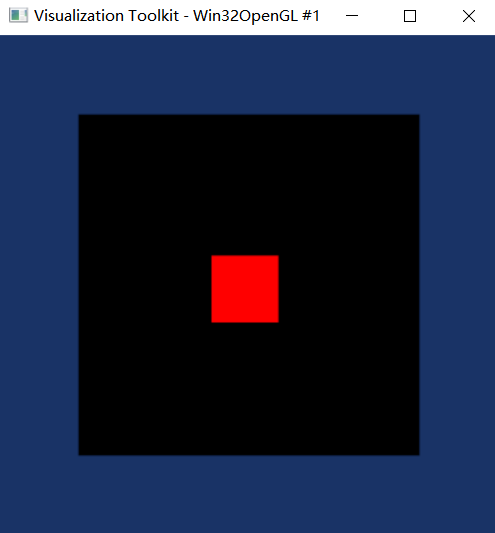
Unfortunately, the `image_blender.GetOutput()` is:
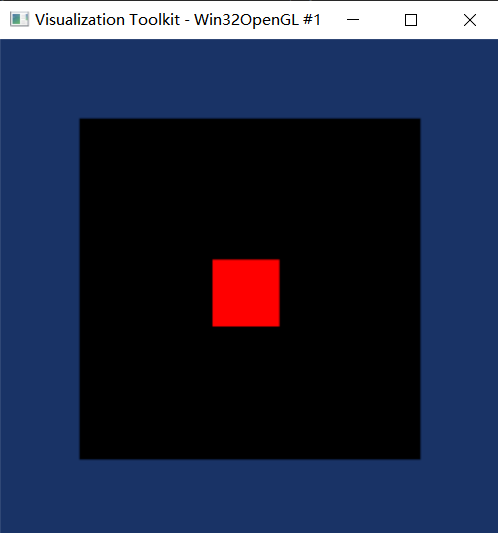
Is there anything wrong with my code? How can I blend the gray and rgb image? Any suggestion is appreciated!
---
### Author:  [@dgobbi](https://discourse.vtk.org/u/dgobbi)
#### Post date: [January 27, 2021, 4:10pm UTC](https://discourse.vtk.org/t/how-to-blend-a-gray-and-rgb-image/5072/2 "2021-01-27T16:10:16Z")
The inputs for vtkImageBlend must have the same data type. Your RGB image is VTK\_FLOAT, but the output of vtkImageMapToWindowLevelColors is VTK\_UNSIGNED\_CHAR.
If you change the type of your RGB image to VTK\_UNSIGNED\_CHAR, then the blending will work. I recommend that you add a data\_type parameter to your numpyToVTK() function, so that you can do this:
```python
rgb = np.zeros(shape=[256, 256, 3], dtype=np.uint8)
rgb[100:150, 100:150, 0] = 255
rgb = numpyToVTK(rgb, multi_component=True, data_type=vtk.VTK_UNSIGNED_CHAR)
```
Also, I recommend that you remove this line from your code, because it has no effect (as I will explain below):
```python
image_blender.SetOpacity(0, 0.5)
```
For alpha blending, the blending coefficient for the base image always computed automatically. If you set the opacity of the second image to 0.5, then the blending coefficient for the base image is automatically set to 0.5. If you set the opacity of the second image to 0.25, the coefficient for the base image is automatically set to 0.75.
Also, I don’t know exactly what your requirements are, but it is common for the base image to be gray, and for the overlay image to be color. It is also fairly common for the overlay image to be RGBA, so that the alpha is part of the overlay image:
```python
rgb = np.zeros(shape=[256, 256, 4], dtype=np.uint8) # RGBA
rgb[100:150, 100:150, 0] = 255 # set red=1.0
rgb[100:150, 100:150, 3] = 255 # set alpha=1.0
```
then apply the RGBA overlay to the gray image:
```python
image_blender = vtk.vtkImageBlend()
image_blender.AddInputData(windowLevelColor.GetOutput())
image_blender.AddInputData(rgb)
# each pixel of the overlay will have an opacity of 1.0 * alpha
image_blender.SetOpacity(1, 1.0)
image_blender.Update()
```
---
### Author:  [@zhang-qiang-github](https://discourse.vtk.org/u/zhang-qiang-github)
#### Post date: [January 28, 2021, 12:23am UTC](https://discourse.vtk.org/t/how-to-blend-a-gray-and-rgb-image/5072/3 "2021-01-28T00:23:55Z")
Thank you for your very kindly reply. It solved my problem.