# How to blend a gray and rgb image ?
**URL:** https://discourse.vtk.org/t/how-to-blend-a-gray-and-rgb-image/6357
**Category:** Support
**Created:** [August 11, 2021, 12:49pm UTC](https://discourse.vtk.org/t/how-to-blend-a-gray-and-rgb-image/6357 "2021-08-11T12:49:34Z")
**Posts on this page:** 3
**Page:** 1
### Author:  [@zhang-qiang-github](https://discourse.vtk.org/u/zhang-qiang-github)
#### Post date: [August 11, 2021, 12:49pm UTC](https://discourse.vtk.org/t/how-to-blend-a-gray-and-rgb-image/6357/1 "2021-08-11T12:49:34Z")
I want to blend a gray and rgb image.
Firstly, I have a image:
```auto
torgbGray = np.zeros(shape=[256, 256])
for i in range(256):
for j in range(256):
torgbGray[i, j] = i+j
```
Then, I convert this gray image to a rgb image by:
```auto
colorTable = vtk.vtkLookupTable()
colorTable.SetRange(100, 300)
colorTable.SetBelowRangeColor(0, 0, 0, 0)
colorTable.SetUseBelowRangeColor(True)
colorTable.SetAboveRangeColor(0, 0, 0, 0)
colorTable.SetUseAboveRangeColor(True)
colorTable.Build()
colorMap = vtk.vtkImageMapToColors()
colorMap.SetInputData(numpyToVTK(torgbGray))
colorMap.SetLookupTable(colorTable)
colorMap.Update()
```
The pixel of `torgbGray` would be transparent when the value is out of 100~300.
Then, I want to blend this `colorMap` with a gray image, for example the `torgbGray`.
The result is: `torgbGray` (left), `colorMap` (middle), `blender result` (right)
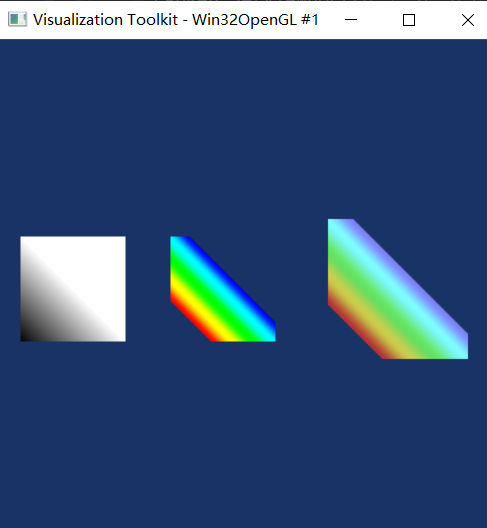
We can see that the `torgbGray`, `colorMap` is OK, but the `blender result` is wrong.
The whole code is:
```auto
import matplotlib.pyplot as plt
import vtkmodules.all as vtk
import numpy as np
from vtk.util.numpy_support import vtk_to_numpy, numpy_to_vtk
def numpyToVTK(data):
if len(data.shape) == 2:
data = data[:, :, np.newaxis]
flat_data_array = data.transpose(2,1,0).flatten()
vtk_data = numpy_to_vtk(num_array=flat_data_array, deep=True, array_type=vtk.VTK_UNSIGNED_SHORT)
img = vtk.vtkImageData()
img.GetPointData().SetScalars(vtk_data)
img.SetDimensions(data.shape[0], data.shape[1], 1)
return img
torgbGray = np.zeros(shape=[256, 256])
for i in range(256):
for j in range(256):
torgbGray[i, j] = i+j
grayImg = numpyToVTK(torgbGray)
colorTable = vtk.vtkLookupTable()
# colorTable.SetRange(torgbGray.min(), torgbGray.max())
colorTable.SetRange(100, 300)
colorTable.SetBelowRangeColor(0, 0, 0, 0)
colorTable.SetUseBelowRangeColor(True)
colorTable.SetAboveRangeColor(0, 0, 0, 0)
colorTable.SetUseAboveRangeColor(True)
colorTable.Build()
colorMap = vtk.vtkImageMapToColors()
colorMap.SetInputData(numpyToVTK(torgbGray))
colorMap.SetLookupTable(colorTable)
colorMap.Update()
windowLevelColor = vtk.vtkImageMapToWindowLevelColors()
windowLevelColor.SetInputData(grayImg)
windowLevelColor.Update()
grayImageActor = vtk.vtkImageActor()
grayImageActor.GetMapper().SetInputData(windowLevelColor.GetOutput())
grayRen = vtk.vtkRenderer()
grayRen.AddActor(grayImageActor)
grayRen.SetBackground(0.1, 0.2, 0.4)
grayRen.SetViewport(0, 0, 0.3, 1)
rgbImageActor = vtk.vtkImageActor()
rgbImageActor.GetMapper().SetInputData(colorMap.GetOutput())
rgbRen = vtk.vtkRenderer()
rgbRen.AddActor(rgbImageActor)
rgbRen.SetBackground(0.1, 0.2, 0.4)
rgbRen.SetViewport(0.3, 0, 0.6, 1)
image_blender = vtk.vtkImageBlend()
image_blender.AddInputData(colorMap.GetOutput())
image_blender.AddInputData(windowLevelColor.GetOutput())
image_blender.SetOpacity(1, 0.5)
image_blender.Update()
blenderImageActor = vtk.vtkImageActor()
blenderImageActor.GetMapper().SetInputData(image_blender.GetOutput())
blenderRen = vtk.vtkRenderer()
blenderRen.AddActor(blenderImageActor)
blenderRen.SetBackground(0.1, 0.2, 0.4)
blenderRen.SetViewport(0.6, 0, 1, 1)
renWin = vtk.vtkRenderWindow()
renWin.AddRenderer(grayRen)
renWin.AddRenderer(rgbRen)
renWin.AddRenderer(blenderRen)
renWin.SetSize(400, 400)
iren = vtk.vtkRenderWindowInteractor()
iren.SetRenderWindow(renWin)
renWin.Render()
iren.Start()
```
Any suggestion is appreciated~~~
---
### Author:  [@dgobbi](https://discourse.vtk.org/u/dgobbi)
#### Post date: [August 11, 2021, 1:48pm UTC](https://discourse.vtk.org/t/how-to-blend-a-gray-and-rgb-image/6357/2 "2021-08-11T13:48:10Z")
For alpha blending, the ordering of the images is important. The image with the alpha must come after the other image:
```python
image_blender.AddInputData(windowLevelColor.GetOutput())
image_blender.AddInputData(colorMap.GetOutput())
```
The math for alpha blending an overlay image [R1, G1, B1, A1] with a base image [R0, B0, G0] is:
```nohighlight
[R, G, B] = (1 - A1)*[R0, G0, B0] + A1*[R1, G1, B1]
```
---
### Author:  [@zhang-qiang-github](https://discourse.vtk.org/u/zhang-qiang-github)
#### Post date: [August 11, 2021, 11:04pm UTC](https://discourse.vtk.org/t/how-to-blend-a-gray-and-rgb-image/6357/3 "2021-08-11T23:04:07Z")
Thank you very much~~