# How to build vtkDicom in Windows10??
**URL:** https://discourse.vtk.org/t/how-to-build-vtkdicom-in-windows10/8128
**Category:** Support
**Tags:** proposal
**Created:** [March 24, 2022, 2:15am UTC](https://discourse.vtk.org/t/how-to-build-vtkdicom-in-windows10/8128 "2022-03-24T02:15:56Z")
**Posts on this page:** 12
**Page:** 1
### Author:  [@kookoo9999](https://discourse.vtk.org/u/kookoo9999)
#### Post date: [March 24, 2022, 2:15am UTC](https://discourse.vtk.org/t/how-to-build-vtkdicom-in-windows10/8128/1 "2022-03-24T02:15:56Z")
@dgobbi Hello,
I tried to build vtk8.0 with option vtk-module-vtkDicom using gdcm2.8.0(after Cmake build).
CMake configure and generate hasn’t error, but all\_build occured error in vtk.sln .
Can you explain in detail how to build a in Windows 10?
Thank you.
---
### Author:  [@dgobbi](https://discourse.vtk.org/u/dgobbi)
#### Post date: [March 24, 2022, 5:48am UTC](https://discourse.vtk.org/t/how-to-build-vtkdicom-in-windows10/8128/2 "2022-03-24T05:48:33Z")
For building VTK-8.0 with vtkDICOM, the recipe is as follows:
1. Open the “Developer Command Prompt for VS 2019” (or whichever version of Visual Studio you are using).
2. Create an empty directory for the build, e.g. C:\VTK8-Build
3. Then cd into the build directory and run cmake:
```nohighlight
cmake /path/to/VTK -DModule_vtkDICOM=ON -DUSE_GDCM=ON -DGDCM_DIR=/path/to/gdcm
```
The `/path/to/gdcm` should point to the directory in the GDCM installation that contains the file “`GDCMConfig.cmake`”
If cmake succeeds, then you should be able to build `VTK.sln`. If it fails, then tell me what the error message is, and I will try to find out what went wrong.
---
### Author:  [@kookoo9999](https://discourse.vtk.org/u/kookoo9999)
#### Post date: [March 24, 2022, 6:09am UTC](https://discourse.vtk.org/t/how-to-build-vtkdicom-in-windows10/8128/3 "2022-03-24T06:09:16Z")
Thank you for reply. @dgobbi
I can’t understand “1. Create an empty directory for the build, e.g. C:\VTK8-Build
2. Then cd into the build directory and run cmake:” these commnet.
I am using CMAKE-GUI. And I tried to build with VTK9.1 include USE\_GDCM(gdcm2.8.0/lib/gdcm2.8.0 GDCMConfig.cmake) and checked Module\_Enable\_vtkDicom then I succeed configuration and Generate. and then I don’t occured error in All\_build , INSTALL .
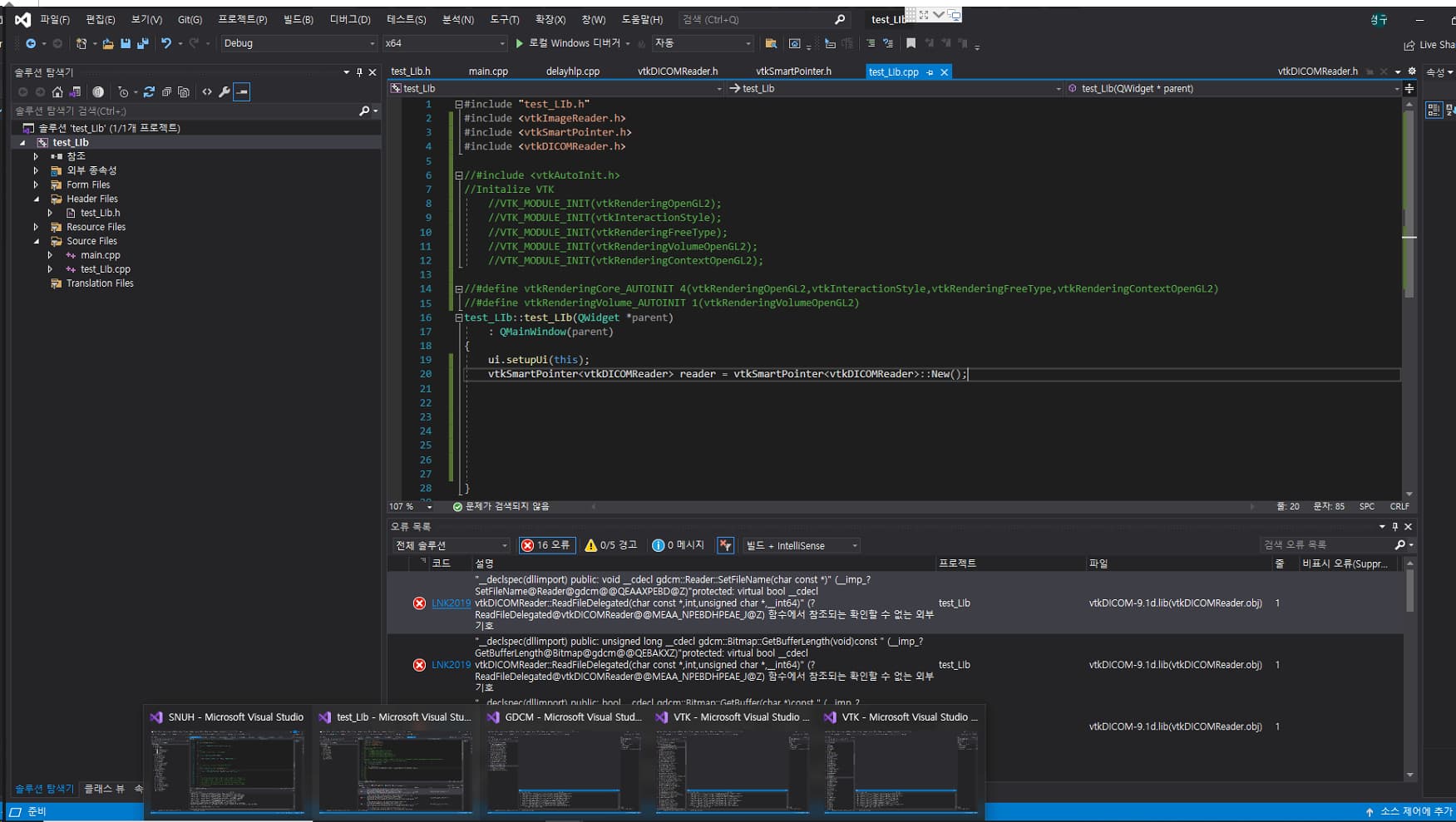
but when I using this VTK’s lib , I occured error like this photo.
(when I build vtk8.0 with vtkDICOM , I get the same error like photo)
---
### Author:  [@dgobbi](https://discourse.vtk.org/u/dgobbi)
#### Post date: [March 24, 2022, 12:51pm UTC](https://discourse.vtk.org/t/how-to-build-vtkdicom-in-windows10/8128/4 "2022-03-24T12:51:42Z")
The error shows that it is not correctly linking to the GDCM libraries.
What do you use for `GDCM_DIR`? Did you build GDCM yourself? Did you use the same compiler as for VTK?
---
### Author:  [@kookoo9999](https://discourse.vtk.org/u/kookoo9999)
#### Post date: [March 25, 2022, 12:35am UTC](https://discourse.vtk.org/t/how-to-build-vtkdicom-in-windows10/8128/5 "2022-03-25T00:35:01Z")
@dgobbi
I’m using GDCM build by myself. Now I will retry to build GDCM withou vtk\_dir and VTK with USE\_GDCM.
When I build the GDCM2.8.0 and VTK8.0 , I use this compiler like photo.
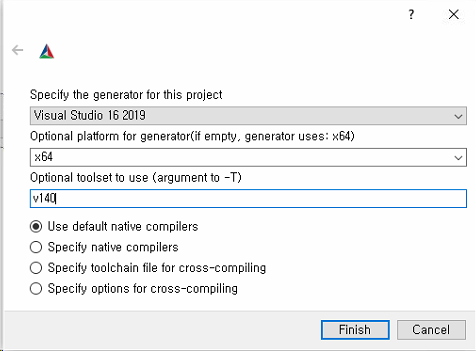
As a result of the above picture, the All\_build process in VTK.sln, QtRendering project failed due to a QPainter override error. So I will tri to build with VS2019,x64,V141 for gdcm-2.8.0 and VTK8.0 in CMAKE\_PREFIX\_PATH = Qt5.15.2 .
every try is fail…
What is the best configuration (Qt Version, VTK Version, GDCM Version) to build a VTK for QT?
---
### Author:  [@kookoo9999](https://discourse.vtk.org/u/kookoo9999)
#### Post date: [March 27, 2022, 4:03pm UTC](https://discourse.vtk.org/t/how-to-build-vtkdicom-in-windows10/8128/6 "2022-03-27T16:03:00Z")
@dgobbi
After I succeed build within VTK9.1, then I build the vtk-Dicom without GDCM(Qt5.15.2 of msvc2019,VTK9.1,GDCM3.0.8).
and I am trying to build VTK8.0 with vtkDicom with use\_gdcm\_on , but GDCM Directory is not have library folder in cross compile’s result of GDCM(gdcmconfig.cmake). so I add path of GDCM’s path/Debug/lib/GDCM-2.8.0 , I succeed to build ALL\_BUILD project in Debug mode, but I can’t build same project in Release mode.
Can you explain how to build the vtk-Dicom within VTK8.0 with Qt5.6 of msvc2015 ???
I don’t know set what gdcm\_dir in configuration of CMAKE Cross Compile.
---
### Author:  [@dgobbi](https://discourse.vtk.org/u/dgobbi)
#### Post date: [March 27, 2022, 9:43pm UTC](https://discourse.vtk.org/t/how-to-build-vtkdicom-in-windows10/8128/7 "2022-03-27T21:43:02Z")
Instead of setting GDCM\_DIR to GDCM’s path/Debug/lib/GDCM-2.8.0`, try just using GDCM’s path instead. It also has GDCMConfig.cmake. You might have to update to a later version of GDCM, for example gdcm-2.8.9.
---
### Author:  [@kookoo9999](https://discourse.vtk.org/u/kookoo9999)
#### Post date: [March 28, 2022, 7:35am UTC](https://discourse.vtk.org/t/how-to-build-vtkdicom-in-windows10/8128/8 "2022-03-28T07:35:33Z")
@dgobbi
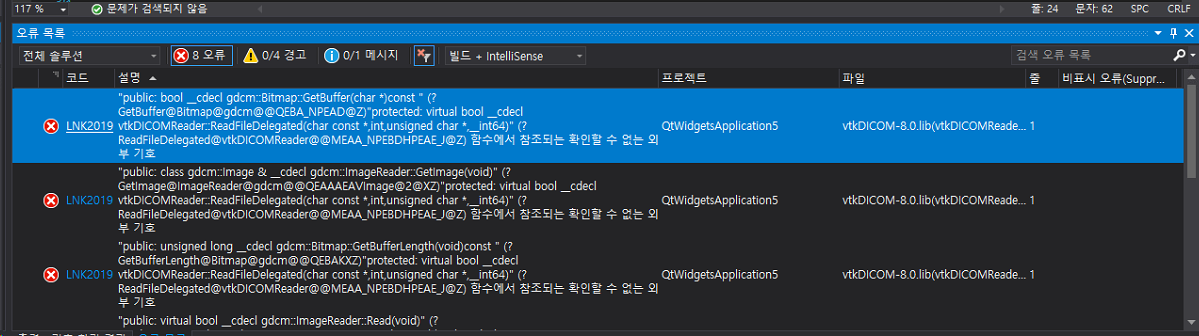
I tried the way you told me, but an error occurred as shown in the picture.(gdcm\_dir = gdcm-2.8.9’s cross compile’s directory)
What should I do if I do vtk-Dicom separately without configuring VTK?
Is the latest version of vtk-Dicom source compatible with vtk8.0?
There was a QVTKWidget in VTK8.0, but it disappeared in VTK9.1?
---
### Author:  [@dgobbi](https://discourse.vtk.org/u/dgobbi)
#### Post date: [March 28, 2022, 12:31pm UTC](https://discourse.vtk.org/t/how-to-build-vtkdicom-in-windows10/8128/9 "2022-03-28T12:31:00Z")
Those are link errors, so in the Visual Studio project, please check that the GDCM libraries (especially gdcmMSFF) are being linked. You can also open your CMakeCache.txt in a text editor and search for gdcmMSFF, it should be listed as one of the dependencies of vtkDICOM.
The latest version of vtk-dicom is source compatible with VTK 7.x, VTK 8.x, and VTK 9.x.
For the QVTKWidget, see the topic [yet-another-qvtkopenglwidget-renaming](https://discourse.vtk.org/t/yet-another-qvtkopenglwidget-renaming/2602).
---
### Author:  [@kookoo9999](https://discourse.vtk.org/u/kookoo9999)
#### Post date: [March 29, 2022, 12:38am UTC](https://discourse.vtk.org/t/how-to-build-vtkdicom-in-windows10/8128/10 "2022-03-29T00:38:59Z")
@dgobbi
Thank you for reply.
I check GDCM libraries(gdcmMSFF) in CMakeCache.txt in VTK cross compile result directory.
> //Dependencies for the target
> vtkDICOM\_LIB\_DEPENDS:STATIC=general;vtkIOImage;general;vtkIOSQL;general;vtkImagingCore;general;vtksys;general;vtkzlib;general;gdcmMSFF;general;gdcmIOD;general;gdcmDSED;general;gdcmDICT;
Do you mean VTK cross compile’s result ?? when I configure VTK8.0 with GDCM2.8.9 in CMake GDCM\_DIR = GDCM2.8.9’s cross compile result directory.
> You can also open your CMakeCache.txt in a text editor and search for gdcmMSFF, it should be listed as one of the dependencies of vtkDICOM.
---
### Author:  [@dgobbi](https://discourse.vtk.org/u/dgobbi)
#### Post date: [March 29, 2022, 2:09pm UTC](https://discourse.vtk.org/t/how-to-build-vtkdicom-in-windows10/8128/11 "2022-03-29T14:09:52Z")
Please explain what you mean by “cross-compile” in this context.
---
### Author:  [@kookoo9999](https://discourse.vtk.org/u/kookoo9999)
#### Post date: [March 29, 2022, 3:05pm UTC](https://discourse.vtk.org/t/how-to-build-vtkdicom-in-windows10/8128/12 "2022-03-29T15:05:36Z")
@dgobbi
I mean cross-compile is process of configure and generate via CMAKE-GUI.
I solved this problem. The reason of error is GDCM’s install.cmake can’t find VTK’s dll directory!
Thanks you , your commnet is very helpful for me.