# How to clip polydata along ribbon?
**URL:** https://discourse.vtk.org/t/how-to-clip-polydata-along-ribbon/11539
**Category:** Support
**Tags:** python, code
**Created:** [May 25, 2023, 7:41pm UTC](https://discourse.vtk.org/t/how-to-clip-polydata-along-ribbon/11539 "2023-05-25T19:41:05Z")
**Posts on this page:** 13
**Page:** 1
### Author:  [@matthew.strugari](https://discourse.vtk.org/u/matthew.strugari)
#### Post date: [May 25, 2023, 7:41pm UTC](https://discourse.vtk.org/t/how-to-clip-polydata-along-ribbon/11539/1 "2023-05-25T19:41:05Z")
Hi all,
I am having difficulty clipping my polydata along a specific path and would be very grateful for some assistance.
As shown in the image below, I am trying to clip my (green) polydata along a path corresponding to the widest points along the head in the z-direction. I have projected my polydata onto a z-plane, obtained a convex hull, then extracted the widest positions along the sides of the head in 3D. Using those points, I have created a ribbon on each side of the head that I would like to use to clip my polydata so I may discard the data towards the back of the head. How can I clip my polydata along this ribbon?
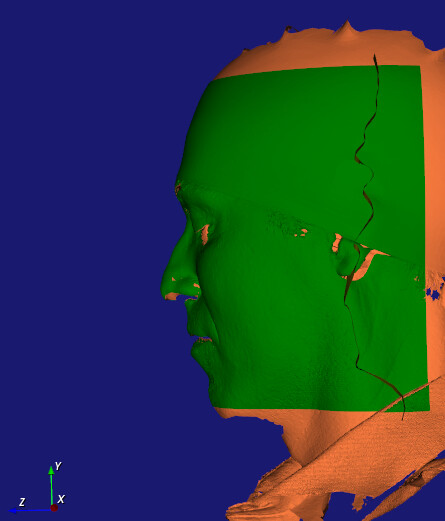
So far, I have tried using those points to define a **vtkImplicitSelectionLoop** which I then used as the clip function with **vtkClipPolyData** , but this didn’t work. Perhaps the issue here is the orientation of my loop since the examples I’ve seen appear to define the loop on the surface to essentially punch a hole in the surface. I also tried using the selection loop with **vtkSelectPolyData** and **vtkCutter** , but did not obtain any sensible results.
I have also tried using **vtkIntersectionPolyDataFilter** to split the polydata along the intersection of the ribbon. However, that gives a warning stating “No intersection between objects”, and the number of intersection points and lines are equal to 0. The polydata are clearly intersecting so I’m not sure why there are 0 intersections.
How can I clip my polydata along the points that I’ve identified to be the widest positions around the head?
Thank you for your time!
Matthew
---
### Author:  [@Paulo\_Carvalho](https://discourse.vtk.org/u/Paulo_Carvalho)
#### Post date: [May 27, 2023, 12:17pm UTC](https://discourse.vtk.org/t/how-to-clip-polydata-along-ribbon/11539/2 "2023-05-27T12:17:23Z")
Hello,
If I understood it right, both your input and ribbon are polydata objects, so I suggest using `vtkBooleanOperationPolyDataFilter` ([https://vtk.org/doc/nightly/html/classvtkBooleanOperationPolyDataFilter.html#details](https://vtk.org/doc/nightly/html/classvtkBooleanOperationPolyDataFilter.html#details)) to perform the operation you want. Also, I’d check the tolerance parameters of the classes you’re using. Other than those, drawing a figure illustrating what you’re trying to achieve may help people help you.
best,
PC
---
### Author:  [@matthew.strugari](https://discourse.vtk.org/u/matthew.strugari)
#### Post date: [June 1, 2023, 2:59pm UTC](https://discourse.vtk.org/t/how-to-clip-polydata-along-ribbon/11539/3 "2023-06-01T14:59:35Z")
Hi Paulo,
Correct, they are both polydata objects. I tried the `vtkBooleanOperationPolyDataFilter` and all operations return an empty polydata object in the first and second outputs when I use `booleanOperation.GetOutput()`. Perhaps this is expected behaviour since the [BooleanOperationPolyDataFilter example](https://examples.vtk.org/site/Python/PolyData/BooleanOperationPolyDataFilter/) also returns empty polydata objects, although the identical lines renders the difference between the two spheres in the example.
To better describe my problem, I have a 3D head that I am trying to cut along the outermost points of the head when viewed along the z-axis. The remaining region of the face I would like to use as a mask.
Here is my code:
`booleanOperation = vtk.vtkBooleanOperationPolyDataFilter()`
`booleanOperation.SetOperationToDifference()`
`booleanOperation.SetInputData( 0, mask )`
`booleanOperation.SetInputData( 1, ribbon )`
`#booleanOperation.SetTolerance( 0 ) # 0, default 1e-6, and 1, have no effect; documentation unclear`
`booleanOperationMapper = vtk.vtkPolyDataMapper()`
`booleanOperationMapper.SetInputConnection(booleanOperation.GetOutputPort())`
`booleanOperationMapper.ScalarVisibilityOff()`
`booleanOperationActor = vtk.vtkActor()`
`booleanOperationActor.SetMapper(booleanOperationMapper)`
`booleanOperationActor.GetProperty().SetDiffuseColor(colors.GetColor3d('Banana'))`
`renderer = vtkRenderer()`
`renderer.AddViewProp(booleanOperationActor)`
This returns an error (see below) that doesn’t appear when I execute the example using spheres.
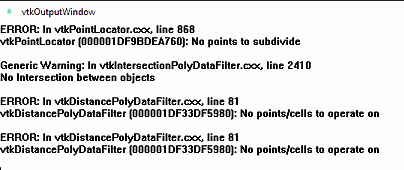
What am I doing wrong?
Cheers,
Matthew
---
### Author:  [@Paulo\_Carvalho](https://discourse.vtk.org/u/Paulo_Carvalho)
#### Post date: [June 1, 2023, 3:18pm UTC](https://discourse.vtk.org/t/how-to-clip-polydata-along-ribbon/11539/4 "2023-06-01T15:18:24Z")
Hello,
Make sure you call `Update()`, on all your algorithms, including `vtkBooleanOperationPolyDataFilter`.
regards,
PC
---
### Author:  [@matthew.strugari](https://discourse.vtk.org/u/matthew.strugari)
#### Post date: [June 1, 2023, 3:31pm UTC](https://discourse.vtk.org/t/how-to-clip-polydata-along-ribbon/11539/5 "2023-06-01T15:31:27Z")
I have added `booleanOperation.Update()` but still receive the errors. The input polydata objects appear to be okay as they render correctly, but they are non-manifold. The documentation says that unexpected results may be obtained with non-manifold surfaces.
Do you have any suggestions as to how I can obtain my desired output, maybe using another approach, or possibly specifying the appropriate (manifold?) polydata object instead of a ribbon?
M
---
### Author:  [@Paulo\_Carvalho](https://discourse.vtk.org/u/Paulo_Carvalho)
#### Post date: [June 1, 2023, 4:49pm UTC](https://discourse.vtk.org/t/how-to-clip-polydata-along-ribbon/11539/6 "2023-06-01T16:49:21Z")
When mysterious issues like that arise, try to reduce the test case to a trivial one. I mean, use very simple geometries as the two inputs and observe whether you reproduce the observed behavior.
---
### Author:  [@Paulo\_Carvalho](https://discourse.vtk.org/u/Paulo_Carvalho)
#### Post date: [June 1, 2023, 5:01pm UTC](https://discourse.vtk.org/t/how-to-clip-polydata-along-ribbon/11539/7 "2023-06-01T17:01:04Z")
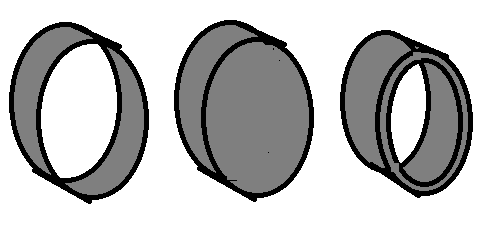
If your ribbon is a flat strip of triangles, for example, it represents an object that can’t exist in reality. So we say it is non-manifold geometry. In the figure below, the leftmost is what I think is your ribbon. It is non-manifold as zero-thickness ribbons can’t exist. You either have to enclose the volume it occupies (middle) or make it a non-zero thickness (rightmost). Choose the one that suits your objective. There are VTK filters that can do both for you.
---
### Author:  [@matthew.strugari](https://discourse.vtk.org/u/matthew.strugari)
#### Post date: [June 1, 2023, 6:17pm UTC](https://discourse.vtk.org/t/how-to-clip-polydata-along-ribbon/11539/8 "2023-06-01T18:17:31Z")
Indeed, which is why I went back to the boolean sphere example and inspected the output.
What filter would you recommend to create thickness?
My ribbon doesn’t loop back on itself, but you’re right that it has zero thickness. The `vtkRibbonFilter` doesn’t have a thickness parameter, and although the `vtkTubeFilter` creates a manifold object enclosing the outermost points along the head, the boolean operation creates the same error. I envision creating a parallel ribbon a large enough distance away, closing the volume that it occupies (middle object above), then taking the boolean difference to obtain the mask.
---
### Author:  [@matthew.strugari](https://discourse.vtk.org/u/matthew.strugari)
#### Post date: [June 1, 2023, 6:25pm UTC](https://discourse.vtk.org/t/how-to-clip-polydata-along-ribbon/11539/9 "2023-06-01T18:25:44Z")
Is there a filter to extrude a surface along a normal to create an enclosed volume?
---
### Author:  [@Paulo\_Carvalho](https://discourse.vtk.org/u/Paulo_Carvalho)
#### Post date: [June 1, 2023, 10:06pm UTC](https://discourse.vtk.org/t/how-to-clip-polydata-along-ribbon/11539/10 "2023-06-01T22:06:34Z")
Before trying that, make sure you have good quality meshes before applying a boolean operation. I mean, making sure the geomeytries not only are manifold, but also watertight, free from duplicate vertexes, degenerate faces, etc. For that, you can use `vtkCleanPolyData`.
---
### Author:  [@Paulo\_Carvalho](https://discourse.vtk.org/u/Paulo_Carvalho)
#### Post date: [June 1, 2023, 10:11pm UTC](https://discourse.vtk.org/t/how-to-clip-polydata-along-ribbon/11539/11 "2023-06-01T22:11:29Z")
Please, check `vtkLinearExtrusionFilter` (or its `vtkPLinearExtrusionFilter` subclass if you wish to go parallel).
---
### Author:  [@matthew.strugari](https://discourse.vtk.org/u/matthew.strugari)
#### Post date: [June 2, 2023, 7:35pm UTC](https://discourse.vtk.org/t/how-to-clip-polydata-along-ribbon/11539/12 "2023-06-02T19:35:20Z")
Thanks, Paulo.
I was able to extrude and clean my ribbon to create a volume that envelopes the data I would like to subtract. I do not seen any non-manifold edges in this bounding volume according to `vtkFeatureEdges` and MeshMixer. However, I cannot perform boolean operations on it. My mask does contain some non-manifold edges, and I tried to extrude my mask by a minuscule amount then apply `vtkCleanPolyData`, but I still see some non-manifold edges. Again, I cannot perform boolean operations on it and receive the “No points to subdivide” error.
My input data comes from a 3D scanner and is non-manifold - I cannot avoid this. I know that VTK is capable of cutting out the (non-manifold) mask since I am able to use `vtkClipPolyData` to extract the mask from the input data with nice clean edges using a bounding box. I’m not sure what I need to do to make my volumes compatible for boolean operations after trying your directions to create a closed or non-zero thickness volume.
Regards,
Matthew
---
### Author:  [@matthew.strugari](https://discourse.vtk.org/u/matthew.strugari)
#### Post date: [June 22, 2023, 5:35pm UTC](https://discourse.vtk.org/t/how-to-clip-polydata-along-ribbon/11539/13 "2023-06-22T17:35:20Z")
Hi Paulo,
I just wanted to let you know that I solved my problem. Here’s my workflow:
1. Extract points to clip along (I’ll call it crossline).
2. Extract points from largest edge (i.e., perimeter of mask).
3. Determine nearest neighbours from crossline to perimeter.
4. Create closed loop bound by crossline and perimeter and convert to polydata.
5. Use `vtkSelectPolyData` then `vtkClipPolyData` to clip mask along loop.
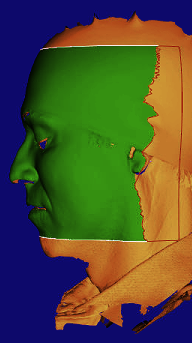
The image shows the clipped mask in green, the perimiter in white, and the closed loop for clipping in red.
Thanks for discussing and helping me improve my understanding!
Positively,
Matthew