# How to cut a surface along a closed polyline?
**URL:** https://discourse.vtk.org/t/how-to-cut-a-surface-along-a-closed-polyline/2099
**Category:** Support
**Created:** [November 18, 2019, 2:05am UTC](https://discourse.vtk.org/t/how-to-cut-a-surface-along-a-closed-polyline/2099 "2019-11-18T02:05:33Z")
**Posts on this page:** 2
**Page:** 1
### Author:  [@normanius](https://discourse.vtk.org/u/normanius)
#### Post date: [November 18, 2019, 2:05am UTC](https://discourse.vtk.org/t/how-to-cut-a-surface-along-a-closed-polyline/2099/1 "2019-11-18T02:05:34Z")
Dear all
I’ve got a specific problem, and I wondered how you would solve it.
Let’s be given a triangular surface mesh _M_ and a closed poly line _L_ that goes along the edges of M. All points of _L_ coincide with points of _M_. How can I cut _M_ along _L_? The result should look something like this:
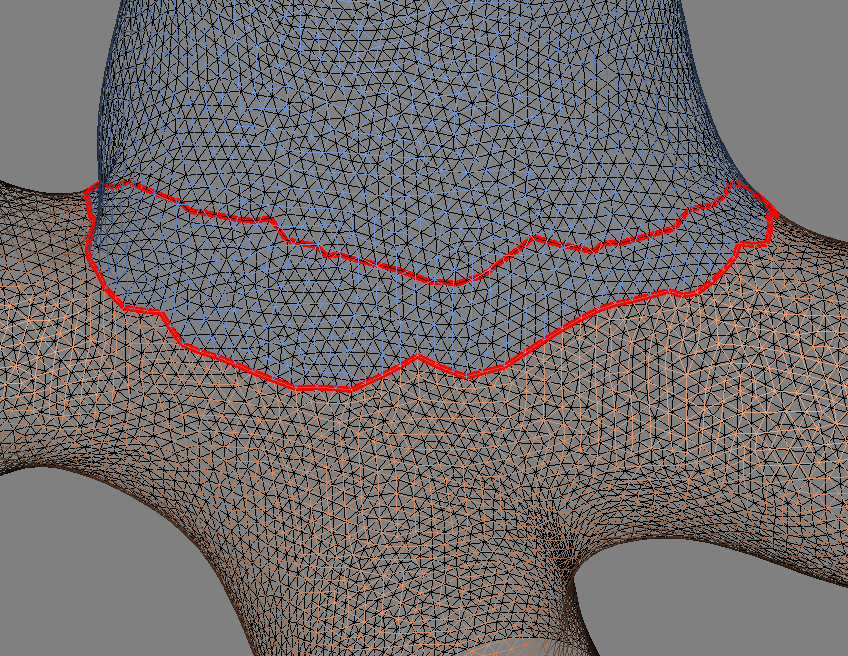
My current approach is based on [vtkvmtkPolyDataScissors](http://www.vmtk.org/doc/html/classvtkvmtkPolyDataScissors.html) and [vtkConnectivityFilter](https://vtk.org/doc/nightly/html/classvtkConnectivityFilter.html), but particularly the scissors filter is not very robust, failing in about 60% of the time.
I wonder if there is a simple alternative in vtk. It seems to me like a basic task to cut a surface along a line. But I was not able to figure out a robust way.
Help is much appreciated.
Norman
---
### Author:  [@normanius](https://discourse.vtk.org/u/normanius)
#### Post date: [November 19, 2019, 3:09pm UTC](https://discourse.vtk.org/t/how-to-cut-a-surface-along-a-closed-polyline/2099/2 "2019-11-19T15:09:37Z")
Alright friends, I wrote my own scissor, see attachment. The code is fairly complete. Here’s the idea:
1. Prepare input data. Mainly: extract line points and find them in the source.
2. Collect the cells “left” of the cut-line (“left” with respect to cell orientation), see Fig. 1
3. Copy the points of the source mesh, duplicate the points along the cut-line.
4. Replace the cells identified in step 1) with cells using the new points created in step 2)
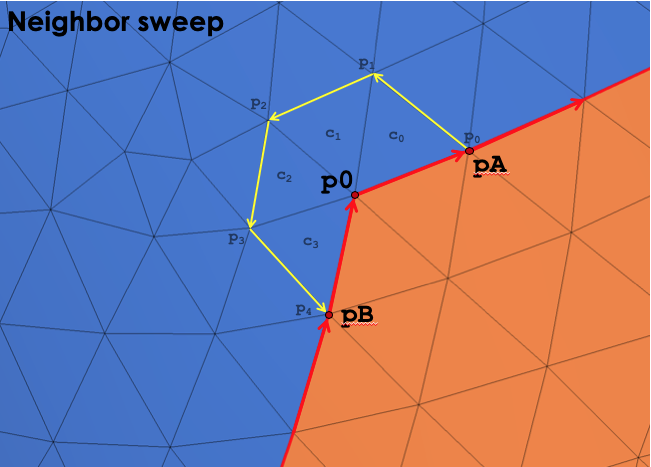
The trickiest part is step 1). I had to write a sub-routine `traverseNeighborsClockwise(source, pId0, pIdA, pIdB)` that returns the cell ids and point ids of a counter-clockwise “sweep” around the central point `pId0`, see Fig. 2. This sweep starts with `pIdA` and (optionally) stops with `pIdB`. (I’m sure that such a functionality has been done elsewhere already, but I was not able to find it.)
My implementation will create (at least) two topologically separated surfaces. Of course, I’m certainly missing several corner cases and performance (my implementation is in python) - but it works for my type of data. (It even handles self-intersecting cut-lines without failures, but one would have to elaborate a bit more on this, I guess.)
Hope this helps somebody.
[cut\_along\_line.py](https://discourse.vtk.org/uploads/short-url/rD0Sn5uxUSukGMpB4c4cpMfzTx9.py) (7.7 KB)
Fig. 1
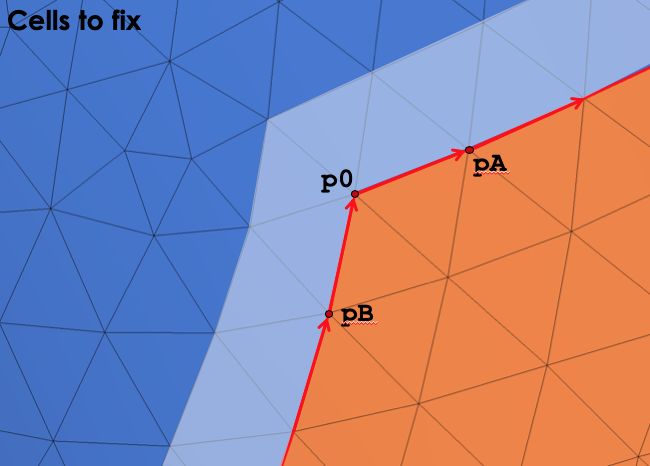
Fig. 2