# How to disable the line that automatically connect the polyData in the vtk renderer window?
**URL:** https://discourse.vtk.org/t/how-to-disable-the-line-that-automatically-connect-the-polydata-in-the-vtk-renderer-window/11843
**Category:** Support
**Created:** [June 29, 2023, 3:19am UTC](https://discourse.vtk.org/t/how-to-disable-the-line-that-automatically-connect-the-polydata-in-the-vtk-renderer-window/11843 "2023-06-29T03:19:56Z")
**Posts on this page:** 5
**Page:** 1
### Author:  [@yen](https://discourse.vtk.org/u/yen)
#### Post date: [June 29, 2023, 3:19am UTC](https://discourse.vtk.org/t/how-to-disable-the-line-that-automatically-connect-the-polydata-in-the-vtk-renderer-window/11843/1 "2023-06-29T03:19:56Z")
Hello, I am a newcomer to vtk recently. I just encountered a problem. When I show my 3D object in vtk renderer window, I saw a lot of line that connect all vtkPolyData. However, when I extract some features that I want to display on vtk, I dont know how to cancel those lines by code. The prefered vtk display I want is to show my original object with line connecting its points. And the extra feature like the protrusion on the object will be shown without any line connect among them.
Thank you very much.
---
### Author:  [@Sebastien\_Jourdain](https://discourse.vtk.org/u/Sebastien_Jourdain)
#### Post date: [June 29, 2023, 10:05pm UTC](https://discourse.vtk.org/t/how-to-disable-the-line-that-automatically-connect-the-polydata-in-the-vtk-renderer-window/11843/2 "2023-06-29T22:05:40Z")
A picture would help as no lines should connect different polydata together.
---
### Author:  [@Paulo\_Carvalho](https://discourse.vtk.org/u/Paulo_Carvalho)
#### Post date: [June 30, 2023, 2:36pm UTC](https://discourse.vtk.org/t/how-to-disable-the-line-that-automatically-connect-the-polydata-in-the-vtk-renderer-window/11843/3 "2023-06-30T14:36:09Z")
Hello,
Lines don’t automatically connect in VTK. Whatever your code/datafile is (you didn’t post any), it certainly assembled the `vtkPolyData`’s geometry to have all de edges you see. There are VTK filters to remove edges with a given characteristic, but you need to give more details on what you have and what you need. Pictures are better for this as suggested above.
take care,
PC
---
### Author:  [@yen](https://discourse.vtk.org/u/yen)
#### Post date: [July 3, 2023, 1:01am UTC](https://discourse.vtk.org/t/how-to-disable-the-line-that-automatically-connect-the-polydata-in-the-vtk-renderer-window/11843/4 "2023-07-03T01:01:19Z")
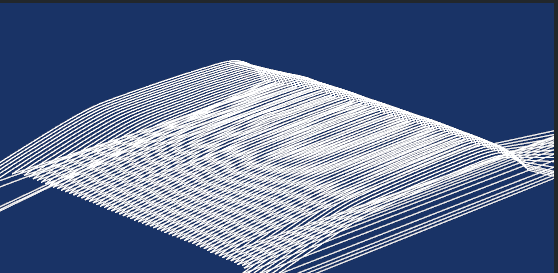
This is my vtk picture that I made from a pcl point cloud. Below is my code:

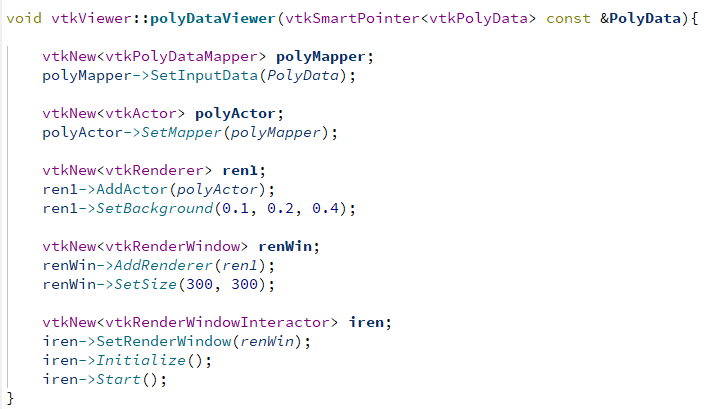
These two function can display the 3D object in vtk. My problem is in the PointCloudToPolyData. I currently know that the messy lines are from the cellarrays and lines I wrote in my code. As a result, I want to ask whether there is any good way to display pointclouds in vtk?
---
### Author:  [@Paulo\_Carvalho](https://discourse.vtk.org/u/Paulo_Carvalho)
#### Post date: [July 12, 2023, 2:15pm UTC](https://discourse.vtk.org/t/how-to-disable-the-line-that-automatically-connect-the-polydata-in-the-vtk-renderer-window/11843/5 "2023-07-12T14:15:09Z")
Hi,
Sorry for the late response. Well, VTK is doing exactly what you’re telling it to do. In the first for loop you add a point and define an edge. This results in a continuous polyline connecting all the points. You have somehow to identify the points that belong to each part and define separate polylines for them. Perhaps dropping the lines entirely, rendering only the points and posting the picture here will help us better to help you to achive what you need.
take care,
Paulo