# How to draw division lines between colors on the surface of the grid?
**URL:** https://discourse.vtk.org/t/how-to-draw-division-lines-between-colors-on-the-surface-of-the-grid/12146
**Category:** Support
**Created:** [August 14, 2023, 11:37pm UTC](https://discourse.vtk.org/t/how-to-draw-division-lines-between-colors-on-the-surface-of-the-grid/12146 "2023-08-14T23:37:43Z")
**Posts on this page:** 2
**Page:** 1
### Author:  [@SkyFishers](https://discourse.vtk.org/u/SkyFishers)
#### Post date: [August 14, 2023, 11:37pm UTC](https://discourse.vtk.org/t/how-to-draw-division-lines-between-colors-on-the-surface-of-the-grid/12146/1 "2023-08-14T23:37:43Z")
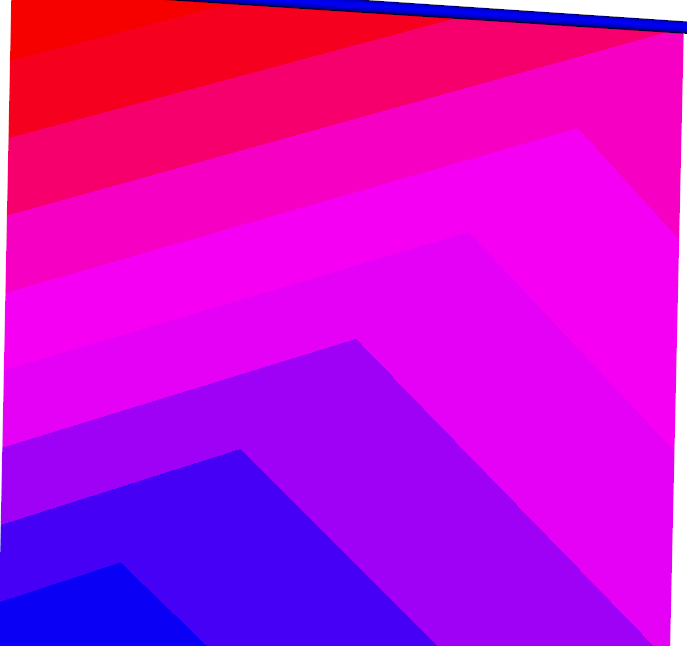
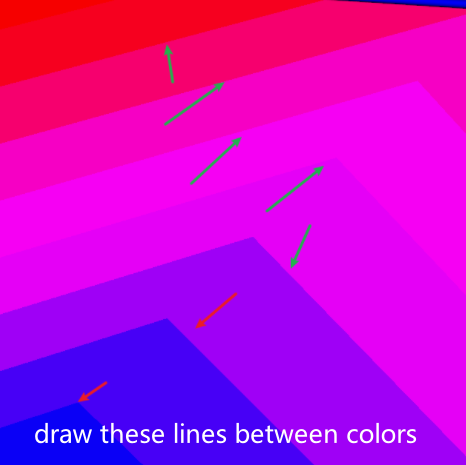
I use vtkUnstructuredGrid to display a grid and display relevant cloud images. There is a clear division between cloud image colors. How to draw division lines between colors on the surface of the grid.
```auto
import vtk
grid = vtk.vtkUnstructuredGrid()
points = vtk.vtkPoints()
points.InsertNextPoint(0, 0, 0)
points.InsertNextPoint(1, 0, 0)
points.InsertNextPoint(1, 1, 0)
points.InsertNextPoint(0, 1, 0)
grid.SetPoints(points)
cellArray = vtk.vtkCellArray()
cellArray.InsertNextCell(4)
cellArray.InsertCellPoint(0)
cellArray.InsertCellPoint(1)
cellArray.InsertCellPoint(2)
cellArray.InsertCellPoint(3)
grid.SetCells(vtk.VTK_QUAD, cellArray)
scalars = vtk.vtkFloatArray()
scalars.SetNumberOfComponents(1)
scalars.InsertNextValue(0)
scalars.InsertNextValue(1)
scalars.InsertNextValue(2)
scalars.InsertNextValue(3)
# grid.GetCellData().SetScalars(scalars)
grid.GetPointData().SetScalars(scalars)
lut = vtk.vtkLookupTable()
lut.SetNumberOfColors(9)
lut.SetHueRange(0.688, 1.0)
mapper = vtk.vtkDataSetMapper()
mapper.SetInputData(grid)
mapper.SetScalarRange(0, 3)
mapper.SetLookupTable(lut)
mapper.SetInterpolateScalarsBeforeMapping(1)
actor = vtk.vtkActor()
actor.SetMapper(mapper)
renderer = vtk.vtkRenderer()
renderer.AddActor(actor)
renderer.SetBackground(1.0, 1.0, 1.0)
renderWindow = vtk.vtkRenderWindow()
renderWindow.AddRenderer(renderer)
interactor = vtk.vtkRenderWindowInteractor()
style = vtk.vtkInteractorStyleTrackballCamera()
interactor.SetInteractorStyle(style)
interactor.SetRenderWindow(renderWindow)
renderWindow.Render()
interactor.Start()
```
---
### Author:  [@Paulo\_Carvalho](https://discourse.vtk.org/u/Paulo_Carvalho)
#### Post date: [August 15, 2023, 2:12pm UTC](https://discourse.vtk.org/t/how-to-draw-division-lines-between-colors-on-the-surface-of-the-grid/12146/2 "2023-08-15T14:12:38Z")
Hello,
I believe you need something like this: [Unity mesh shader for outlining colour changes - Game Development Stack Exchange](https://gamedev.stackexchange.com/questions/180175/unity-mesh-shader-for-outlining-colour-changes) . There, the accepted solution has a shader code that you can use in your mapper to achieve the effect you want. If you don’t know how to set shaders for your mapper, please take a look at this: [https://gitlab.kitware.com/vtk/vtk/blob/v7.0.0.rc2/Rendering/OpenGL2/Testing/Cxx/TestUserShader2.cxx](https://gitlab.kitware.com/vtk/vtk/blob/v7.0.0.rc2/Rendering/OpenGL2/Testing/Cxx/TestUserShader2.cxx) .
regards,
PC