# How to draw UIs on top of the image
**URL:** https://discourse.vtk.org/t/how-to-draw-uis-on-top-of-the-image/15133
**Category:** vtk.js
**Tags:** vtkjs
**Created:** [January 10, 2025, 6:16am UTC](https://discourse.vtk.org/t/how-to-draw-uis-on-top-of-the-image/15133 "2025-01-10T06:16:50Z")
**Posts on this page:** 8
**Page:** 1
### Author:  [@shunia](https://discourse.vtk.org/u/shunia)
#### Post date: [January 10, 2025, 6:16am UTC](https://discourse.vtk.org/t/how-to-draw-uis-on-top-of-the-image/15133/1 "2025-01-10T06:16:50Z")
I want to build flexable UIs just like in webgl games that the UIs looks like they are related to the screen rather than the actual 3D objects in the 3D space, and the UIs looks and feels like 2D, as they are just texts, graphics, image icons, etc., while keeping the image rendered which feels like it is “behind” the UIs.
The current widget solutions use SVG to do that but that is not what I want because eventually I would want to be able to save the whole scene that includes the canvas and the UIs as ImageData for post processing, using SVG introduces complexity for ImageData generation. So I would like to use the current webgl context to draw the UIs alone with the image in the same 3D space.
Is it possible? And where should I start?
---
### Author:  [@mwestphal](https://discourse.vtk.org/u/mwestphal)
#### Post date: [January 10, 2025, 6:21am UTC](https://discourse.vtk.org/t/how-to-draw-uis-on-top-of-the-image/15133/2 "2025-01-10T06:21:11Z")
Not sure this is a VTK question but you may want to check out ImGui. [GitHub - ocornut/imgui: Dear ImGui: Bloat-free Graphical User interface for C++ with minimal dependencies](https://github.com/ocornut/imgui)
---
### Author:  [@shunia](https://discourse.vtk.org/u/shunia)
#### Post date: [January 10, 2025, 6:35am UTC](https://discourse.vtk.org/t/how-to-draw-uis-on-top-of-the-image/15133/3 "2025-01-10T06:35:24Z")
Thanks for the quick response, I thought I forgot to add tag, but indeed I’m asking on ‘vtkjs’.
And I would like to clarify a bit more that I want to draw the UIs right in the canvas vtkjs creates, not some other standalone solutions.
---
### Author:  [@jaswantp](https://discourse.vtk.org/u/jaswantp)
#### Post date: [January 10, 2025, 2:44pm UTC](https://discourse.vtk.org/t/how-to-draw-uis-on-top-of-the-image/15133/4 "2025-01-10T14:44:50Z")
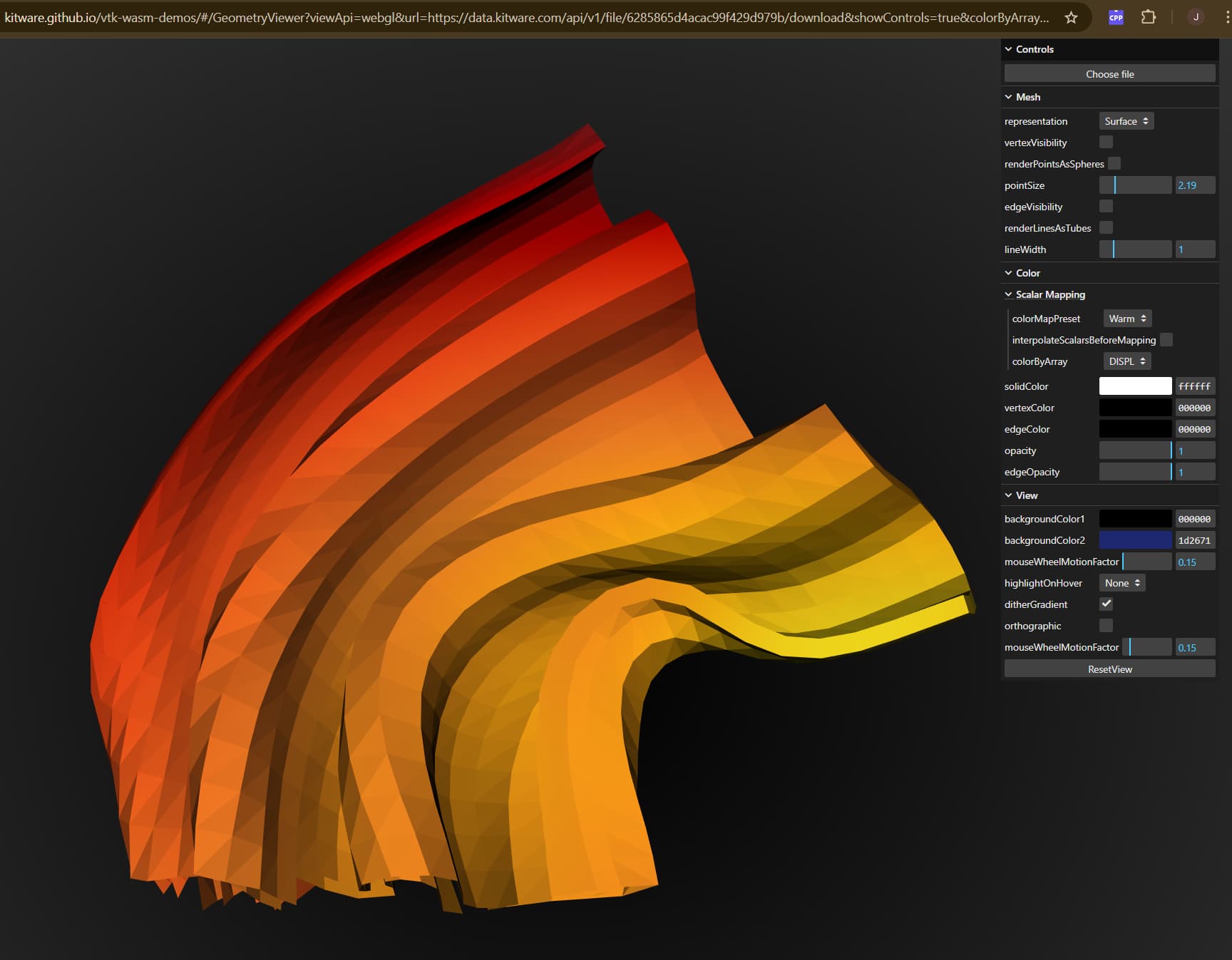
Try the JS library lil-gui [https://lil-gui.georgealways.com/](https://lil-gui.georgealways.com/)
It was easy for me to integrate it using JavaScript in [vtk-wasm-demos](https://kitware.github.io/vtk-wasm-demos/#/GeometryViewer?viewApi=webgl&url=https://data.kitware.com/api/v1/file/6285865d4acac99f429d979b/download&showControls=true&colorByArray=Normals&colorMapPreset=Warm).
---
### Author:  [@shunia](https://discourse.vtk.org/u/shunia)
#### Post date: [January 13, 2025, 2:20am UTC](https://discourse.vtk.org/t/how-to-draw-uis-on-top-of-the-image/15133/5 "2025-01-13T02:20:15Z")
Yes I know this type of solutions, and I have managed to implement this in projects, with vtkjs of course, but it is just totally different than what I was looking for.
I want to render the UIs inside the geometry of the rendered images/objects, I just don’t know where should I start with, I did not see any examples in vtkjs for text rendering, or simple graphics rendering, in the 3D spaces vtkjs creates. Or maybe I just did not find them.
---
### Author:  [@jaswantp](https://discourse.vtk.org/u/jaswantp)
#### Post date: [January 13, 2025, 6:22pm UTC](https://discourse.vtk.org/t/how-to-draw-uis-on-top-of-the-image/15133/6 "2025-01-13T18:22:05Z")
if you want it to use gl context, for text, there is a `vtkTextActor`. For sliders, there is vtkSliderWidget. I don’t think vtk.js has those equivalent classes.
---
### Author:  [@finetjul](https://discourse.vtk.org/u/finetjul)
#### Post date: [September 28, 2025, 10:12am UTC](https://discourse.vtk.org/t/how-to-draw-uis-on-top-of-the-image/15133/7 "2025-09-28T10:12:59Z")
VTK.js supports vtkTextActor (see example: [vtk.js](https://kitware.github.io/vtk-js/examples/TextActor.html) and [vtk.js](https://kitware.github.io/vtk-js/examples/LabelWidget.html) )
---
### Author:  [@sankhesh](https://discourse.vtk.org/u/sankhesh)
#### Post date: [October 2, 2025, 10:43pm UTC](https://discourse.vtk.org/t/how-to-draw-uis-on-top-of-the-image/15133/8 "2025-10-02T22:43:51Z")
Sharing a visual representation, such as an image or graphic, of your project or idea will significantly improve our understanding and enable us to provide a more precise solution for your needs.