::New();
// Foreground renderer will use the same camera of the main renderer
_rendererForeground->SetActiveCamera( _rendererMainScene->GetActiveCamera() );
/* Renderers assigned to layers greater than zero have no background and
are rendered last. */
_rendererForeground->SetLayer( 1 );
(...)
_vtkwidget->renderWindow()->AddRenderer(_rendererMainScene);
_vtkwidget->renderWindow()->AddRenderer(_rendererForeground);
```
This way, actors added to `_renderedForeground` will always be on top of those added to `_rendererMainScene`.
best,
PC
---
### Author:  [@amaclean](https://discourse.vtk.org/u/amaclean)
#### Post date: [April 11, 2025, 3:25am UTC](https://discourse.vtk.org/t/how-to-ensure-one-actor-always-renders-on-top-of-another-actor-in-vtk-without-z-fighting/15485/3 "2025-04-11T03:25:08Z")
Please see:
- [MultipleLayersAndWindows](https://examples.vtk.org/site/Cxx/Rendering/MultipleLayersAndWindows/)
- [LayeredActors](https://examples.vtk.org/site/Cxx/Rendering/LayeredActors/)
- [TransparentBackground](https://examples.vtk.org/site/Cxx/Rendering/TransparentBackground/)
---
### Author:  [@yarenakin](https://discourse.vtk.org/u/yarenakin)
#### Post date: [April 13, 2025, 5:17pm UTC](https://discourse.vtk.org/t/how-to-ensure-one-actor-always-renders-on-top-of-another-actor-in-vtk-without-z-fighting/15485/4 "2025-04-13T17:17:19Z")
Thanks a lot for your suggestion — adding a second renderer with different layers is a clever idea.
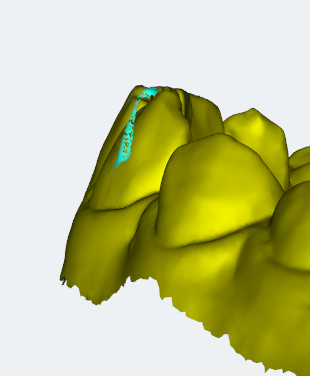
However, I’d prefer not to set up separate interactors for each renderer. My goal is to maintain a single interactor for user input handling, as managing multiple interactors complicates the interaction logic in my application. What I actually want to do is to make sure that the two actors do not interfere with each other:

---
### Author:  [@yarenakin](https://discourse.vtk.org/u/yarenakin)
#### Post date: [April 14, 2025, 7:46am UTC](https://discourse.vtk.org/t/how-to-ensure-one-actor-always-renders-on-top-of-another-actor-in-vtk-without-z-fighting/15485/5 "2025-04-14T07:46:25Z")
I try multiple layer and I have a problem like this:
> [@Layered rendering with multiple renderers](https://discourse.vtk.org/t/layered-rendering-with-multiple-renderers/4670):
>
> Hello developers, I am stuck in a problem that seems a bit basic but still could not solve it yet. I am using multiple rendering layers to render different kinds of Fiber tracts (Red and orange) overlaid each other. As shown in the Figure below. Red fibers are rendered always on the top of the orange fibers as they are rendered on another renderer. [image] This is what I needed and it worse really well. The problem rises when I visualize slices on the ordering window. Since the slices are re…
---
### Author:  [@yarenakin](https://discourse.vtk.org/u/yarenakin)
#### Post date: [April 14, 2025, 8:02am UTC](https://discourse.vtk.org/t/how-to-ensure-one-actor-always-renders-on-top-of-another-actor-in-vtk-without-z-fighting/15485/6 "2025-04-14T08:02:34Z")
I try but I have same problem like topology:
---
### Author:  [@sankhesh](https://discourse.vtk.org/u/sankhesh)
#### Post date: [April 18, 2025, 11:36am UTC](https://discourse.vtk.org/t/how-to-ensure-one-actor-always-renders-on-top-of-another-actor-in-vtk-without-z-fighting/15485/7 "2025-04-18T11:36:07Z")
@yarenakin Have you tried playing with the offset and factor parameters?
```auto
highlightMapper->SetRelativeCoincidentTopologyPolygonOffset(-5, -10);
currentMapper->SetRelativeCoincidentTopologyPolygonOffset(5, 10);
```
In the above code, I’m pulling the highlight actor out of the screen and pushing the current mapper into the screen. The actual values for the parameters depend on your scene but in general,
- `offset` (first parameter) is dominant when looking at the geometry face down
- `factor` (second parameter) is dominant when looking at the geometry from the size (aka edge on).