# how to extract geometry entirely or partly covered by selection polygon
**URL:** https://discourse.vtk.org/t/how-to-extract-geometry-entirely-or-partly-covered-by-selection-polygon/639
**Category:** Support
**Created:** [March 29, 2019, 10:21am UTC](https://discourse.vtk.org/t/how-to-extract-geometry-entirely-or-partly-covered-by-selection-polygon/639 "2019-03-29T10:21:24Z")
**Posts on this page:** 2
**Page:** 1
### Author:  [@andreasbuykx](https://discourse.vtk.org/u/andreasbuykx)
#### Post date: [March 29, 2019, 10:21am UTC](https://discourse.vtk.org/t/how-to-extract-geometry-entirely-or-partly-covered-by-selection-polygon/639/1 "2019-03-29T10:21:24Z")
I’m looking for a way to select 1D, 2D and 3D (polydata and unstructured grid) geometry (shape) that is either entirely _or partly_ covered by a 2D selection polygon (loop) drawn on the screen.
All of the following cases should select the shape:
1. shape entirely inside loop
2. loop crosses shape edges including edge end-points
3. loop crosses shape edges, not including edge end-points
4. loop entirely inside shape
I am currently using vtkImplicitSelectionLoop which boundary cells extraction enabled, but this works only for cases 1 and 2.
In ParaView, there is the ‘Select Cells With Polygon’ tool but it only selects cells on the surface and ‘Select Cells Through’ which only works with a selection rectangle.
An alternative solution would be to project all edges along the camera orientation on the 2D plane of the loop and see which edges cross the loop edges, but fails on case 4.
Is there any support for this latter approach? Or am I overlooking other options?
Thanks a lot for any help on this!
---
### Author:  [@andreasbuykx](https://discourse.vtk.org/u/andreasbuykx)
#### Post date: [March 29, 2019, 1:10pm UTC](https://discourse.vtk.org/t/how-to-extract-geometry-entirely-or-partly-covered-by-selection-polygon/639/2 "2019-03-29T13:10:07Z")
Here’s an illustration of what I hope to achieve:
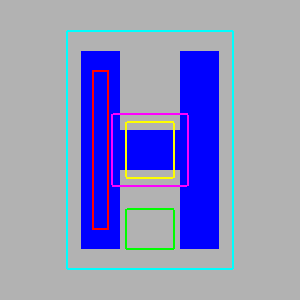
In this image I would like only the ‘lime’ loop to no select anything, whereas all other loops should select the cell (a single polygon).
When running the attached script I get:
loop in (red) extracts nothing
loop out (lime) extracts nothing
loop crosses\_edges (yellow) extracts nothing
loop includes\_points (magenta) extracts 12 points 1 cells bounds=(0.0, 7.0, 0.0, 10.0, 0.0, 0.0)
loop encloses (cyan) extracts 12 points 1 cells bounds=(0.0, 7.0, 0.0, 10.0, 0.0, 0.0)
Extraction using implicit selection loops [select\_loop.py](https://discourse.vtk.org/uploads/default/original/1X/f90717182f67c5232b1115f59c20bde52b011336.py) (4.2 KB)