# How to find MR from commit

**URL:** https://discourse.vtk.org/t/how-to-find-mr-from-commit/2511
**Category:** Development
**Created:** [January 28, 2020, 11:14pm UTC](https://discourse.vtk.org/t/how-to-find-mr-from-commit/2511 "2020-01-28T23:14:26Z")
**Posts on this page:** 15
**Page:** 1

<div class="post-metadata">

### Author: ![toddy](https://discourse.vtk.org/letter_avatar_proxy/v4/letter/t/edb3f5/32.png) [@toddy](https://discourse.vtk.org/u/toddy)
#### Post date: [January 28, 2020, 11:14pm UTC](https://discourse.vtk.org/t/how-to-find-mr-from-commit/2511/1 "2020-01-28T23:14:26Z")

</div>

Hi.

Is it possible to find the gitlab merge request associated with a git commit (SHA number) in master? Or do the commits need to be tagged somehow?

---

<div class="post-metadata">

### Author: ![utkarshayachit](https://discourse.vtk.org/user_avatar/discourse.vtk.org/utkarshayachit/32/379_2.png) [@utkarshayachit](https://discourse.vtk.org/u/utkarshayachit)
#### Post date: [January 28, 2020, 11:31pm UTC](https://discourse.vtk.org/t/how-to-find-mr-from-commit/2511/2 "2020-01-28T23:31:24Z")

</div>

Based on [ref](https://stackoverflow.com/questions/8475448/find-merge-commit-which-include-a-specific-commit/30998048), I have `find-merge` and `show-merge` alias set as follows:

```auto
# in ~/.gitconfig
[alias]
  find-merge = "!sh -c 'commit=$0 && branch=${1:-HEAD} && (git rev-list $commit..$branch --ancestry-path | cat -n; git rev-list $commit..$branch --first-parent | cat -n) | sort -k2 -s | uniq -f1 -d | sort -n | tail -1 | cut -f2'"
  show-merge = "!sh -c 'merge=$(git find-merge $0 $1) && [-n \"$merge\"] && git show $merge'"

```

With these aliases set, for any commit of interest, say `b55b54b60e`, I do the following:

```auto
git show-merge b55b54b60e master

```

I get the following result which shows the merge commit for the selected commit on the `master` branch.

```auto
commit faa45a7949ca44ce7aec6f848eac68996a5ced08 (master)
Merge: 0e6b872d44 b55b54b60e
Author: Utkarsh Ayachit <utkarsh.ayachit@kitware.com>
Date: Sun Jan 12 16:40:28 2020 +0000

    Merge topic 'module-cleanups'
    
    b55b54b60e Move vtkPSLACReader to IOParallelNetCDF
    
    Acked-by: Kitware Robot <kwrobot@kitware.com>
    Acked-by: Cory Quammen <cory.quammen@kitware.com>
    Merge-request: !6383

```

The log for the merge commit has the merge request id mentioned, e.g. `Merge-request: !6383`. You can then browse to merge request using the URL: `http://gitlab.kitware.com/vtk/vtk/merge_requests/[MERGE REQUEST NUMBER]`.

---

<div class="post-metadata">

### Author: ![toddy](https://discourse.vtk.org/letter_avatar_proxy/v4/letter/t/edb3f5/32.png) [@toddy](https://discourse.vtk.org/u/toddy)
#### Post date: [January 28, 2020, 11:54pm UTC](https://discourse.vtk.org/t/how-to-find-mr-from-commit/2511/3 "2020-01-28T23:54:18Z")

</div>

and what if the log doesn’t mention the merge id?

Does it mean there was no MR? In which case, how do I notify the author of an error?

---

<div class="post-metadata">

### Author: ![utkarshayachit](https://discourse.vtk.org/user_avatar/discourse.vtk.org/utkarshayachit/32/379_2.png) [@utkarshayachit](https://discourse.vtk.org/u/utkarshayachit)
#### Post date: [January 29, 2020, 12:10am UTC](https://discourse.vtk.org/t/how-to-find-mr-from-commit/2511/4 "2020-01-29T00:10:25Z")

</div>

> [@toddy](#):
>
> and what if the log doesn’t mention the merge id?

For VTK, 99% of merges mention the merge id. The robot that does all the merges following a `Do: merge` request on the MR adds the appropriate message automatically (there are very very few exceptions where that robot may be circumvented).

Note that VTK has not used Gitlab throughout its life cycle. There was several year of development which happened before Gitlab and hence will not have any MRs associated with those changes.

---

<div class="post-metadata">

### Author: ![toddy](https://discourse.vtk.org/letter_avatar_proxy/v4/letter/t/edb3f5/32.png) [@toddy](https://discourse.vtk.org/u/toddy)
#### Post date: [January 29, 2020, 12:37am UTC](https://discourse.vtk.org/t/how-to-find-mr-from-commit/2511/5 "2020-01-29T00:37:03Z")

</div>

In tortoiseGit, for your example, I see

 ![image](https://discourse.vtk.org/uploads/default/original/2X/e/e6f97604d3b38191429b25476f106dab2d5588fb.png)

but here’s the commit I’m interested in

 ![image](https://discourse.vtk.org/uploads/default/original/2X/2/2cfa2cc608c6e4fcab69d74a3aa3c4fa498f5102.png)

---

<div class="post-metadata">

### Author: ![utkarshayachit](https://discourse.vtk.org/user_avatar/discourse.vtk.org/utkarshayachit/32/379_2.png) [@utkarshayachit](https://discourse.vtk.org/u/utkarshayachit)
#### Post date: [January 29, 2020, 12:42am UTC](https://discourse.vtk.org/t/how-to-find-mr-from-commit/2511/6 "2020-01-29T00:42:27Z")

</div>

The alias works just fine for your commit of interest too:

```auto
> git show-merge b7621

commit 24025ed278301d7462ca0e144f4384957c9d8324
Merge: 29ab569b39 b762161639
Author: Sean McBride <sean@rogue-research.com>
Date: Mon Oct 14 17:18:29 2019 +0000

    Merge topic 'Bug17677'

    b762161639 Fixed bug #17677: use a thread_local to avoid returning a dangling pointer

    Acked-by: Kitware Robot <kwrobot@kitware.com>
    Acked-by: David Thompson <david.thompson@kitware.com>
    Acked-by: Cory Quammen <cory.quammen@kitware.com>
    Merge-request: !6027

```

---

<div class="post-metadata">

### Author: ![toddy](https://discourse.vtk.org/letter_avatar_proxy/v4/letter/t/edb3f5/32.png) [@toddy](https://discourse.vtk.org/u/toddy)
#### Post date: [January 29, 2020, 12:46am UTC](https://discourse.vtk.org/t/how-to-find-mr-from-commit/2511/7 "2020-01-29T00:46:08Z")

</div>

Ok. Thanks. Strange that I can’t see that information in TortoiseGit.

---

<div class="post-metadata">

### Author: ![toddy](https://discourse.vtk.org/letter_avatar_proxy/v4/letter/t/edb3f5/32.png) [@toddy](https://discourse.vtk.org/u/toddy)
#### Post date: [January 29, 2020, 12:50am UTC](https://discourse.vtk.org/t/how-to-find-mr-from-commit/2511/8 "2020-01-29T00:50:18Z")

</div>

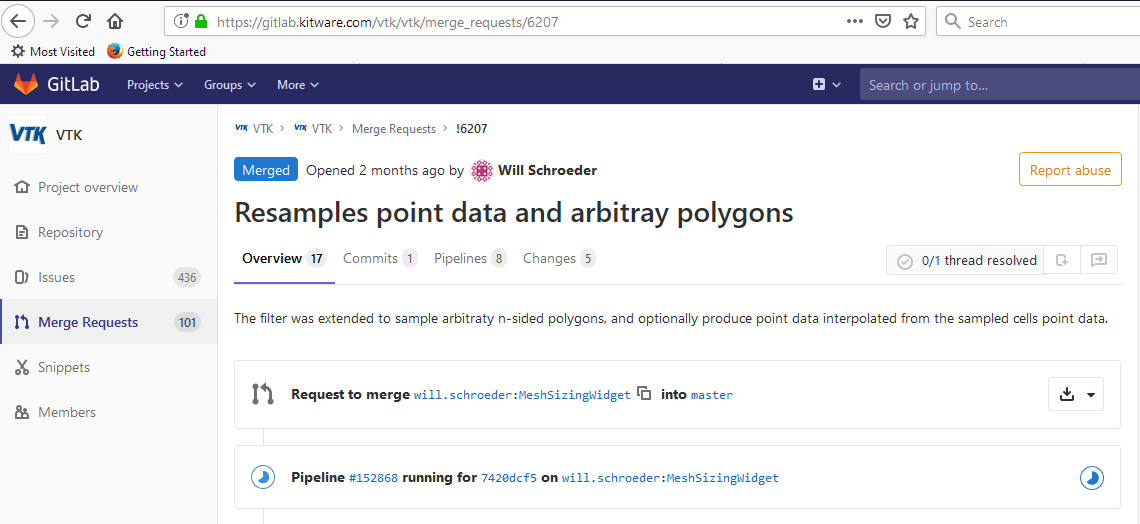
Actually MR 6027 is not the right commit.
 ![image](https://discourse.vtk.org/uploads/default/original/2X/9/91062d44d0898686b30afc946596267b1cdda7ae.png)

---

<div class="post-metadata">

### Author: ![utkarshayachit](https://discourse.vtk.org/user_avatar/discourse.vtk.org/utkarshayachit/32/379_2.png) [@utkarshayachit](https://discourse.vtk.org/u/utkarshayachit)
#### Post date: [January 29, 2020, 1:00am UTC](https://discourse.vtk.org/t/how-to-find-mr-from-commit/2511/9 "2020-01-29T01:00:18Z")

</div>

You have typed the url incorrectly. Here’s the correct one:  
[https://gitlab.kitware.com/vtk/vtk/merge\_requests/6027](https://gitlab.kitware.com/vtk/vtk/merge_requests/6027)

---

<div class="post-metadata">

### Author: ![toddy](https://discourse.vtk.org/letter_avatar_proxy/v4/letter/t/edb3f5/32.png) [@toddy](https://discourse.vtk.org/u/toddy)
#### Post date: [January 29, 2020, 1:01am UTC](https://discourse.vtk.org/t/how-to-find-mr-from-commit/2511/10 "2020-01-29T01:01:39Z")

</div>

DUH. Thanks.

---

<div class="post-metadata">

### Author: ![cory.quammen](https://discourse.vtk.org/user_avatar/discourse.vtk.org/cory.quammen/32/6751_2.png) [@cory.quammen](https://discourse.vtk.org/u/cory.quammen)
#### Post date: [January 29, 2020, 1:02am UTC](https://discourse.vtk.org/t/how-to-find-mr-from-commit/2511/11 "2020-01-29T01:02:50Z")

</div>

I use this one liner to do this:

```bash
$ git log --merges --grep b7621

```

```bash
commit 24025ed278301d7462ca0e144f4384957c9d8324
Merge: 29ab569 b762161
Author: Sean McBride <sean@rogue-research.com>
Date: Mon Oct 14 17:18:29 2019 +0000

    Merge topic 'Bug17677'
    
    b762161639 Fixed bug #17677: use a thread_local to avoid returning a dangling pointer
    
    Acked-by: Kitware Robot <kwrobot@kitware.com>
    Acked-by: David Thompson <david.thompson@kitware.com>
    Acked-by: Cory Quammen <cory.quammen@kitware.com>
    Merge-request: !6027

```

---

<div class="post-metadata">

### Author: ![toddy](https://discourse.vtk.org/letter_avatar_proxy/v4/letter/t/edb3f5/32.png) [@toddy](https://discourse.vtk.org/u/toddy)
#### Post date: [January 29, 2020, 1:27am UTC](https://discourse.vtk.org/t/how-to-find-mr-from-commit/2511/12 "2020-01-29T01:27:03Z")

</div>

@cory.quammen I see the trick is not to use more than 10 characters from the SHA

---

<div class="post-metadata">

### Author: ![ben.boeckel](https://discourse.vtk.org/letter_avatar_proxy/v4/letter/b/ea5d25/32.png) [@ben.boeckel](https://discourse.vtk.org/u/ben.boeckel)
#### Post date: [January 29, 2020, 3:49pm UTC](https://discourse.vtk.org/t/how-to-find-mr-from-commit/2511/13 "2020-01-29T15:49:08Z")

</div>

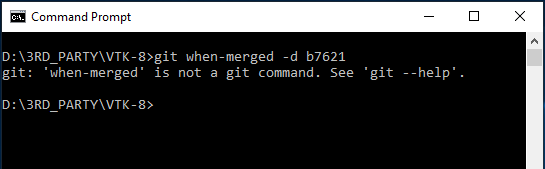
I use this script: [https://raw.githubusercontent.com/mhagger/git-when-merged/master/bin/git-when-merged](https://raw.githubusercontent.com/mhagger/git-when-merged/master/bin/git-when-merged) like this:

```auto
git when-merged -d b7621

```

Which gets the same information, but isn’t limited to only the last 10 commits in the merge commit message since it traverses the history (they get elided if there are too many).

---

<div class="post-metadata">

### Author: ![toddy](https://discourse.vtk.org/letter_avatar_proxy/v4/letter/t/edb3f5/32.png) [@toddy](https://discourse.vtk.org/u/toddy)
#### Post date: [January 29, 2020, 9:58pm UTC](https://discourse.vtk.org/t/how-to-find-mr-from-commit/2511/14 "2020-01-29T21:58:16Z")
</div>

![image](https://discourse.vtk.org/uploads/default/original/2X/b/b77a15fcd4ee9c865bb63185a606e8c820115143.png)

---

<div class="post-metadata">

### Author: ![cory.quammen](https://discourse.vtk.org/user_avatar/discourse.vtk.org/cory.quammen/32/6751_2.png) [@cory.quammen](https://discourse.vtk.org/u/cory.quammen)
#### Post date: [January 30, 2020, 1:33am UTC](https://discourse.vtk.org/t/how-to-find-mr-from-commit/2511/15 "2020-01-30T01:33:46Z")

</div>

You need to download the script and at the path where it is located to your `PATH` environment variable.
