# How to generate a Quadric mesh without topological holes
**URL:** https://discourse.vtk.org/t/how-to-generate-a-quadric-mesh-without-topological-holes/2381
**Category:** Support
**Created:** [January 6, 2020, 2:00pm UTC](https://discourse.vtk.org/t/how-to-generate-a-quadric-mesh-without-topological-holes/2381 "2020-01-06T14:00:04Z")
**Posts on this page:** 3
**Page:** 1
### Author:  [@stwalker](https://discourse.vtk.org/u/stwalker)
#### Post date: [January 6, 2020, 2:00pm UTC](https://discourse.vtk.org/t/how-to-generate-a-quadric-mesh-without-topological-holes/2381/1 "2020-01-06T14:00:04Z")
Hello, I am using `vtkQuadric` and `vtkSampleFunction` to generate a quadric surface mesh, however, my application has the requirement that all meshes be closed (by which I mean no holes). I was wondering if there was any way to close the topological holes. I had a look at vtkFillHolesFilter, but I noticed the warning:
> Note that any mesh with boundary edges by definition has a topological hole. This even includes a reactangular grid (e.g., the output of vtkPlaneSource). In such situations, if the outer hole is filled, retriangulation of the hole will cause geometric overlap of the mesh. This can be prevented by using the hole size instance variable to prevent the larger holes from being triangulated.
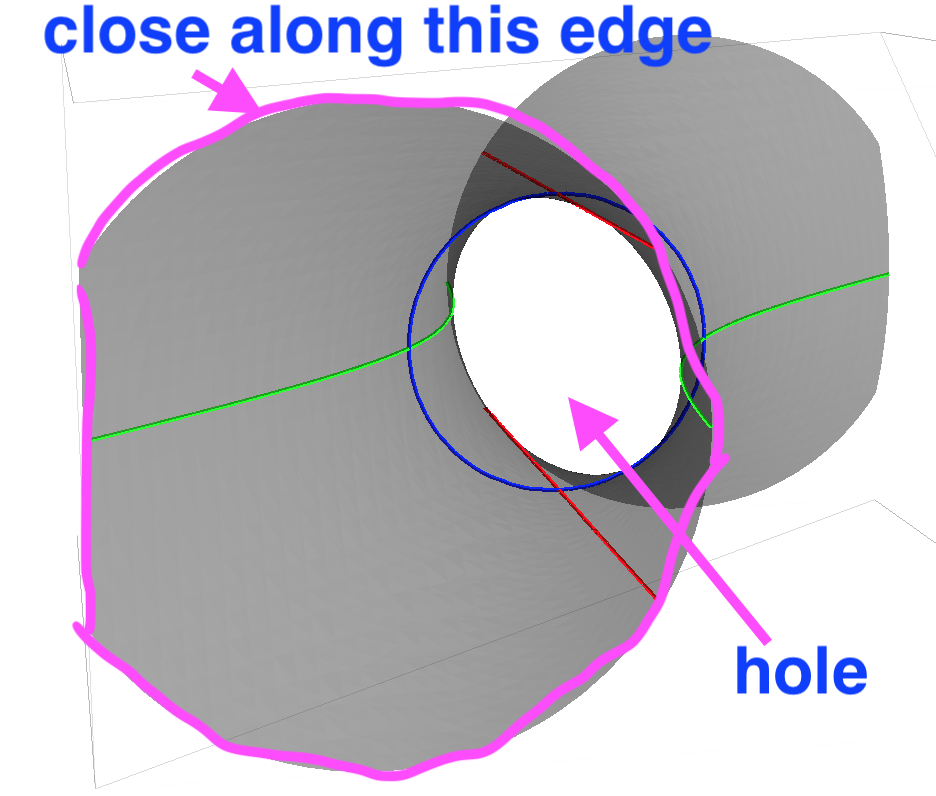
My understanding of this warning is basically that you can’t use the `vtkFillHolesFilter` for such meshes. I gave it a go (just in case), and lo and behold, the holes do not appear to be closed. How I would like the holes to be closed: the box set with `vtkSampleFunction.SetModelBounds` determines the region of space over which the quadric surface is sampled, I would like to close the holes of the `vtkQuadric` along the box faces. I hope I have explained what I am trying to do clearly.
Is there any way I can do this in VTK? If not does anyone know of an algorithm which fits the bill? Perhaps I can implement it myself if so.
I have attached an image of a quadric with the hole that I don’t want, and one of the edges along which I would like to close the mesh highlighted.
Thanks for your help.
---
### Author:  [@Kenichiro-Yoshimi](https://discourse.vtk.org/u/Kenichiro-Yoshimi)
#### Post date: [January 7, 2020, 12:49am UTC](https://discourse.vtk.org/t/how-to-generate-a-quadric-mesh-without-topological-holes/2381/2 "2020-01-07T00:49:32Z")
Hello,
You can do it by turning the capping option in vtkSampleFunction. That is, CappingOn() function insures surfaces are closed.
---
### Author:  [@stwalker](https://discourse.vtk.org/u/stwalker)
#### Post date: [January 7, 2020, 1:03am UTC](https://discourse.vtk.org/t/how-to-generate-a-quadric-mesh-without-topological-holes/2381/3 "2020-01-07T01:03:08Z")
This is perfect, thank you so much!