# How to get rid of this tipples on the volume?
**URL:** https://discourse.vtk.org/t/how-to-get-rid-of-this-tipples-on-the-volume/8201
**Category:** Support
**Created:** [April 3, 2022, 9:52am UTC](https://discourse.vtk.org/t/how-to-get-rid-of-this-tipples-on-the-volume/8201 "2022-04-03T09:52:23Z")
**Posts on this page:** 3
**Page:** 1
### Author:  [@xxyyy159](https://discourse.vtk.org/u/xxyyy159)
#### Post date: [April 3, 2022, 9:52am UTC](https://discourse.vtk.org/t/how-to-get-rid-of-this-tipples-on-the-volume/8201/1 "2022-04-03T09:52:23Z")
Hi,
I downloaded the code from here-\>[medicalDemo4](https://kitware.github.io/vtk-examples/site/Cxx/Medical/MedicalDemo4/) and modified a little.
The ripples(dont know how to name it) intensified but I dont know how to get rid of it.
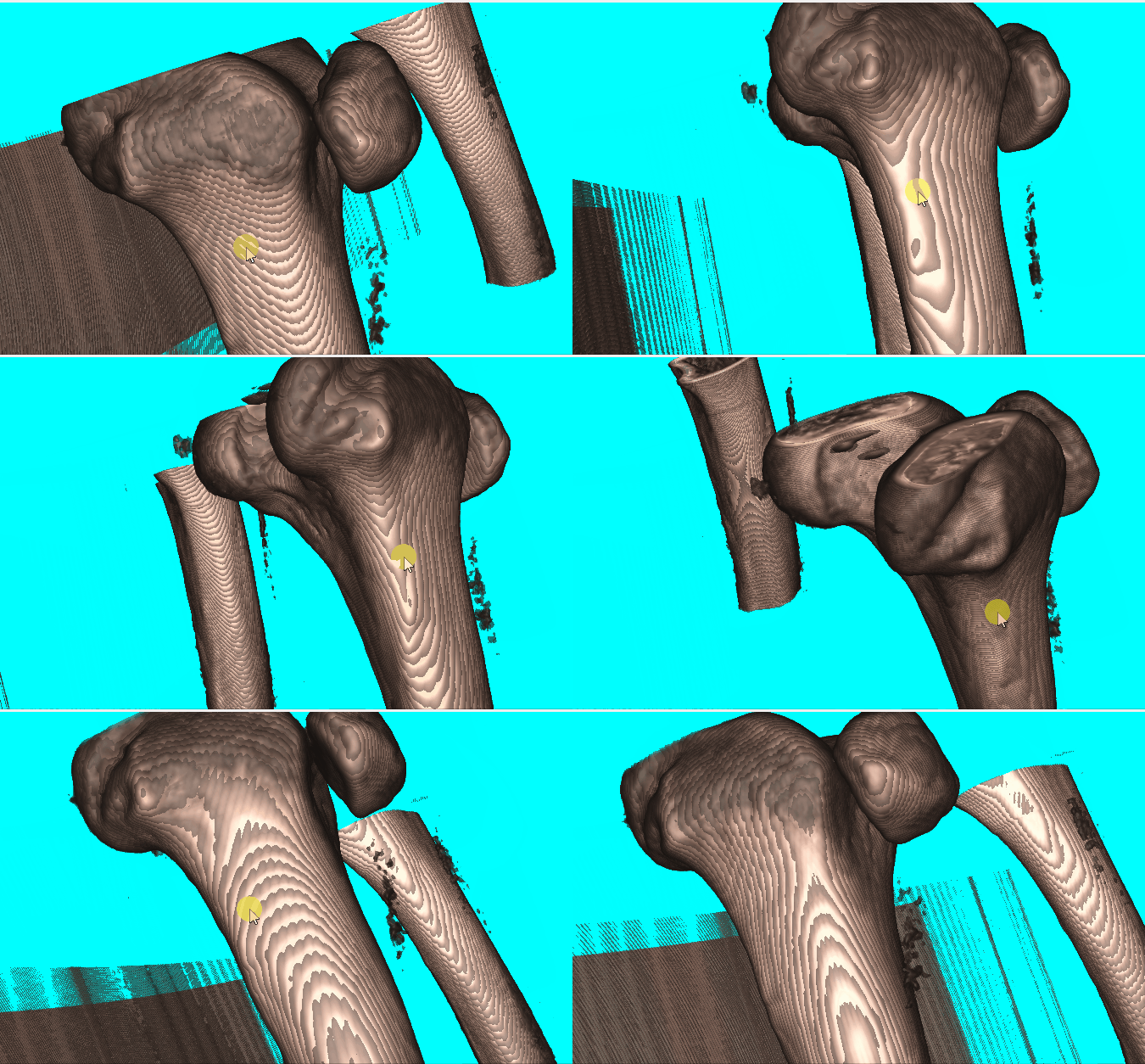
Here are what I modified.
from
vtkFixedPointVolumeRayCastMapper
to
vtkGPUVolumeRayCastMapper
from
vtkNew volumeScalarOpacity;
volumeScalarOpacity-\>AddPoint(0, 0.00);
volumeScalarOpacity-\>AddPoint(500, 0.15);
volumeScalarOpacity-\>AddPoint(1000, 0.15);
volumeScalarOpacity-\>AddPoint(1150, 0.85);
to
vtkNew volumeScalarOpacity;
volumeScalarOpacity-\>AddPoint(0, 0.00);
volumeScalarOpacity-\>AddPoint(99, 0);
volumeScalarOpacity-\>AddPoint(100, 0.7);
volumeScalarOpacity-\>AddPoint(2000, 1);
Thanks.
---
### Author:  [@lassoan](https://discourse.vtk.org/u/lassoan)
#### Post date: [April 4, 2022, 12:06pm UTC](https://discourse.vtk.org/t/how-to-get-rid-of-this-tipples-on-the-volume/8201/2 "2022-04-04T12:06:17Z")
To remove wood grain artifacts you can:
- enable [jittering](https://vtk.org/doc/nightly/html/classvtkGPUVolumeRayCastMapper.html#a9f58bdf2f81625edfbcb1fa7e9c26bd6) of the ray starting position: adds a subtle noise pattern but does not increase rendering time; or
- reduce sampling distance: this removes the artifacts without adding a noise pattern, but slows down rendering; or
- make the ramp in your scalar opacity transfer function a bit less steep: this blurs the boundary a bit, which is also helpful for reducing staircase artifacts (that occurs when volume spacing is anisotropic)
For such trivial bone visualization (when image quality is this good) you can also use surface rendering (get isosurface by flying edge filter and smooth using vtkWindowedSincPolyDataFilter). Surface rendering has a number of advantages: rendering time is negligible, you can display many structures, easily show/hide them, use advanced lighting (PBR), use GPU-based picking, etc.
---
### Author:  [@xxyyy159](https://discourse.vtk.org/u/xxyyy159)
#### Post date: [May 31, 2022, 1:57am UTC](https://discourse.vtk.org/t/how-to-get-rid-of-this-tipples-on-the-volume/8201/3 "2022-05-31T01:57:05Z")
Thank you for your help. Enable jittering works perfectly.