# How to get separate boundary for a tube?
**URL:** https://discourse.vtk.org/t/how-to-get-separate-boundary-for-a-tube/10521
**Category:** Support
**Created:** [January 23, 2023, 4:26am UTC](https://discourse.vtk.org/t/how-to-get-separate-boundary-for-a-tube/10521 "2023-01-23T04:26:32Z")
**Posts on this page:** 4
**Page:** 1
### Author:  [@zhang-qiang-github](https://discourse.vtk.org/u/zhang-qiang-github)
#### Post date: [January 23, 2023, 4:26am UTC](https://discourse.vtk.org/t/how-to-get-separate-boundary-for-a-tube/10521/1 "2023-01-23T04:26:33Z")
For a tube without cap, I want to obtain the two cap.
The boundary is calculated as:
```auto
fe = vtk.vtkFeatureEdges()
fe.SetInputData(tubePoly)
fe.BoundaryEdgesOn()
fe.FeatureEdgesOff()
fe.NonManifoldEdgesOff()
fe.ManifoldEdgesOff()
fe.Update()
stripper = vtk.vtkStripper()
stripper.SetInputData(fe.GetOutput())
stripper.Update()
boundaryPoly = vtk.vtkPolyData()
boundaryPoly.SetPoints(stripper.GetOutput().GetPoints())
boundaryPoly.SetPolys(stripper.GetOutput().GetLines())
```
The boundary has been successfully obtained:
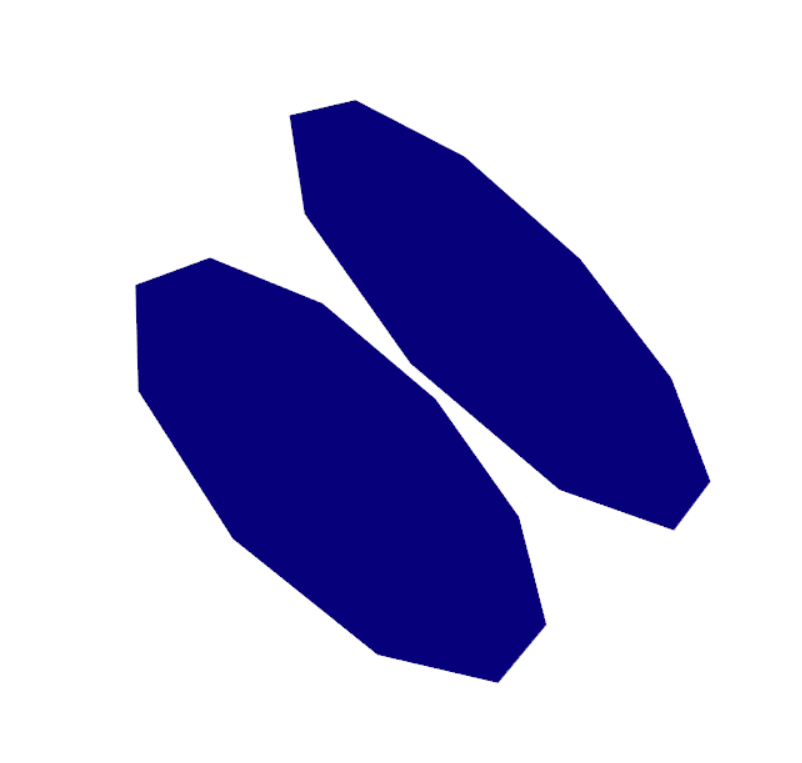
Then, I want to separate the two caps. And one cap is set as red color, the other one is given green color. But, the render result is:
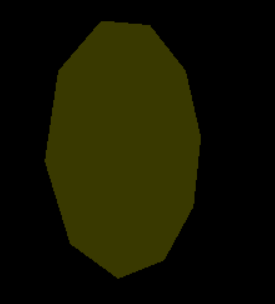
We can see that there is only one yellow actor. I think the yellow color is the blending of red and green, which means the coordinate of two caps is the same. The two caps is built as:
```auto
points = boundaryPoly.GetPoints()
poly1 = boundaryPoly.GetCell(0)
id1 = [poly1.GetPointIds().GetId(i) for i in range(poly1.GetNumberOfPoints())]
poly2 = boundaryPoly.GetCell(1)
id2 = [poly2.GetPointIds().GetId(i) for i in range(poly2.GetNumberOfPoints())]
print('pointer of cap polydata: ', id(poly1), id(poly2))
print('point id of cap polydata: ', id1, id2)
cap1 = vtk.vtkPolyData()
cap1.SetPoints(points)
cap1Polygon = vtk.vtkCellArray()
cap1Polygon.InsertNextCell(poly1)
cap1.SetPolys(cap1Polygon)
cap1.Modified()
#
cap2 = vtk.vtkPolyData()
cap2.SetPoints(points)
cap2Polygon = vtk.vtkCellArray()
cap2Polygon.InsertNextCell(poly2)
cap2.SetPolys(cap2Polygon)
cap2.Modified()
cap1Mapper = vtk.vtkPolyDataMapper()
cap1Mapper.SetInputData(cap1)
cap1Actor = vtk.vtkActor()
cap1Actor.SetMapper(cap1Mapper)
cap1Actor.GetProperty().SetOpacity(0.5)
cap1Actor.GetProperty().SetColor(1, 0, 0)
cap2Mapper = vtk.vtkPolyDataMapper()
cap2Mapper.SetInputData(cap2)
cap2Actor = vtk.vtkActor()
cap2Actor.SetMapper(cap2Mapper)
cap2Actor.GetProperty().SetOpacity(0.5)
cap2Actor.GetProperty().SetColor(0, 1, 0)
```
The printed information is:
```auto
pointer of cap polydata: 1443206601792 1443206601792
point id of cap polydata: [0, 1, 18, 16, 14, 12, 10, 8, 6, 4, 0] [2, 3, 5, 7, 9, 11, 13, 15, 17, 19, 2]
```
We can see that the pointer of `vtkPolyData` is the same, but the point ids are note the same. It make me confuzed.
**My purpose:** generate two seperate caps.
Any suggestion is appreciated ~~~~
The complete code to reproduce my result is:
```auto
import vtkmodules.all as vtk
vpoints = vtk.vtkPoints()
vpoints.InsertNextPoint(0, 0, 0)
vpoints.InsertNextPoint(1, 1, 1)
line = vtk.vtkPolyLine()
line.GetPointIds().SetNumberOfIds(2)
line.GetPointIds().SetId(0, 0)
line.GetPointIds().SetId(1, 1)
lines = vtk.vtkCellArray()
lines.InsertNextCell(line)
polyln = vtk.vtkPolyData()
polyln.SetPoints(vpoints)
polyln.SetLines(lines)
tuf = vtk.vtkTubeFilter()
tuf.SetCapping(False)
tuf.SetNumberOfSides(10)
tuf.SetInputData(polyln)
tuf.SetRadius(2)
tuf.Update()
tubePoly = tuf.GetOutput()
# mapper = vtk.vtkPolyDataMapper()
# mapper.SetInputData(tuf.GetOutput())
# actor = vtk.vtkActor()
# actor.SetMapper(mapper)
# renderer = vtk.vtkRenderer()
# renderer.AddActor(actor)
# renWin = vtk.vtkRenderWindow()
# renWin.AddRenderer(renderer)
# iren = vtk.vtkRenderWindowInteractor()
# iren.SetRenderWindow(renWin)
# iren.SetInteractorStyle(vtk.vtkInteractorStyleTrackballCamera())
# iren.Initialize()
# iren.Start()
fe = vtk.vtkFeatureEdges()
fe.SetInputData(tubePoly)
fe.BoundaryEdgesOn()
fe.FeatureEdgesOff()
fe.NonManifoldEdgesOff()
fe.ManifoldEdgesOff()
fe.Update()
stripper = vtk.vtkStripper()
stripper.SetInputData(fe.GetOutput())
stripper.Update()
boundaryPoly = vtk.vtkPolyData()
boundaryPoly.SetPoints(stripper.GetOutput().GetPoints())
boundaryPoly.SetPolys(stripper.GetOutput().GetLines())
points = boundaryPoly.GetPoints()
poly1 = boundaryPoly.GetCell(0)
id1 = [poly1.GetPointIds().GetId(i) for i in range(poly1.GetNumberOfPoints())]
poly2 = boundaryPoly.GetCell(1)
id2 = [poly2.GetPointIds().GetId(i) for i in range(poly2.GetNumberOfPoints())]
print('pointer of cap polydata: ', id(poly1), id(poly2))
print('point id of cap polydata: ', id1, id2)
cap1 = vtk.vtkPolyData()
cap1.SetPoints(points)
cap1Polygon = vtk.vtkCellArray()
cap1Polygon.InsertNextCell(poly1)
cap1Polygon.InsertNextCell(poly2)
cap1.SetPolys(cap1Polygon)
cap1.Modified()
cap2 = vtk.vtkPolyData()
cap2.SetPoints(points)
cap2Polygon = vtk.vtkCellArray()
cap2Polygon.InsertNextCell(poly2)
cap2.SetPolys(cap2Polygon)
cap2.Modified()
cap1Mapper = vtk.vtkPolyDataMapper()
cap1Mapper.SetInputData(cap1)
cap1Actor = vtk.vtkActor()
cap1Actor.SetMapper(cap1Mapper)
cap1Actor.GetProperty().SetOpacity(0.5)
cap1Actor.GetProperty().SetColor(1, 0, 0)
cap2Mapper = vtk.vtkPolyDataMapper()
cap2Mapper.SetInputData(cap2)
cap2Actor = vtk.vtkActor()
cap2Actor.SetMapper(cap2Mapper)
cap2Actor.GetProperty().SetOpacity(0.5)
cap2Actor.GetProperty().SetColor(0, 1, 0)
renderer = vtk.vtkRenderer()
renderer.AddActor(cap1Actor)
renderer.AddActor(cap2Actor)
renWin = vtk.vtkRenderWindow()
renWin.AddRenderer(renderer)
iren = vtk.vtkRenderWindowInteractor()
iren.SetRenderWindow(renWin)
iren.SetInteractorStyle(vtk.vtkInteractorStyleTrackballCamera())
iren.Initialize()
iren.Start()
```
---
### Author:  [@dgobbi](https://discourse.vtk.org/u/dgobbi)
#### Post date: [January 23, 2023, 5:23am UTC](https://discourse.vtk.org/t/how-to-get-separate-boundary-for-a-tube/10521/2 "2023-01-23T05:23:55Z")
Try [vtkPolyDataConnectivityFilter](https://vtk.org/doc/nightly/html/classvtkPolyDataConnectivityFilter.html#details) to separate the caps.
---
### Author:  [@zhang-qiang-github](https://discourse.vtk.org/u/zhang-qiang-github)
#### Post date: [January 23, 2023, 6:51am UTC](https://discourse.vtk.org/t/how-to-get-separate-boundary-for-a-tube/10521/3 "2023-01-23T06:51:32Z")
> [@dgobbi](#):
>
> Try [vtkPolyDataConnectivityFilter](https://vtk.org/doc/nightly/html/classvtkPolyDataConnectivityFilter.html#details) to separate the caps.
@dgobbi Thanks for kindly reply.
But, I also want to know why the pointer of `poly1&poly2` is the same?
```auto
poly1 = boundaryPoly.GetCell(0)
poly2 = boundaryPoly.GetCell(1)
```
In my thought, it should be different.
---
### Author:  [@dgobbi](https://discourse.vtk.org/u/dgobbi)
#### Post date: [January 23, 2023, 11:00am UTC](https://discourse.vtk.org/t/how-to-get-separate-boundary-for-a-tube/10521/4 "2023-01-23T11:00:44Z")
A vtkDataSet does not store the cells as vtkCell objects, it stores them implicitly in one or more vtkCellArrays. So the first time you call GetCell(i), it builds a vtkCell object and returns it. And the next time you call GetCell(j), it re-uses the same object, but changes the point ids. See the code if you are curious:
[Common/DataModel/vtkPolyData.cxx](https://gitlab.kitware.com/vtk/vtk/-/blob/6d5c0110/Common/DataModel/vtkPolyData.cxx#L240)