# How to Include 2D Image as Overlay in a 3D Scene
**URL:** https://discourse.vtk.org/t/how-to-include-2d-image-as-overlay-in-a-3d-scene/3075
**Category:** Support
**Created:** [April 17, 2020, 5:18am UTC](https://discourse.vtk.org/t/how-to-include-2d-image-as-overlay-in-a-3d-scene/3075 "2020-04-17T05:18:49Z")
**Posts on this page:** 3
**Page:** 1
### Author:  [@Aaron\_Nowack](https://discourse.vtk.org/u/Aaron_Nowack)
#### Post date: [April 17, 2020, 5:18am UTC](https://discourse.vtk.org/t/how-to-include-2d-image-as-overlay-in-a-3d-scene/3075/1 "2020-04-17T05:18:49Z")
In the example [ChartsOn3DScene](https://lorensen.github.io/VTKExamples/site/Cxx/Plotting/ChartsOn3DScene/)
a 2D Chart is displayed on top of a 3D scene which can be interacted with.
I’m trying to do something similar, but instead of displaying a Chart, to show an image, which persists and does not change position or scale as the user interacts with the cube.
My naive attempt shows what I do not want to happen, which is that the image is included in the 3D scene and rotates with the cube
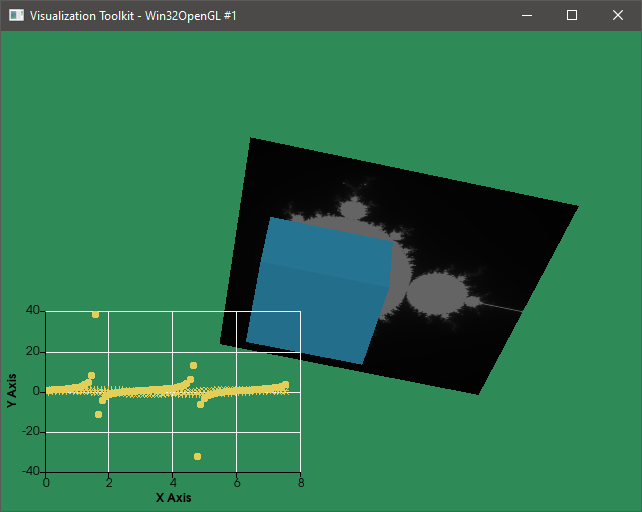
I’m using Python, but going between C++ and Python examples are fairly straight forward, my modification to the example is
```python
image = vtk.vtkImageMandelbrotSource()
image.Update()
imageActor = vtk.vtkImageActor()
imageActor.GetMapper().SetInputConnection(image.GetOutputPort())
renderer.AddActor(imageActor)
```
---
### Author:  [@mwestphal](https://discourse.vtk.org/u/mwestphal)
#### Post date: [April 17, 2020, 7:28am UTC](https://discourse.vtk.org/t/how-to-include-2d-image-as-overlay-in-a-3d-scene/3075/2 "2020-04-17T07:28:20Z")
vtkLogoRepresentation should do the trick.
[https://vtk.org/doc/nightly/html/classvtkLogoRepresentation.html](https://vtk.org/doc/nightly/html/classvtkLogoRepresentation.html)
---
### Author:  [@Aaron\_Nowack](https://discourse.vtk.org/u/Aaron_Nowack)
#### Post date: [April 17, 2020, 4:23pm UTC](https://discourse.vtk.org/t/how-to-include-2d-image-as-overlay-in-a-3d-scene/3075/3 "2020-04-17T16:23:09Z")
Thank you, this does seem to be a good approach that I have working. An alternative I found was to use the concept of rendering layers, with one camera using a parallel projection, but the logorepresentation makes the positioning easy.
Thanks again.