::New();
renderer->AddActor(actor);
renderer->ResetCamera();
renWin->AddRenderer(renderer);
interactor->SetRenderWindow(renWin);
renWin->Render();
interactor->Start();
```
Here is the rendered Image with and without the vtkContoutFilter:
Without: 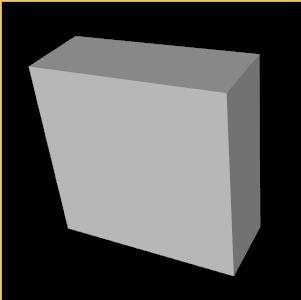
With: 
If I open the same file in ParaView with Contours I get a different result:
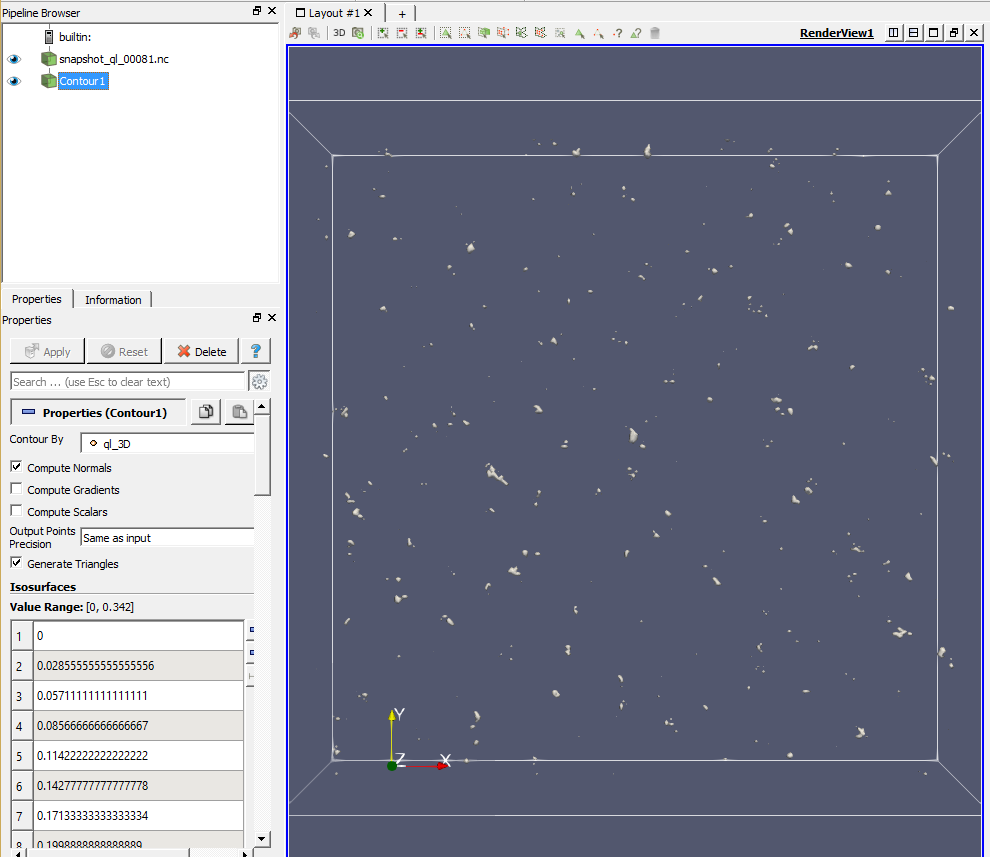
I can provide the test file if needed.
Thanks for your help in advance.
---
### Author:  [@Paulo\_Carvalho](https://discourse.vtk.org/u/Paulo_Carvalho)
#### Post date: [January 18, 2020, 10:49pm UTC](https://discourse.vtk.org/t/how-to-isosurface-for-nc-netcdf-data/2448/2 "2020-01-18T22:49:32Z")
Hello, Alex,
According to the documentation of `vtkContourFilter`: [https://vtk.org/doc/nightly/html/classvtkContourFilter.html#details](https://vtk.org/doc/nightly/html/classvtkContourFilter.html#details), you need to compute the normals (with [vtkPolyDataNormals](https://vtk.org/doc/nightly/html/classvtkPolyDataNormals.html)) for the resulting `vtkPolyData`, assuming the output of `vtkNetCDFCFReader` is either a `vtkUnstructuredGrid` or a `vtkStructuredGrid`. Incorrect or null normals usually lead to problems with rendering.
all the best,
Paulo
---
### Author:  [@Alex1](https://discourse.vtk.org/u/Alex1)
#### Post date: [January 21, 2020, 8:15am UTC](https://discourse.vtk.org/t/how-to-isosurface-for-nc-netcdf-data/2448/3 "2020-01-21T08:15:43Z")
Hello Paulo,
I get vtkImageDaten from the vtkCDFCFReader. I have tried to change the data type with
`vtkCDFCFReader() -> SetOutputTypeToStructured();`
and then calculating the normals with vtkPolyDateNormals, but unfortunately that didn’t work.
Do you have an idea how it could work with the vtkImageDate and vtkContourFilter?
Thanks for your help in advance.
---
### Author:  [@Paulo\_Carvalho](https://discourse.vtk.org/u/Paulo_Carvalho)
#### Post date: [January 21, 2020, 10:41am UTC](https://discourse.vtk.org/t/how-to-isosurface-for-nc-netcdf-data/2448/4 "2020-01-21T10:41:11Z")
Can you, please, post the strings returned by `cdfCFReader->GetAllDimensions()`?
According to the [documentation](https://vtk.org/doc/nightly/html/classvtkNetCDFReader.html#ae5ee7e14a911a9129366fbee87936cad), you could:
- Remove the call to `SetVariableArrayStatus()`;
- Change the call to `SetDimensions()` to `cdfCFReader->SetDimensions("z,y,x,ql_3D")`.
Alternativelly, try:
- Remove the call to `SetDimensions()`;
- Add a call to `SetDimensions()` for each variable:
```auto
cdfCFReader->SetVariableArrayStatus("x", 1);
cdfCFReader->SetVariableArrayStatus("y", 1);
cdfCFReader->SetVariableArrayStatus("z", 1);
cdfCFReader->SetVariableArrayStatus("ql_3D", 1);
```
---
### Author:  [@Alex1](https://discourse.vtk.org/u/Alex1)
#### Post date: [January 21, 2020, 11:45am UTC](https://discourse.vtk.org/t/how-to-isosurface-for-nc-netcdf-data/2448/5 "2020-01-21T11:45:31Z")
With `cdfCFReader->GetAllDimensions()`:
```
vtkSmartPointer stringallDims = vtkSmartPointer::New();
stringallDims = cdfCFReader->GetAllDimensions();
for (int i = 0; i < stringallDims->GetNumberOfValues(); i++) {
cout << "This is Dim: "<< i << " " << stringallDims->GetValue(i) << endl;
}
```
I get the following output:
“This is Dim: 0 (z,y,x)”
If I use `cdfCFReader->SetDimensions("z,y,x,ql_3D")` I get the same result with the black window like in the first post.
But if I use
```auto
cdfCFReader->SetVariableArrayStatus("x", 1);
cdfCFReader->SetVariableArrayStatus("y", 1);
cdfCFReader->SetVariableArrayStatus("z", 1);
cdfCFReader->SetVariableArrayStatus("ql_3D", 1);
```
i get the following error messages:
```auto
Warning: In G:\VTK-8.2.0\src\IO\NetCDF\vtkNetCDFReader.cxx, line 823
vtkNetCDFCFReader (000000985E5EC5A0): Variable x dimensions (x) are different than the other variable dimensions (z y x). Skipping
Warning: In G:\VTK-8.2.0\src\IO\NetCDF\vtkNetCDFReader.cxx, line 823
vtkNetCDFCFReader (000000985E5EC5A0): Variable y dimensions (y) are different than the other variable dimensions (z y x). Skipping
Warning: In G:\VTK-8.2.0\src\IO\NetCDF\vtkNetCDFReader.cxx, line 823
vtkNetCDFCFReader (000000985E5EC5A0): Variable z dimensions (z) are different than the other variable dimensions (z y x). Skipping
```
---
### Author:  [@Paulo\_Carvalho](https://discourse.vtk.org/u/Paulo_Carvalho)
#### Post date: [January 21, 2020, 12:33pm UTC](https://discourse.vtk.org/t/how-to-isosurface-for-nc-netcdf-data/2448/6 "2020-01-21T12:33:43Z")
Ok… can you try this:
```
cdfCFReader->SetVariableArrayStatus("z,y,x", 1);
cdfCFReader->SetVariableArrayStatus("ql_3D", 1);
```
?
---
### Author:  [@Alex1](https://discourse.vtk.org/u/Alex1)
#### Post date: [January 21, 2020, 1:13pm UTC](https://discourse.vtk.org/t/how-to-isosurface-for-nc-netcdf-data/2448/7 "2020-01-21T13:13:27Z")
If i do this I get a new error:
```
ERROR: In G:\VTK-8.2.0\src\IO\NetCDF\vtkNetCDFReader.cxx, line 202
vtkNetCDFCFReader (000000D3BD9EC5A0): netCDF Error: NetCDF: Variable not found
ERROR: In G:\VTK-8.2.0\src\Common\ExecutionModel\vtkExecutive.cxx, line 782
vtkCompositeDataPipeline (000000D3BD9ECC30): Algorithm vtkNetCDFCFReader(000000D3BD9EC5A0) returned failure for request: vtkInformation (000000D3BDE3D820)
Debug: Off
Modified Time: 1404
Reference Count: 1
Registered Events: (none)
Request: REQUEST_INFORMATION
FORWARD_DIRECTION: 0
ALGORITHM_AFTER_FORWARD: 1
ERROR: In G:\VTK-8.2.0\src\IO\NetCDF\vtkNetCDFReader.cxx, line 761
vtkNetCDFCFReader (000000D3BD9EC5A0): netCDF Error: NetCDF: Variable not found
ERROR: In G:\VTK-8.2.0\src\Common\ExecutionModel\vtkExecutive.cxx, line 782
vtkCompositeDataPipeline (000000D3BD9ECC30): Algorithm vtkNetCDFCFReader(000000D3BD9EC5A0) returned failure for request: vtkInformation (000000D3BDE3F2A0)
Debug: Off
Modified Time: 1660
Reference Count: 1
Registered Events: (none)
Request: REQUEST_DATA
FORWARD_DIRECTION: 0
ALGORITHM_AFTER_FORWARD: 1
FROM_OUTPUT_PORT: 0
```
---
### Author:  [@Paulo\_Carvalho](https://discourse.vtk.org/u/Paulo_Carvalho)
#### Post date: [January 21, 2020, 2:06pm UTC](https://discourse.vtk.org/t/how-to-isosurface-for-nc-netcdf-data/2448/8 "2020-01-21T14:06:37Z")
It seems that your original code is correct afterall, based on the almost absent documentation of the `vtkNetCDFCFReader` class. In that case, I’d report a bug: [https://gitlab.kitware.com/vtk/vtk/issues](https://gitlab.kitware.com/vtk/vtk/issues)
I suspect it’s a bug because ParaView uses a custom class: [https://github.com/Kitware/ParaView/blob/df2aad3888107a6d61cd28bc755b535c7adcf471/Plugins/CDIReader/Reader/vtkCDIReader.h](https://github.com/Kitware/ParaView/blob/df2aad3888107a6d61cd28bc755b535c7adcf471/Plugins/CDIReader/Reader/vtkCDIReader.h)
Perhaps you could copy that over to your project (possibly along with some other source files) and give it a try while you wait for a feedback.
---
### Author:  [@Alex1](https://discourse.vtk.org/u/Alex1)
#### Post date: [March 5, 2020, 6:52pm UTC](https://discourse.vtk.org/t/how-to-isosurface-for-nc-netcdf-data/2448/9 "2020-03-05T18:52:52Z")
I have a solution for my Problem to use `vtkAssignAttribute` and `vtkDataSetSurfaceFilter`
Here the full code:
````auto
vtkSmartPointer cdfCFReader = vtkSmartPointer::New();
cdfCFReader->SetFileName(filenameNC.c_str());
cdfCFReader->UpdateMetaData();
cdfCFReader->SetVariableArrayStatus("ql_3D", 1);
cdfCFReader->Update();
vtkSmartPointer assignAttribute = vtkSmartPointer::New();
assignAttribute->SetInputConnection(cdfCFReader->GetOutputPort());
assignAttribute->Assign("ql_3D", "SCALARS", "POINT_DATA");
vtkSmartPointer contour = vtkSmartPointer::New();
contour->SetInputConnection(assignAttribute->GetOutputPort());
contour->GenerateValues(10, 0.0, 0.257);
vtkSmartPointer surfaceFilter = vtkSmartPointer::New();
surfaceFilter->SetInputConnection(contour->GetOutputPort());
vtkSmartPointer polyMapper = vtkSmartPointer::New();
polyMapper->SetInputConnection(surfaceFilter->GetOutputPort());
//polyMapper->SetScalarRange(0, 0.257);
vtkSmartPointer actor = vtkSmartPointer::New();
actor->SetMapper(polyMapper);
vtkSmartPointer = vtkSmartPointer::New();
renderer->AddActor(actor);
vtkSmartPointer renWin = vtkSmartPointer::New();
renWin->AddRenderer(renderer);
renWin->Render();```

````