# How to make a DicomImage fill a window
**URL:** https://discourse.vtk.org/t/how-to-make-a-dicomimage-fill-a-window/3218
**Category:** Support
**Created:** [May 5, 2020, 2:44pm UTC](https://discourse.vtk.org/t/how-to-make-a-dicomimage-fill-a-window/3218 "2020-05-05T14:44:33Z")
**Posts on this page:** 3
**Page:** 1
### Author:  [@Amnesie](https://discourse.vtk.org/u/Amnesie)
#### Post date: [May 5, 2020, 2:44pm UTC](https://discourse.vtk.org/t/how-to-make-a-dicomimage-fill-a-window/3218/1 "2020-05-05T14:44:33Z")
Here is my code ,
> vtkSmartPointer imageViewer =vtkSmartPointer::New();
> imageViewer-\>SetInputConnection(imageflip-\>GetOutputPort());
> imageViewer-\>Render();
> imageViewer-\>GetRenderWindow()-\>SetWindowName(“ROI”);
> imageViewer-\>GetRenderer()-\>GetActiveCamera()-\>SetParallelProjection(1);
> double size1 = size[1];//size is the size of image
> double size0 = size[0];
> imageViewer-\>GetRenderer()-\>GetRenderWindow()-\> SetSize(size0 / 4, size1 /4);
> imageViewer-\>Render();
When i run the programm ,the image can dispaly on the vtkwidgets(vtkimageviewer2) but always with the annoying blue borders.As the screenshot shows…
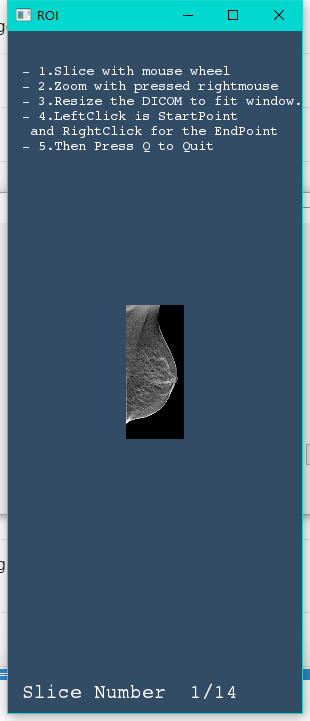
I try to set the
> imageViewer-\>GetRenderer()-\>GetActiveCamera()-\>Zoom(offset);
It helps to reduce the borders but i dont know how big is offset is correct, I used 4 as offset because i have resized the window 1/4 than original size but that not big enough,for this image i need to set offset as 5.1
And i noticed if i load the different dicomseries then the offset will also be different ,it is so wired.
There is some function in vtk let the image automaic fill the window?
---
### Author:  [@normanius](https://discourse.vtk.org/u/normanius)
#### Post date: [May 5, 2020, 8:29pm UTC](https://discourse.vtk.org/t/how-to-make-a-dicomimage-fill-a-window/3218/2 "2020-05-05T20:29:02Z")
Have you checked the following resources?
[http://vtk.1045678.n5.nabble.com/fit-to-screen-in-vtkImageViewer2-QVTKWidget-td5744151.html](http://vtk.1045678.n5.nabble.com/fit-to-screen-in-vtkImageViewer2-QVTKWidget-td5744151.html)
[https://lorensen.github.io/VTKExamples/site/Cxx/Images/FillWindow/](https://lorensen.github.io/VTKExamples/site/Cxx/Images/FillWindow/)
---
### Author:  [@Amnesie](https://discourse.vtk.org/u/Amnesie)
#### Post date: [May 6, 2020, 2:05am UTC](https://discourse.vtk.org/t/how-to-make-a-dicomimage-fill-a-window/3218/3 "2020-05-06T02:05:35Z")
Thanks for your reply! Yes i have both of them checked. My input data is a Dicomseries not a single dicom which show in Example , So I didn’t read it carefully. But you said it might work, so I went through it again. This part from link [https://lorensen.github.io/VTKExamples/site/Cxx/Images/FillWindow/](https://lorensen.github.io/VTKExamples/site/Cxx/Images/FillWindow/) help me out of the Problem! even though i dont know why it works butI’ll figure it out later. Thank you so much !!!
```
int extent[6];
castFilter->GetOutput()->GetExtent(extent);
double origin[3];
castFilter->GetOutput()->GetOrigin(origin);
double spacing[3];
castFilter->GetOutput()->GetSpacing(spacing);
// Setup renderer
vtkSmartPointer renderer =
vtkSmartPointer::New();
renderer->AddActor(imageSlice);
renderer->ResetCamera();
// Setup render window
vtkSmartPointer renderWindow =
vtkSmartPointer::New();
renderWindow->AddRenderer(renderer);
vtkCamera* camera = renderer->GetActiveCamera();
camera->ParallelProjectionOn();
renderer->SetBackground(1,0,0);
float xc = origin[0] + 0.5*(extent[0] + extent[1])*spacing[0];
float yc = origin[1] + 0.5*(extent[2] + extent[3])*spacing[1];
// float xd = (extent[1] - extent[0] + 1)*spacing[0]; // not used
float yd = (extent[3] - extent[2] + 1)*spacing[1];
float d = camera->GetDistance();
camera->SetParallelScale(0.5f*static_cast(yd));
camera->SetFocalPoint(xc,yc,0.0);
camera->SetPosition(xc,yc,+d);
```