# How to make vertex colored squares show black borders
**URL:** https://discourse.vtk.org/t/how-to-make-vertex-colored-squares-show-black-borders/3863
**Category:** Support
**Created:** [July 28, 2020, 1:48pm UTC](https://discourse.vtk.org/t/how-to-make-vertex-colored-squares-show-black-borders/3863 "2020-07-28T13:48:20Z")
**Posts on this page:** 5
**Page:** 1
### Author:  [@Cheng1087](https://discourse.vtk.org/u/Cheng1087)
#### Post date: [July 28, 2020, 1:48pm UTC](https://discourse.vtk.org/t/how-to-make-vertex-colored-squares-show-black-borders/3863/1 "2020-07-28T13:48:20Z")
I have a square with four vertices, color of each vertex is different.
in order to distinguish this square from other squares, I want the border to be black color.
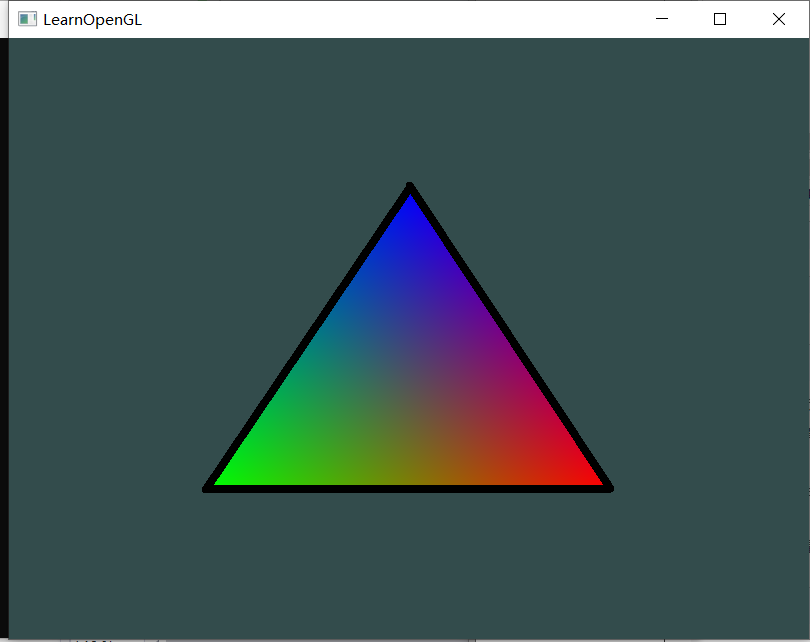
Approximately as shown below, the triangle used vertex shader by `vtkPolyDataMapper::SetScalarModeToUsePointData()`, I also need a black border to distinguish it from others.
how can I achieve this with only one actor.
---
### Author:  [@Michael](https://discourse.vtk.org/u/Michael)
#### Post date: [July 30, 2020, 1:44pm UTC](https://discourse.vtk.org/t/how-to-make-vertex-colored-squares-show-black-borders/3863/2 "2020-07-30T13:44:14Z")
See `vtkProperty::SetEdgeVisibility` and `vtkProperty::SetLineWidth` / `vtkProperty::SetEdgeColor`.
---
### Author:  [@Cheng1087](https://discourse.vtk.org/u/Cheng1087)
#### Post date: [July 31, 2020, 4:15am UTC](https://discourse.vtk.org/t/how-to-make-vertex-colored-squares-show-black-borders/3863/3 "2020-07-31T04:15:49Z")
In order for the polygon to be displayed normally, I need use `vtkTriangleFilter` to guarantee this.
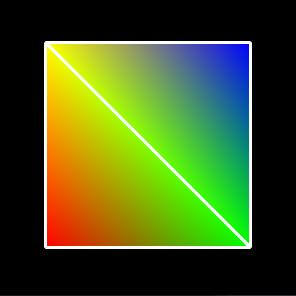
So if i use `vtkProperty::SetEdgexxxx`, it will result in the following.
A square only have four edges, but the square shows five sides in the window.
Anyway, thanks for your reply.
---
### Author:  [@Charles\_Gueunet](https://discourse.vtk.org/u/Charles_Gueunet)
#### Post date: [July 31, 2020, 9:18am UTC](https://discourse.vtk.org/t/how-to-make-vertex-colored-squares-show-black-borders/3863/4 "2020-07-31T09:18:53Z")
You may want to have a look at the [vtkFeatureEdges](https://vtk.org/doc/nightly/html/classvtkFeatureEdges.html) class to get rid of the inner edges.
---
### Author:  [@Cheng1087](https://discourse.vtk.org/u/Cheng1087)
#### Post date: [July 31, 2020, 10:55am UTC](https://discourse.vtk.org/t/how-to-make-vertex-colored-squares-show-black-borders/3863/5 "2020-07-31T10:55:47Z")
thanks for your reply.
It will help when it is a polygon, but most application scenarios i used are cubes or blocks. All of the edges are used by two polygon, `vtkFeatureEdges` can not find out the true boundary.