::New();
filter->SetInputData(oldPolyData);
filter->SetTransform(transform);
filter->Update();
auto newPolyData = filter->GetOutput();
actor->SetOrientation(0, 0, 0);
actor->SetOrigin(0, 0, 0);
actor->SetScale(1, 1, 1);
actor->SetPosition(0, 0, 0);
actor->SetUserTransform(nullptr);
actor->SetUserMatrix(nullptr);
actor->GetMapper()->SetInputData(newPolyData);
```
But, the result is wrong~~~
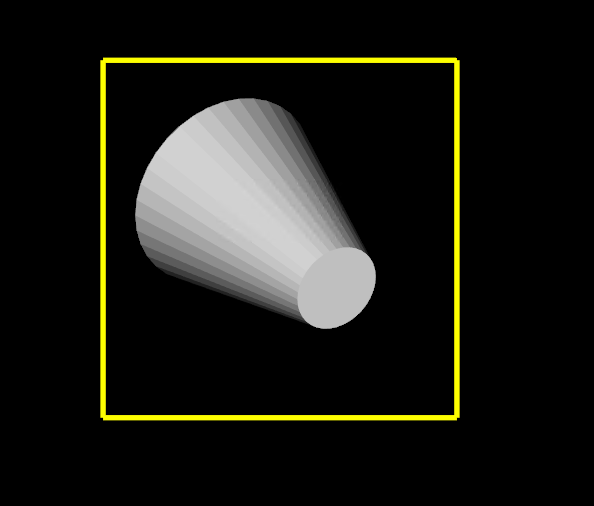
The gray actor is the target, and yellow line is the bounds of the actor.
If only `spin` happen, the actor would get out of the bounds.
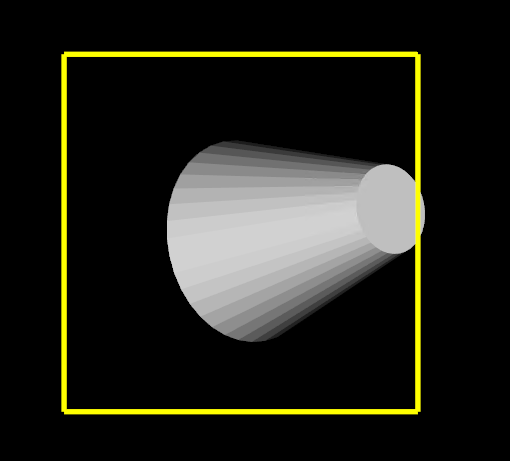
Is there anything wrong with my code? Any suggestion is appreciated~~~
---
### Author:  [@Paulo\_Carvalho](https://discourse.vtk.org/u/Paulo_Carvalho)
#### Post date: [December 25, 2022, 5:17pm UTC](https://discourse.vtk.org/t/how-to-obtain-the-polydata-added-in-trackball-actor-interactor/10306/2 "2022-12-25T17:17:27Z")
Hello,
How are you populating `oldPolyData`? I mean, what are the typical values of XYZ used to make it?
regards,
Paulo
---
### Author:  [@zhang-qiang-github](https://discourse.vtk.org/u/zhang-qiang-github)
#### Post date: [December 26, 2022, 8:56am UTC](https://discourse.vtk.org/t/how-to-obtain-the-polydata-added-in-trackball-actor-interactor/10306/3 "2022-12-26T08:56:21Z")
@Paulo_Carvalho Thanks for kindly reply. I have written a complete code to reproduce my problem:
```auto
import vtkmodules.all as vtk
# cylinder = vtk.vtkCylinderSource()
# cylinder.Update()
# polydata = cylinder.GetOutput()
reader = vtk.vtkSTLReader()
reader.SetFileName('polydata.stl')
reader.Update()
polydata = reader.GetOutput()
mapper = vtk.vtkPolyDataMapper()
mapper.SetInputData(polydata)
actor = vtk.vtkActor()
actor.SetMapper(mapper)
actor.SetPosition(10, 10, 20)
actor.RotateX(30)
actor.RotateY(30)
actor.RotateZ(30)
def lineActor(p1, p2):
lineSource = vtk.vtkLineSource()
lineSource.SetPoint1(p1[0], p1[1], p1[2])
lineSource.SetPoint2(p2[0], p2[1], p2[2])
lineSource.Update()
lineMapper = vtk.vtkPolyDataMapper()
lineMapper.SetInputData(lineSource.GetOutput())
lineActor = vtk.vtkActor()
lineActor.SetMapper(lineMapper)
lineActor.GetProperty().SetColor(1, 1, 0)
lineActor.GetProperty().SetLineWidth(5)
return lineActor
bounds = actor.GetBounds()
xmin, xmax, ymin, ymax, zmin, zmax = bounds
ps = [
[xmin, ymin, zmin, xmax, ymin, zmin],
[xmax, ymin, zmin, xmax, ymax, zmin],
[xmin, ymax, zmin, xmax, ymax, zmin],
[xmin, ymin, zmin, xmin, ymax, zmin],
[xmin, ymin, zmax, xmax, ymin, zmax],
[xmax, ymin, zmax, xmax, ymax, zmax],
[xmin, ymax, zmax, xmax, ymax, zmax],
[xmin, ymin, zmax, xmin, ymax, zmax],
[xmin, ymin, zmin, xmin, ymin, zmax],
[xmax, ymin, zmin, xmax, ymin, zmax],
[xmax, ymax, zmin, xmax, ymax, zmax],
[xmin, ymax, zmin, xmin, ymax, zmax]
]
renderer = vtk.vtkRenderer()
renderer.AddActor(actor)
for p in ps:
lineA = lineActor(p1=[p[0], p[1], p[2]], p2=[p[3], p[4], p[5]])
renderer.AddActor(lineA)
renWin = vtk.vtkRenderWindow()
renWin.AddRenderer(renderer)
iren = vtk.vtkRenderWindowInteractor()
def mouseMoveEvent(iren, event):
print('mouse move')
matrix = actor.GetMatrix()
transform = vtk.vtkTransform()
transform.SetMatrix(matrix)
transform.Update()
print(actor.GetCenter())
oldPolyData = actor.GetMapper().GetInput()
filter = vtk.vtkTransformPolyDataFilter()
filter.SetInputData(oldPolyData)
filter.SetTransform(transform)
filter.Update()
newPolyData = filter.GetOutput()
actor.SetOrigin(0, 0, 0)
actor.SetOrientation(0, 0, 0)
actor.SetScale(1, 1, 1)
actor.SetPosition(0, 0, 0)
actor.SetUserTransform(None)
actor.GetMapper().SetInputData(newPolyData)
iren.AddObserver('MouseMoveEvent', mouseMoveEvent)
style = vtk.vtkInteractorStyleTrackballActor()
iren.SetInteractorStyle(style)
iren.SetRenderWindow(renWin)
iren.Initialize()
iren.Start()
```
My test data is:
[polydata.stl](https://discourse.vtk.org/uploads/short-url/lPlN8z1MFLdtgERYqbX6WfBRcqW.stl) (41.1 KB)
Steps to reproduct my problem:
1. when the code is run, and the result is:
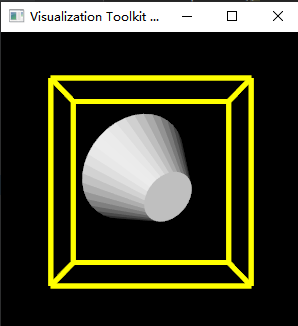
And the printed center is: `(41.48747253417969, 123.91775894165039, 9.721415996551514)`
The white actor is my target, and the yellow line is the bounds of target. We can see that the target is included by the yellow line.
1. Spin the actor: `ctrl+left press in the white actor`, please notes that the `ctrl` board is pressed so that `spin` would happen for the target.The left mouse button is pressed and move, the target would spin:
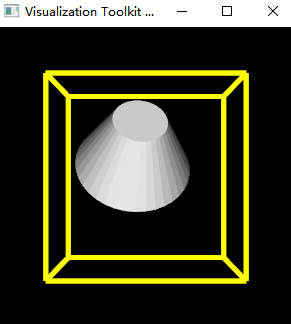
we can see that the target is still included by the yellow lines. The printing is stopped.
1. Releases the left mouse button, and move the mouse, we can see the printed center is: `(41.556962966918945, 124.36083602905273, 9.856724977493286)`. And it is changed.
2. Repeating step 2/3, we can obtain the following figure, and the target is not included by the yellow lines.
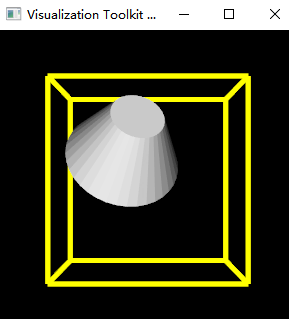
When repeating step 2/3, we must iterative `ctrl+press left mouse and move` and `release left mouse and move`. We can see the printed center is changing.
Strangely, when I replace the target with a `vtk.vtkCylinderSource()`, everything is ok.
Any suggestion is appreciated~~~
---
### Author:  [@Paulo\_Carvalho](https://discourse.vtk.org/u/Paulo_Carvalho)
#### Post date: [January 6, 2023, 2:02pm UTC](https://discourse.vtk.org/t/how-to-obtain-the-polydata-added-in-trackball-actor-interactor/10306/7 "2023-01-06T14:02:18Z")
Hello,
It appears to me that the model is off-center. I mean, the geometric center of the object does not correspond to the origin of the actor. Maybe you can achive the desired effect if you set the actor’s origin to match the center of the model’s geometry (mean of all vertexes’ XYZ).
take care,
Paulo
---
### Author:  [@zhang-qiang-github](https://discourse.vtk.org/u/zhang-qiang-github)
#### Post date: [January 6, 2023, 2:11pm UTC](https://discourse.vtk.org/t/how-to-obtain-the-polydata-added-in-trackball-actor-interactor/10306/8 "2023-01-06T14:11:18Z")
Thanks for your kindly reply.
> [@Paulo\_Carvalho](#):
>
> Maybe you can achive the desired effect if you set the actor’s origin to match the center of the model’s geometry (mean of all vertexes’ XYZ)
It works.
After reading the c++ source code, I figure out the bug reason.
The c++ code is:
```auto
void vtkInteractorStyleTrackballActor::Spin()
{
if (this->CurrentRenderer == nullptr || this->InteractionProp == nullptr)
{
return;
}
vtkRenderWindowInteractor* rwi = this->Interactor;
vtkCamera* cam = this->CurrentRenderer->GetActiveCamera();
// Get the axis to rotate around = vector from eye to origin
double* obj_center = this->InteractionProp->GetCenter();
double motion_vector[3];
double view_point[3];
...
```
The actor center is obtained: `double* obj_center = this->InteractionProp->GetCenter();`. But, the `vtkTransformPolyDataFilter->GetOutput()->GetCenter()` is not equal to the `actor->GetCenter()`.
After the changing:
```auto
newPolyData = filter.GetOutput()
actor.SetOrigin(0, 0, 0)
actor.SetOrientation(0, 0, 0)
actor.SetScale(1, 1, 1)
actor.SetPosition(0, 0, 0)
actor.SetUserTransform(None)
actor.SetOrigin(newPolyData.GetCenter()) ######### set the actor's origin
actor.GetMapper().SetInputData(newPolyData)
```
It works as I expect.