# How to Pick Edge?
**URL:** https://discourse.vtk.org/t/how-to-pick-edge/10719
**Category:** Web
**Created:** [February 17, 2023, 2:51am UTC](https://discourse.vtk.org/t/how-to-pick-edge/10719 "2023-02-17T02:51:48Z")
**Posts on this page:** 10
**Page:** 1
### Author:  [@sunlin0oo](https://discourse.vtk.org/u/sunlin0oo)
#### Post date: [February 17, 2023, 2:51am UTC](https://discourse.vtk.org/t/how-to-pick-edge/10719/1 "2023-02-17T02:51:48Z")
Hi!my current Polydata contains Line but not Ploy. I want to pick up the relevant information of such a red line. How should I do it?
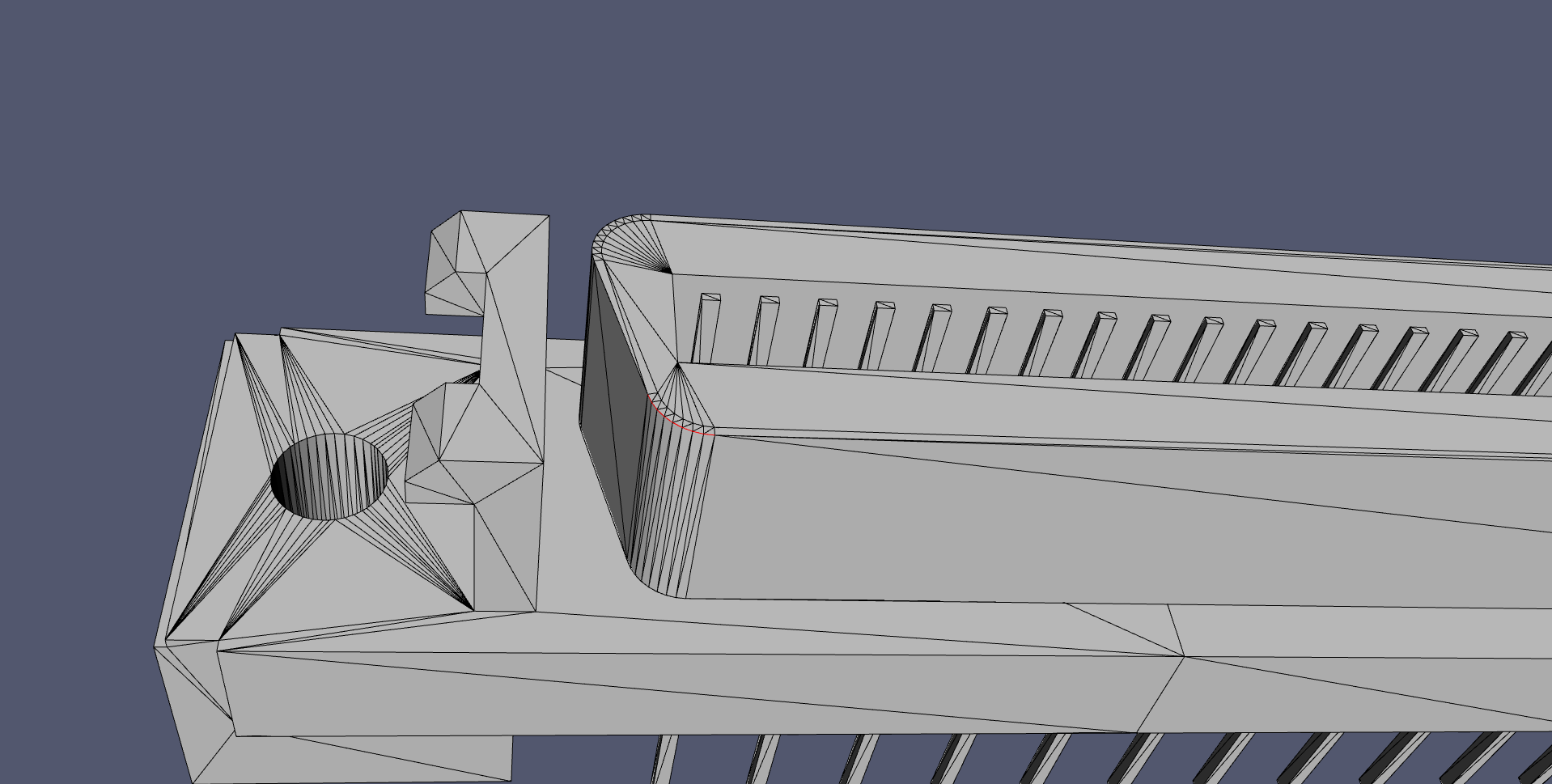
(ps:I presuppose that I have the polyline selected and go to render)
Now,My current operation idea wants to be processed through CellPicker; because in my understanding, Line, PolyLine, and Poly can all be called Cells, but I have not succeeded in implementing them.
The data aspect has the index number corresponding to each line and the coordinate value of the vertex that a line contains.
I will humbly accept any suggestion you give me!
Thanks for everyone’s help!
---
### Author:  [@Jens\_Munk\_Hansen](https://discourse.vtk.org/u/Jens_Munk_Hansen)
#### Post date: [February 19, 2023, 2:26am UTC](https://discourse.vtk.org/t/how-to-pick-edge/10719/2 "2023-02-19T02:26:50Z")
Add an observer to the interactor, the object in the handler will be the interactor
```auto
def MousePress(iren , ev):
renWin = iren.GetRenderWindow()
pos = irenj.GetEventPosition()
renderer = obj.FindPokedRenderer(pos[0], pos[1])
x, y = iren.GetEventPosition()
picker = vtk.vtkWorldPointPicker()
picker.Pick(x, y, 0, renderer)
worldPoint = picker.GetPickPosition()
print('world point from vtkPropPicker: ', worldPoint)
# Now you could add a small sphere to show the position
sphere = vtk.vtkSphereSource()
sphere.SetCenter(worldPoint[0], worldPoint[1], worldPoint[2])
sphere.SetRadius(sphereRadius)
sphere.Update()
sphereMapper = vtk.vtkPolyDataMapper()
sphereMapper.SetInputData(sphere.GetOutput())
sphereActor = vtk.vtkActor()
sphereActor.SetMapper(sphereMapper)
sphereActor.GetProperty().SetColor(255, 0, 0)
renderer.AddActor(sphereActor)
renderer.Render()
You can store the last actor to remove the previous to avoid adding to many spheres. Was it something like this you had in mind?
```
---
### Author:  [@sunlin0oo](https://discourse.vtk.org/u/sunlin0oo)
#### Post date: [February 19, 2023, 6:47am UTC](https://discourse.vtk.org/t/how-to-pick-edge/10719/3 "2023-02-19T06:47:26Z")
Thanks for your replay!
But maybe I don’t think so;
What I mean is: I want to pick a line on the model, like this and the red line, but I don’t know how I can do it.
In other words, when I click on the model, I want to pick the line,what should I do?
---
### Author:  [@sunlin0oo](https://discourse.vtk.org/u/sunlin0oo)
#### Post date: [February 19, 2023, 6:52am UTC](https://discourse.vtk.org/t/how-to-pick-edge/10719/4 "2023-02-19T06:52:58Z")
You mean: when I click on the model, return me a world coordinate value, and render a sphere for labeling,this is my understanding.
I have considered using the coordinate value to judge the line segment before, but there will be some problems;
I’m wondering if there’s a better way.
---
### Author:  [@Jens\_Munk\_Hansen](https://discourse.vtk.org/u/Jens_Munk_Hansen)
#### Post date: [February 19, 2023, 9:33am UTC](https://discourse.vtk.org/t/how-to-pick-edge/10719/5 "2023-02-19T09:33:38Z")
What do you mean by judge the line segment? I wasn’t really sure what you were trying to achieve and thought that you might wanted the world position for a point in the scene. What do you mean by data aspect has an index number. Where is the red line?
If you want information about a cell that you pick, you can use a cell picker as shown here.
[https://kitware.github.io/vtk-examples/site/Cxx/Picking/CellPicking/](https://kitware.github.io/vtk-examples/site/Cxx/Picking/CellPicking/)
Change the example a bit:
```auto
plane_source.SetResolution(10,10)
selection_node.SetContentType(vtkSelectionNode.VERTEX)
```
I believe the author meant to have used this content type when creating the example. Press ‘w’ and you will see a wireframe with all edges of the picked triangle highlighted.
---
### Author:  [@finetjul](https://discourse.vtk.org/u/finetjul)
#### Post date: [February 19, 2023, 8:54pm UTC](https://discourse.vtk.org/t/how-to-pick-edge/10719/6 "2023-02-19T20:54:35Z")
Did you check that [hardware selector example](https://kitware.github.io/vtk-js/examples/HardwareSelector.html) ?
---
### Author:  [@Jens\_Munk\_Hansen](https://discourse.vtk.org/u/Jens_Munk_Hansen)
#### Post date: [February 19, 2023, 9:25pm UTC](https://discourse.vtk.org/t/how-to-pick-edge/10719/7 "2023-02-19T21:25:46Z")
I guess this using the hardware accelerated picker. Picking using color codes. I used that for a standalone C++ application.
---
### Author:  [@Jens\_Munk\_Hansen](https://discourse.vtk.org/u/Jens_Munk_Hansen)
#### Post date: [February 19, 2023, 9:28pm UTC](https://discourse.vtk.org/t/how-to-pick-edge/10719/8 "2023-02-19T21:28:26Z")
In general, it difficult to pick lines. They are thin. In the example I am referring to, you pick the cells and color both the facet and lines surrounding it. If the hardware accelerated example shown below is available I would look into that.
---
### Author:  [@sunlin0oo](https://discourse.vtk.org/u/sunlin0oo)
#### Post date: [February 20, 2023, 3:15am UTC](https://discourse.vtk.org/t/how-to-pick-edge/10719/9 "2023-02-20T03:15:50Z")
Thanks for your replay and suggestion!
I didn’t expect such a suitable example!
I am directly searching for relevant knowledge about Picker, I will continue to advance according to your suggestion!
---
### Author:  [@sunlin0oo](https://discourse.vtk.org/u/sunlin0oo)
#### Post date: [February 20, 2023, 3:18am UTC](https://discourse.vtk.org/t/how-to-pick-edge/10719/10 "2023-02-20T03:18:56Z")
Yes, I thought about using GPU Picker for picking like Three.js.
Due to lack of personal ability, there is no reasonable promotion.
I will continue to promote research, and welcome to continue to communicate if there is relevant progress.