# How to prevent points from disappearing when zooming in?
**URL:** https://discourse.vtk.org/t/how-to-prevent-points-from-disappearing-when-zooming-in/14903
**Category:** Support
**Created:** [November 21, 2024, 6:15am UTC](https://discourse.vtk.org/t/how-to-prevent-points-from-disappearing-when-zooming-in/14903 "2024-11-21T06:15:58Z")
**Posts on this page:** 6
**Page:** 1
### Author:  [@blocky](https://discourse.vtk.org/u/blocky)
#### Post date: [November 21, 2024, 6:15am UTC](https://discourse.vtk.org/t/how-to-prevent-points-from-disappearing-when-zooming-in/14903/1 "2024-11-21T06:15:58Z")
Hi all
I am a beginner with VTK, it’s interesting and I’m currently learning through examples.
When I try the example of [Delaunay2](https://examples.vtk.org/site/Cxx/Filtering/Delaunay2D/), I noticed that the points disappear when the camera is zoomed in to a certain extent
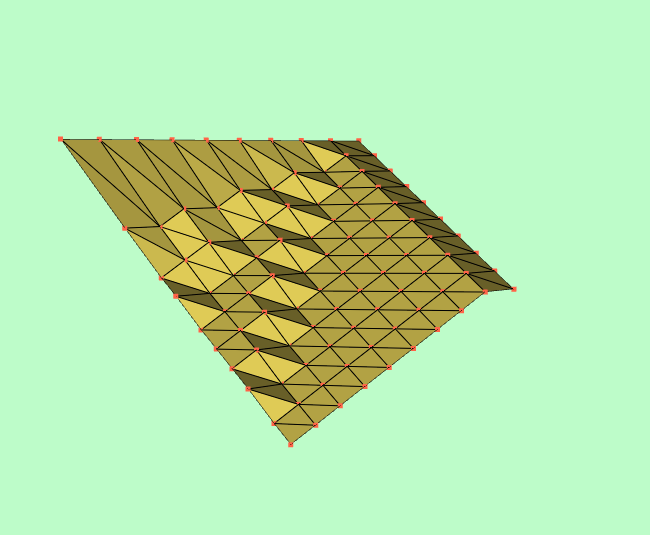
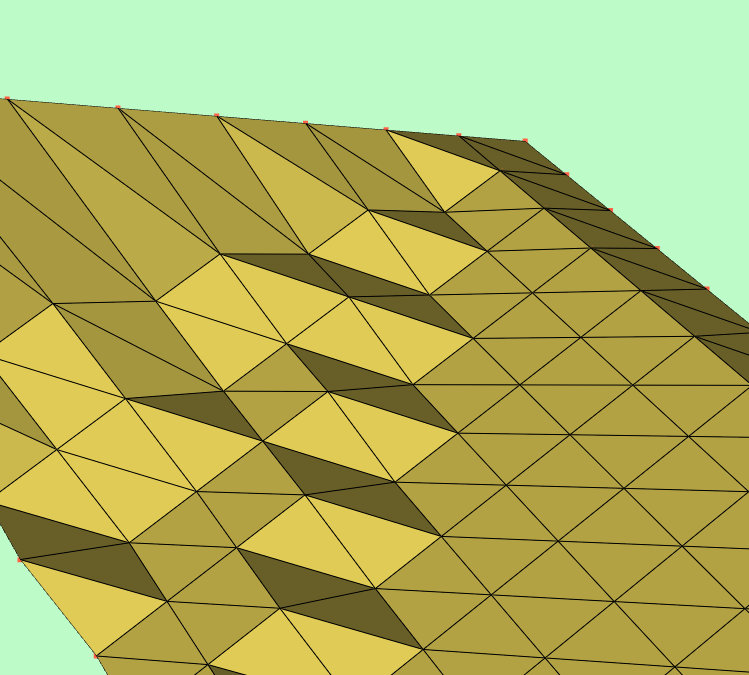
It possibly because they are being occluded by the surfaces. When the surface is at an angle, [(like this)](https://examples.vtk.org/site/Cxx/PolyData/PointInsideObject2/), the points are still partially visible.
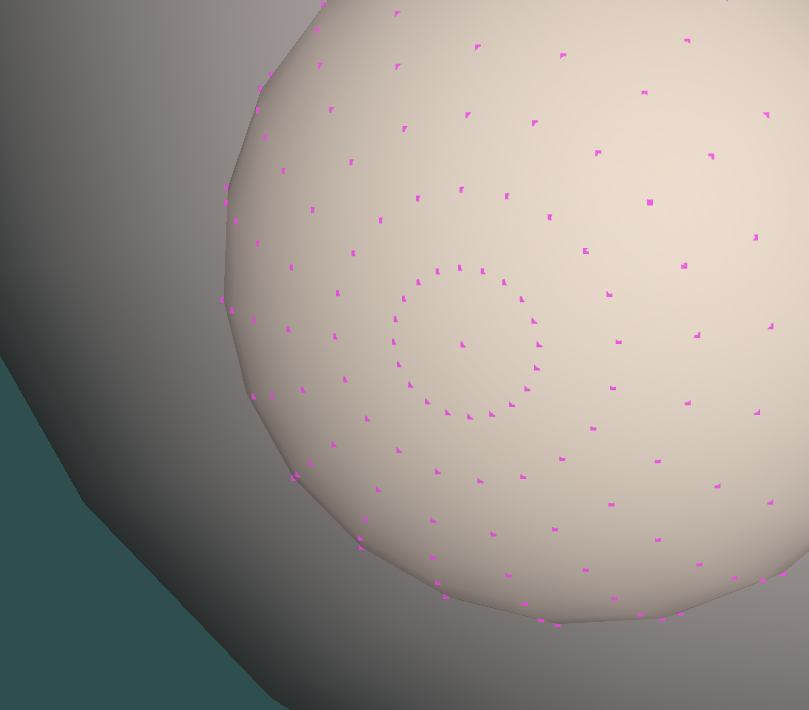
Is there any way to avoid the issue of points being covered and thus disappearing? I hope to see the points clearly at zoomed-in distances, just like their original appearance.
Any advice or suggestion would be great.
---
### Author:  [@Paulo\_Carvalho](https://discourse.vtk.org/u/Paulo_Carvalho)
#### Post date: [November 21, 2024, 1:30pm UTC](https://discourse.vtk.org/t/how-to-prevent-points-from-disappearing-when-zooming-in/14903/2 "2024-11-21T13:30:40Z")
Hello,
Those small squares are called _glyphs_ in computer graphics lingo. They are rendered like little _billboards_ (refer to how _Doom_ monsters were rendered). Hence, they can be occluded by intervening geometry which is the expected behavior.
To change the default behavior, you can, for exemple, disable depth testing for them (see this: [rendering 3d elements on top - Web - VTK](https://discourse.vtk.org/t/rendering-3d-elements-on-top/10839)) or add points’ actor (called `pointActor` in the Delaunay2 example) to a second foreground renderer (see this: [Draw an actor always on top of the secene. - Support - VTK](https://discourse.vtk.org/t/draw-an-actor-always-on-top-of-the-secene/11396)). A third solution may involve customizing the shaders of the points’ `vtkPolyDataMapper`.
best,
PC
---
### Author:  [@dgobbi](https://discourse.vtk.org/u/dgobbi)
#### Post date: [November 21, 2024, 3:23pm UTC](https://discourse.vtk.org/t/how-to-prevent-points-from-disappearing-when-zooming-in/14903/3 "2024-11-21T15:23:37Z")
If points are rendered as spheres instead of disks, the problem should mostly go away:
```c++
pointActor->GetProperty()->RenderPointsAsSpheresOn();
```
Likewise, for rendering lines, there is `RenderLinesAsTubesOn()`.
---
### Author:  [@amaclean](https://discourse.vtk.org/u/amaclean)
#### Post date: [November 23, 2024, 12:09am UTC](https://discourse.vtk.org/t/how-to-prevent-points-from-disappearing-when-zooming-in/14903/4 "2024-11-23T00:09:39Z")
@dgobbi good “point”, I’ll redo the example setting line and point sizes. I’ll also add a version for the new Pythonic API. They should appear in a few days. Colors and screen size will also change, and the points and lines ahould be visible even when zooming in.
@blocky, something for the future: You can also add sliders to control line width and point size. Check out the examples using sliders if you are interested.
Here is the C++ code for the updated version:
[Delaunay2D.cxx](https://discourse.vtk.org/uploads/short-url/myDnI7vRijeaVDfijjC0yyJSrFu.cxx) (2.4 KB)
---
### Author:  [@amaclean](https://discourse.vtk.org/u/amaclean)
#### Post date: [November 23, 2024, 7:41am UTC](https://discourse.vtk.org/t/how-to-prevent-points-from-disappearing-when-zooming-in/14903/5 "2024-11-23T07:41:37Z")
Here is the updated version on my test site [Delaunay2D](https://ajpmaclean.github.io/web-test/site/Cxx/Filtering/Delaunay2D/)
---
### Author:  [@blocky](https://discourse.vtk.org/u/blocky)
#### Post date: [November 28, 2024, 2:10am UTC](https://discourse.vtk.org/t/how-to-prevent-points-from-disappearing-when-zooming-in/14903/6 "2024-11-28T02:10:45Z")
Sorry for the late response.
Both SetForceTranslucent(true) and using two layers for rendering can prevent points from disappearing. It’s cool! And if we want the points on the occluded surfaces in the mesh not to be displayed, we may need additional clipping. I will also try to customizing vtkPolyDataMapper. Thanks to Paulo for the idea!
RenderPointsAsSpheresOn indeed quickly resolves the occlusion issue, thanks for the update on the example!