# how to read .vti files created from stack of 2d PNG Images and render it in vtk.js
**URL:** https://discourse.vtk.org/t/how-to-read-vti-files-created-from-stack-of-2d-png-images-and-render-it-in-vtk-js/5287
**Category:** Web
**Created:** [March 1, 2021, 5:48pm UTC](https://discourse.vtk.org/t/how-to-read-vti-files-created-from-stack-of-2d-png-images-and-render-it-in-vtk-js/5287 "2021-03-01T17:48:46Z")
**Posts on this page:** 20
**Page:** 1
### Author:  [@Saptarshi\_Paul](https://discourse.vtk.org/u/Saptarshi_Paul)
#### Post date: [March 1, 2021, 5:48pm UTC](https://discourse.vtk.org/t/how-to-read-vti-files-created-from-stack-of-2d-png-images-and-render-it-in-vtk-js/5287/1 "2021-03-01T17:48:46Z")
Hello Everyone,
I was able to create a test2.vti file using stack of 2d png images which i want to volume render in vtk.js. I used xmlImageDataReader.parseAsArrayBuffer(‘test2.vti’), but it threw me an error, Failed to execute ‘decode’ on ‘TextDecoder’: The provided value is not of type ‘(ArrayBuffer or ArrayBufferView)’. How can I read the test2.vti correctly in vtk.js. I would really appreciate if anyone can help me out.
Best Regards
---
### Author:  [@Sebastien\_Jourdain](https://discourse.vtk.org/u/Sebastien_Jourdain)
#### Post date: [March 1, 2021, 6:04pm UTC](https://discourse.vtk.org/t/how-to-read-vti-files-created-from-stack-of-2d-png-images-and-render-it-in-vtk-js/5287/2 "2021-03-01T18:04:06Z")
The argument of `parseAsArrayBuffer` is supposed to be the `ArrayBuffer` to parse not a string with a file name. Maybe you are trying to provide a `url` for the browser to download and process? In that case you can call `reader.setURL('/data/test2.vti')`.
---
### Author:  [@Saptarshi\_Paul](https://discourse.vtk.org/u/Saptarshi_Paul)
#### Post date: [March 1, 2021, 6:06pm UTC](https://discourse.vtk.org/t/how-to-read-vti-files-created-from-stack-of-2d-png-images-and-render-it-in-vtk-js/5287/3 "2021-03-01T18:06:32Z")
That makes sense. Thank you so much Sebastien!!!
Best Regards
Saptarshi
---
### Author:  [@Saptarshi\_Paul](https://discourse.vtk.org/u/Saptarshi_Paul)
#### Post date: [March 1, 2021, 6:42pm UTC](https://discourse.vtk.org/t/how-to-read-vti-files-created-from-stack-of-2d-png-images-and-render-it-in-vtk-js/5287/4 "2021-03-01T18:42:08Z")
Hello Sebastien, it worked, but the volume I am getting is in grey scale and I want color of the image. In vtk python i used luminance = vtk.vtkImageLuminance() and appended it to the image, how can i achieve the same with vtk.js
Best Regards
Saptarshi
---
### Author:  [@Sebastien\_Jourdain](https://discourse.vtk.org/u/Sebastien_Jourdain)
#### Post date: [March 1, 2021, 7:02pm UTC](https://discourse.vtk.org/t/how-to-read-vti-files-created-from-stack-of-2d-png-images-and-render-it-in-vtk-js/5287/5 "2021-03-01T19:02:16Z")
Do you get something reasonable by loading your vti with [that example](https://kitware.github.io/vtk-js/examples/VolumeViewer.html)?
If so, you can see how we configure the various parameters based on the array range.
HTH,
Seb
---
### Author:  [@Saptarshi\_Paul](https://discourse.vtk.org/u/Saptarshi_Paul)
#### Post date: [March 2, 2021, 12:01am UTC](https://discourse.vtk.org/t/how-to-read-vti-files-created-from-stack-of-2d-png-images-and-render-it-in-vtk-js/5287/6 "2021-03-02T00:01:35Z")
Hello Sebastien,
Thank you so much for your help. I checked the example, but I just want the same color as the image that I am using for volume rendering.

This is what i want to render. I am able to acheive it in python, but I want it in vtk.js. In the web it is coming as greyscale.
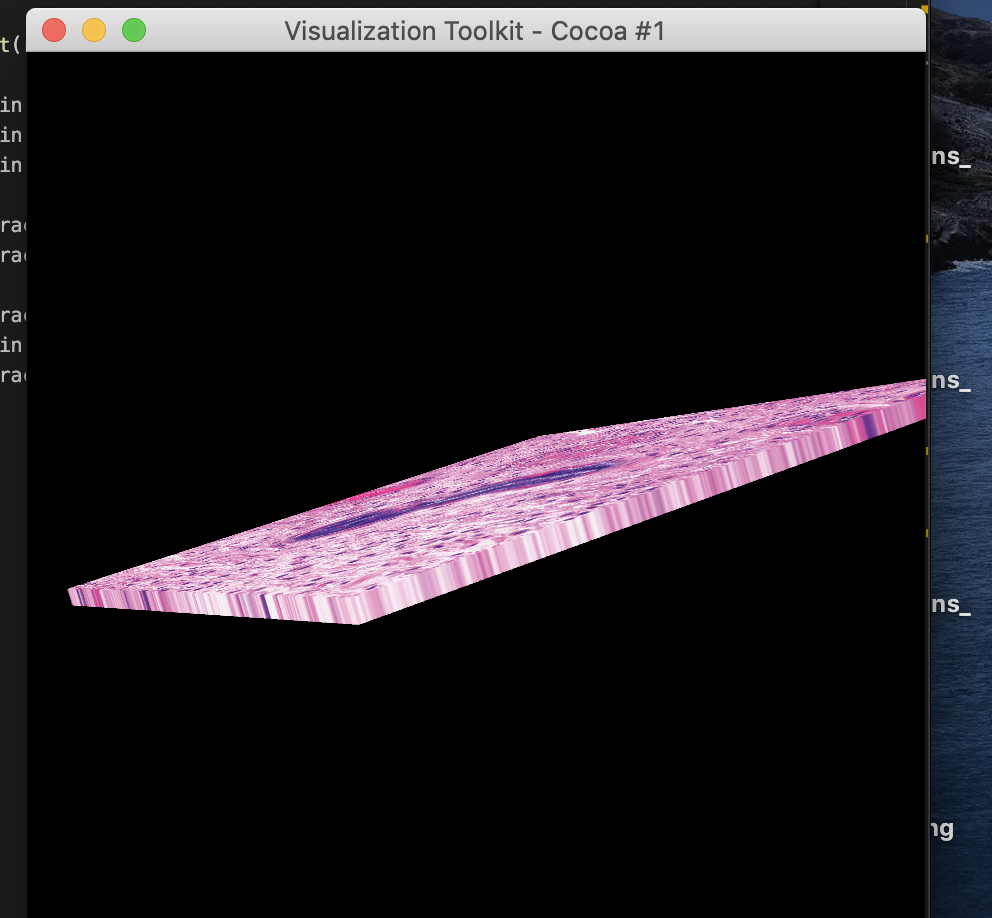
I would really really appreciate if you can help me out!
---
### Author:  [@Sebastien\_Jourdain](https://discourse.vtk.org/u/Sebastien_Jourdain)
#### Post date: [March 2, 2021, 12:25am UTC](https://discourse.vtk.org/t/how-to-read-vti-files-created-from-stack-of-2d-png-images-and-render-it-in-vtk-js/5287/7 "2021-03-02T00:25:14Z")
Can you share your Python code (for the color setup) and the JS in case you try to do it as well?
Because you will have to do the same thing in JS (with maybe some small tweaks).
Also a screenshot of the JS rendering would help understand what you missed.
---
### Author:  [@Saptarshi\_Paul](https://discourse.vtk.org/u/Saptarshi_Paul)
#### Post date: [March 2, 2021, 11:18pm UTC](https://discourse.vtk.org/t/how-to-read-vti-files-created-from-stack-of-2d-png-images-and-render-it-in-vtk-js/5287/8 "2021-03-02T23:18:29Z")
Hello Sebastien,
Thank you so much for your help. Below is the python code which I am using to retain the color of the image.
luminance = vtk.vtkImageLuminance()
luminance.SetInputConnection(reader.GetOutputPort())
//merge the original image and the luminace map into one RGBA image
append = vtk.vtkImageAppendComponents()
append.AddInputConnection(reader.GetOutputPort())
append.AddInputConnection(luminance.GetOutputPort())
volumeMapper.SetInputConnection(append.GetOutputPort())
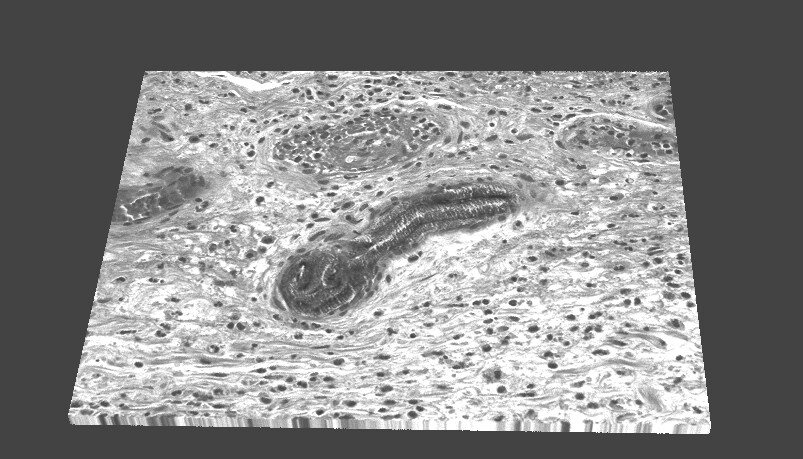
In Javascript I am just doing the simple volume rendering using .vti file and not adding any vtkColorTransferFunction.
This is the output for the JS rendering
---
### Author:  [@Sebastien\_Jourdain](https://discourse.vtk.org/u/Sebastien_Jourdain)
#### Post date: [March 2, 2021, 11:34pm UTC](https://discourse.vtk.org/t/how-to-read-vti-files-created-from-stack-of-2d-png-images-and-render-it-in-vtk-js/5287/9 "2021-03-02T23:34:56Z")
Hum, ok. I was thinking that you were setting a LookupTable yourself.
I don’t know what do vtkImageLuminance() along with vtkImageAppendComponents () but it sounds like your data field is RGB?
In anycase, you could implement the luminance filter if need be in JS since the code is almost nothing (`l = 0.3*r + 0.59*g + 0.11*b`)
Also do you set your mapper in JS the same way you do it in Python?
Maybe if you share your vti with me, I can figure out what are the right parameters of that mapper.
---
### Author:  [@Saptarshi\_Paul](https://discourse.vtk.org/u/Saptarshi_Paul)
#### Post date: [March 2, 2021, 11:40pm UTC](https://discourse.vtk.org/t/how-to-read-vti-files-created-from-stack-of-2d-png-images-and-render-it-in-vtk-js/5287/10 "2021-03-02T23:40:10Z")
Hello Sebastien,
I can share with you my .vti file, but I have not been able to upload here, shall I send it to you via email?
Best Regards
Saptarshi
---
### Author:  [@Sebastien\_Jourdain](https://discourse.vtk.org/u/Sebastien_Jourdain)
#### Post date: [March 3, 2021, 12:35am UTC](https://discourse.vtk.org/t/how-to-read-vti-files-created-from-stack-of-2d-png-images-and-render-it-in-vtk-js/5287/11 "2021-03-03T00:35:46Z")
Send me an email with either a link or an attachement.
sebastien (dot) jourdain (at) [kitware.com](http://kitware.com)
---
### Author:  [@Saptarshi\_Paul](https://discourse.vtk.org/u/Saptarshi_Paul)
#### Post date: [March 4, 2021, 7:04pm UTC](https://discourse.vtk.org/t/how-to-read-vti-files-created-from-stack-of-2d-png-images-and-render-it-in-vtk-js/5287/12 "2021-03-04T19:04:57Z")
Hello Sebastien
I hope you are doing well. I have sent you an email with the attachments which include the .vti file, python file which converts the 2d stack PNG images to .vti file and the javascript file wihich does the volume rendering. I really appreciate your help Thank you so much.
Best Regards,
Saptarshi
---
### Author:  [@Sebastien\_Jourdain](https://discourse.vtk.org/u/Sebastien_Jourdain)
#### Post date: [March 4, 2021, 11:11pm UTC](https://discourse.vtk.org/t/how-to-read-vti-files-created-from-stack-of-2d-png-images-and-render-it-in-vtk-js/5287/13 "2021-03-04T23:11:12Z")
I just did what you were doing in Python and it seems to be working fine.
```auto
import vtkFullScreenRenderWindow from 'vtk.js/Sources/Rendering/Misc/FullScreenRenderWindow';
import vtkVolume from 'vtk.js/Sources/Rendering/Core/Volume';
import vtkVolumeMapper from 'vtk.js/Sources/Rendering/Core/VolumeMapper';
import vtkXMLImageDataReader from 'vtk.js/Sources/IO/XML/XMLImageDataReader';
import vtkDataArray from 'vtk.js/Sources/Common/Core/DataArray';
const fullScreenRenderer = vtkFullScreenRenderWindow.newInstance({
background: [0, 0, 0],
});
const renderer = fullScreenRenderer.getRenderer();
const renderWindow = fullScreenRenderer.getRenderWindow();
const reader = vtkXMLImageDataReader.newInstance();
const actor = vtkVolume.newInstance();
const mapper = vtkVolumeMapper.newInstance();
const property = actor.getProperty();
mapper.setSampleDistance(1.5);
actor.setMapper(mapper);
property.setInterpolationTypeToLinear();
property.setIndependentComponents(false);
mapper.setBlendModeToComposite();
reader.setUrl(`${ __BASE_PATH__ }/data/test2.vti`).then(() => {
reader.loadData().then(() => {
const ds = reader.getOutputData();
const scalars = ds.getPointData().getScalars();
const size = scalars.getNumberOfTuples();
const rawArray = scalars.getData();
const targetTupleSize = 4;
const rgba = new Uint8ClampedArray(size * targetTupleSize);
for (let i = 0; i < size; i++) {
const offsetSrc = i * 3;
const offsetDst = i * targetTupleSize;
const l =
0.3 * rawArray[offsetSrc + 0] +
0.59 * rawArray[offsetSrc + 1] +
0.11 * rawArray[offsetSrc + 2];
rgba[offsetDst + 0] = rawArray[offsetSrc + 0];
rgba[offsetDst + 1] = rawArray[offsetSrc + 1];
rgba[offsetDst + 2] = rawArray[offsetSrc + 2];
rgba[offsetDst + 3] = l;
}
const newScalarWithLuminance = vtkDataArray.newInstance({
name: 'rgba',
values: rgba,
numberOfComponents: targetTupleSize,
});
// Replace png RGB by RGBA with luminance
ds.getPointData().setScalars(newScalarWithLuminance);
mapper.setInputData(ds);
renderer.addVolume(actor);
renderer.resetCamera();
renderWindow.render();
console.log('ready...');
});
});
```
---
### Author:  [@Saptarshi\_Paul](https://discourse.vtk.org/u/Saptarshi_Paul)
#### Post date: [March 4, 2021, 11:17pm UTC](https://discourse.vtk.org/t/how-to-read-vti-files-created-from-stack-of-2d-png-images-and-render-it-in-vtk-js/5287/14 "2021-03-04T23:17:55Z")
Thank you so much Sebastien for your help. I think I have to read more in details about vtk to understand it in depth.
Best Regards
Saptarshi
---
### Author:  [@Sebastien\_Jourdain](https://discourse.vtk.org/u/Sebastien_Jourdain)
#### Post date: [March 4, 2021, 11:25pm UTC](https://discourse.vtk.org/t/how-to-read-vti-files-created-from-stack-of-2d-png-images-and-render-it-in-vtk-js/5287/15 "2021-03-04T23:25:48Z")
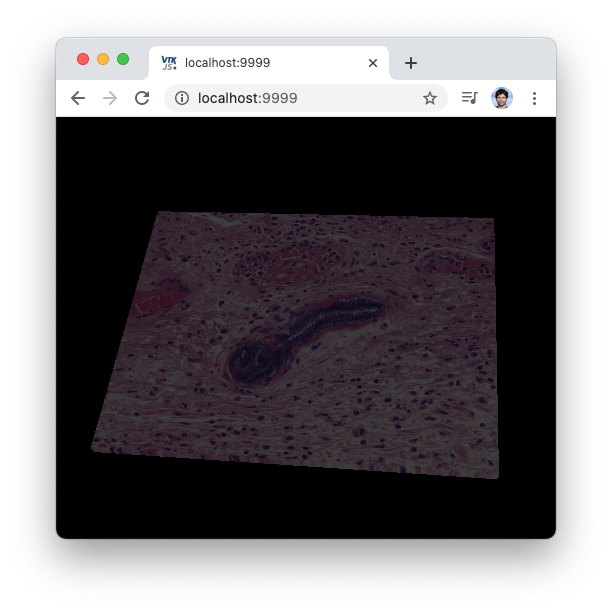
@ken-martin I’m not sure what I’m missing but the rendered volume is darker in JS vs the C++.
---
### Author:  [@ken-martin](https://discourse.vtk.org/u/ken-martin)
#### Post date: [March 5, 2021, 4:42pm UTC](https://discourse.vtk.org/t/how-to-read-vti-files-created-from-stack-of-2d-png-images-and-render-it-in-vtk-js/5287/16 "2021-03-05T16:42:45Z")
What are the settings and input data ranges?
---
### Author:  [@Sebastien\_Jourdain](https://discourse.vtk.org/u/Sebastien_Jourdain)
#### Post date: [March 5, 2021, 4:50pm UTC](https://discourse.vtk.org/t/how-to-read-vti-files-created-from-stack-of-2d-png-images-and-render-it-in-vtk-js/5287/17 "2021-03-05T16:50:12Z")
The data is uint8 RGB.
---
### Author:  [@ken-martin](https://discourse.vtk.org/u/ken-martin)
#### Post date: [March 5, 2021, 5:00pm UTC](https://discourse.vtk.org/t/how-to-read-vti-files-created-from-stack-of-2d-png-images-and-render-it-in-vtk-js/5287/18 "2021-03-05T17:00:25Z")
🙂 What does it look like with a white background?
---
### Author:  [@Sebastien\_Jourdain](https://discourse.vtk.org/u/Sebastien_Jourdain)
#### Post date: [March 5, 2021, 5:07pm UTC](https://discourse.vtk.org/t/how-to-read-vti-files-created-from-stack-of-2d-png-images-and-render-it-in-vtk-js/5287/19 "2021-03-05T17:07:28Z")
Same, not as bright as the pictures from the top. Actually the black bg helps.
---
### Author:  [@ken-martin](https://discourse.vtk.org/u/ken-martin)
#### Post date: [March 5, 2021, 5:08pm UTC](https://discourse.vtk.org/t/how-to-read-vti-files-created-from-stack-of-2d-png-images-and-render-it-in-vtk-js/5287/20 "2021-03-05T17:08:54Z")
Can you make sure lighting is off?
[Next page](https://discourse.vtk.org/t/how-to-read-vti-files-created-from-stack-of-2d-png-images-and-render-it-in-vtk-js/5287.md?page=2)