# How to Rendering the vtkImageData correctyly
**URL:** https://discourse.vtk.org/t/how-to-rendering-the-vtkimagedata-correctyly/13204
**Category:** Support
**Tags:** code
**Created:** [January 31, 2024, 8:37am UTC](https://discourse.vtk.org/t/how-to-rendering-the-vtkimagedata-correctyly/13204 "2024-01-31T08:37:39Z")
**Posts on this page:** 2
**Page:** 1
### Author:  [@lukeqiang9521](https://discourse.vtk.org/u/lukeqiang9521)
#### Post date: [January 31, 2024, 8:37am UTC](https://discourse.vtk.org/t/how-to-rendering-the-vtkimagedata-correctyly/13204/1 "2024-01-31T08:37:39Z")
hello ,everyone! i have code like that :
vtkSmartPointer ImageFillActor;
vtkSmartPointer Reslice;
vtkSmartPointer SliceToImageTransform;
vtkSmartPointer LookupTableFill;
vtkSmartPointer ImageThreshold;
{
```
// this->ImageOutlineActor = vtkSmartPointer::New();
ImageFillActor = vtkSmartPointer::New();
Reslice = vtkSmartPointer::New();
Reslice->SetOutputSpacing(1, 1, 1);
Reslice->SetOutputDimensionality(2);
Reslice->SetOutputOrigin(pDataLayer->GetAxialImageData()->GetOrigin()[0],
pDataLayer->GetAxialImageData()->GetOrigin()[1],
pDataLayer->GetAxialImageData()->GetOrigin()[2]);
Reslice->GenerateStencilOutputOn();
Reslice->SetBackgroundColor(0.0, 0.0, 0.0, 0.0);
Reslice->AutoCropOutputOff();
Reslice->SetOptimization(1);
SliceToImageTransform = vtkSmartPointer::New();
vtkNew matrix;
ConstructWorldToImageMatrix(TestBrushImage, matrix);
SliceToImageTransform->PostMultiply();
{
SliceToImageTransform->Translate(0, 0, 0);
// SliceToImageTransform
}
Reslice->SetResliceTransform(SliceToImageTransform);
Reslice->SetInputData(TestBrushImage);
int* extent = pDataLayer->GetAxialImageData()->GetExtent();
double* spacing = pDataLayer->GetAxialImageData()->GetSpacing();
int extent2[6] = { 0,0,0,0,0,0 };
extent2[1] = std::round(extent[1] * spacing[0]);
extent2[3] = std::round(extent[3] * spacing[1]);
extent2[5] = std::round(extent[5] * spacing[2]);
Reslice->SetOutputExtent(extent2);
// Reslice->SetOutputExtent(extent);
//vtkSmartPointer worldToImageMatrix = vtkSmartPointer::New();
LookupTableFill = vtkSmartPointer::New();
LookupTableFill->SetNumberOfTableValues(2);
LookupTableFill->SetRange(0, 1);
LookupTableFill->IndexedLookupOff();
LookupTableFill->Build();
int index = LookupTableFill->GetIndex(1.0);
LookupTableFill->SetTableValue(index, 255, 0, 0, 0);
// Image fill
vtkSmartPointer fillColorMapper = vtkSmartPointer::New();
fillColorMapper->SetInputConnection(Reslice->GetOutputPort());
fillColorMapper->SetOutputFormatToRGBA();
fillColorMapper->SetLookupTable(LookupTableFill);
fillColorMapper->Update();
vtkSmartPointer imageFillMapper = vtkSmartPointer::New();
imageFillMapper->SetInputConnection(fillColorMapper->GetOutputPort());
imageFillMapper->SetColorWindow(255);
imageFillMapper->SetColorLevel(127.5);
//imageFillMapper->Update();
ImageFillActor->SetMapper(imageFillMapper);
this->CurrentRenderer->DisplayToWorld();
this->CurrentRenderer->AddActor2D(ImageFillActor);
ImageFillActor->SetPosition(0, 0);
this->CurrentRenderer->ResetCamera();
this->Interactor->Render();
```
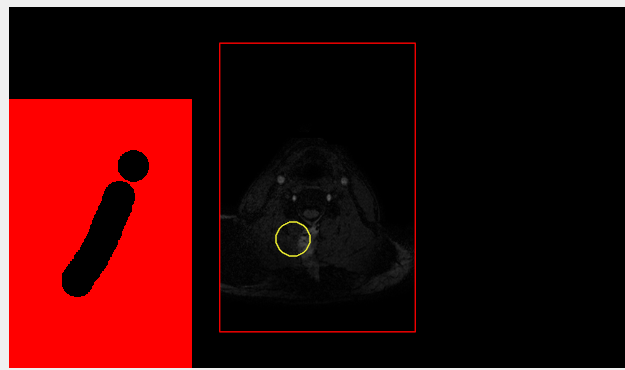
---
### Author:  [@lukeqiang9521](https://discourse.vtk.org/u/lukeqiang9521)
#### Post date: [January 31, 2024, 8:39am UTC](https://discourse.vtk.org/t/how-to-rendering-the-vtkimagedata-correctyly/13204/2 "2024-01-31T08:39:39Z")
the redimag don’t overlay the ct image.i need to do that the path image overlay the ct image,and when i scale or shift the ct image,the path image also do that way