# How to rotate the actor?
**URL:** https://discourse.vtk.org/t/how-to-rotate-the-actor/9840
**Category:** Support
**Created:** [November 17, 2022, 3:26am UTC](https://discourse.vtk.org/t/how-to-rotate-the-actor/9840 "2022-11-17T03:26:40Z")
**Posts on this page:** 2
**Page:** 1
### Author:  [@zhang-qiang-github](https://discourse.vtk.org/u/zhang-qiang-github)
#### Post date: [November 17, 2022, 3:26am UTC](https://discourse.vtk.org/t/how-to-rotate-the-actor/9840/1 "2022-11-17T03:26:40Z")
I have a cylinder, and I want to translate it with (0, 10, 0), and rotate it with 30 degree along x axis.
I can implement it as:
```auto
import vtkmodules.all as vtk
cylinder = vtk.vtkCylinderSource()
cylinder.SetCenter(0, 10, 0)
cylinder.SetRadius(5)
cylinder.SetHeight(10)
cylinder.Update()
cylinderMapper = vtk.vtkPolyDataMapper()
cylinderMapper.SetInputData(cylinder.GetOutput())
cylinderActor = vtk.vtkActor()
cylinderActor.SetMapper(cylinderMapper)
cylinderActor.GetProperty().SetOpacity(0.3)
cylinderActor.SetPosition(0, 10, 0)
cylinderActor.SetOrigin(0, 10, 0)
cylinderActor.RotateX(30)
line = vtk.vtkLineSource()
line.SetPoint1(0, 0, 0)
line.SetPoint2(0, 20, 0)
line.Update()
lineMapper = vtk.vtkPolyDataMapper()
lineMapper.SetInputData(line.GetOutput())
lineActor = vtk.vtkActor()
lineActor.SetMapper(lineMapper)
lineActor.GetProperty().SetColor(1, 0, 0)
renderer = vtk.vtkRenderer()
renderer.AddActor(cylinderActor)
renderer.AddActor(lineActor)
renWin = vtk.vtkRenderWindow()
renWin.AddRenderer(renderer)
iren = vtk.vtkRenderWindowInteractor()
iren.SetRenderWindow(renWin)
iren.SetInteractorStyle(vtk.vtkInteractorStyleTrackballCamera())
iren.Initialize()
iren.Start()
```
And the result is:
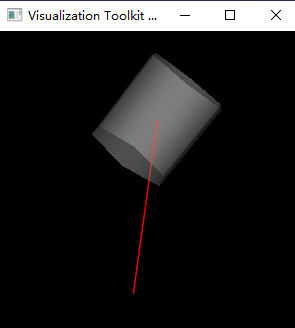
The endpoint of line is `(0, 0, 0)` and `(0, 20, 0)`. The original center of cylinder is `(0, 10, 0)`, after `SetPosition`, the center is `(0, 20, 0)`.
**Question1:** How to reset the actor? If `actor.RotateX(30)` after `actor.RotateX(40)`, the actor is actually rotate 70 degree. Is there a `actor->Reset()` method, so that `actor.RotateX(30)` only rotate 30 degree rather than 30+40 degree.
**Question 2:** How can I achieve the same result using `vtkTransform`?
I modify the following code:
```auto
cylinderMapper = vtk.vtkPolyDataMapper()
cylinderMapper.SetInputData(cylinder.GetOutput())
cylinderActor = vtk.vtkActor()
cylinderActor.SetMapper(cylinderMapper)
cylinderActor.GetProperty().SetOpacity(0.3)
cylinderActor.SetPosition(0, 10, 0)
cylinderActor.SetOrigin(0, 10, 0)
cylinderActor.RotateX(30)
```
to
```auto
cylinderMapper = vtk.vtkPolyDataMapper()
cylinderMapper.SetInputData(cylinder.GetOutput())
cylinderActor = vtk.vtkActor()
cylinderActor.SetMapper(cylinderMapper)
cylinderActor.GetProperty().SetOpacity(0.3)
transform = vtk.vtkTransform()
transform.Translate(0, -10, 0) # translate the original center (0, 10, 0) to (0, 0, 0)
transform.RotateX(30) # rotate
transform.Translate(0, 10, 0) # translate the center (0, 0, 0) to original center (0, 10, 0)
transform.Translate(0, 10, 0) # translate the center (0, 10, 0) to (0, 20, 0)
cylinderActor.SetUserTransform(transform)
```
But the result is:
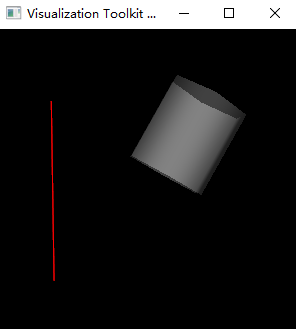
What’s wrong with my `vtkTransform` code?
**Question 3:** `transform.RotateX(30)` what is the point about which all rotations take place? `actor.SetOrigin()` would set this point. But, what is this point for `transform.RotateX()`? Is this point (0, 0, 0)?
Any suggestion is appreciated~~~
---
### Author:  [@Paulo\_Carvalho](https://discourse.vtk.org/u/Paulo_Carvalho)
#### Post date: [November 24, 2022, 10:16pm UTC](https://discourse.vtk.org/t/how-to-rotate-the-actor/9840/2 "2022-11-24T22:16:06Z")
Hi,
I’d remove the second `transform.Translate(0, 10, 0)`.
regards,
Paulo