# How to set the fixed width/height for vtkScalarBarActor?
**URL:** https://discourse.vtk.org/t/how-to-set-the-fixed-width-height-for-vtkscalarbaractor/9676
**Category:** Support
**Created:** [October 25, 2022, 1:10pm UTC](https://discourse.vtk.org/t/how-to-set-the-fixed-width-height-for-vtkscalarbaractor/9676 "2022-10-25T13:10:54Z")
**Posts on this page:** 3
**Page:** 1
### Author:  [@zhang-qiang-github](https://discourse.vtk.org/u/zhang-qiang-github)
#### Post date: [October 25, 2022, 1:10pm UTC](https://discourse.vtk.org/t/how-to-set-the-fixed-width-height-for-vtkscalarbaractor/9676/1 "2022-10-25T13:10:54Z")
I am using `vtkScalarBarActor` in my application. However, the width/height of `vtkScalarBarActor` is changing when the render window is changed.
For example:
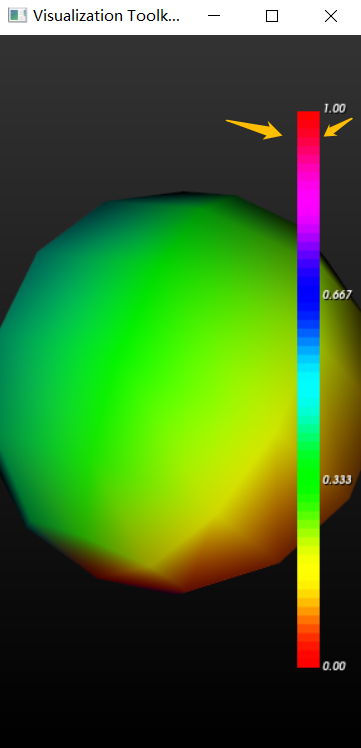
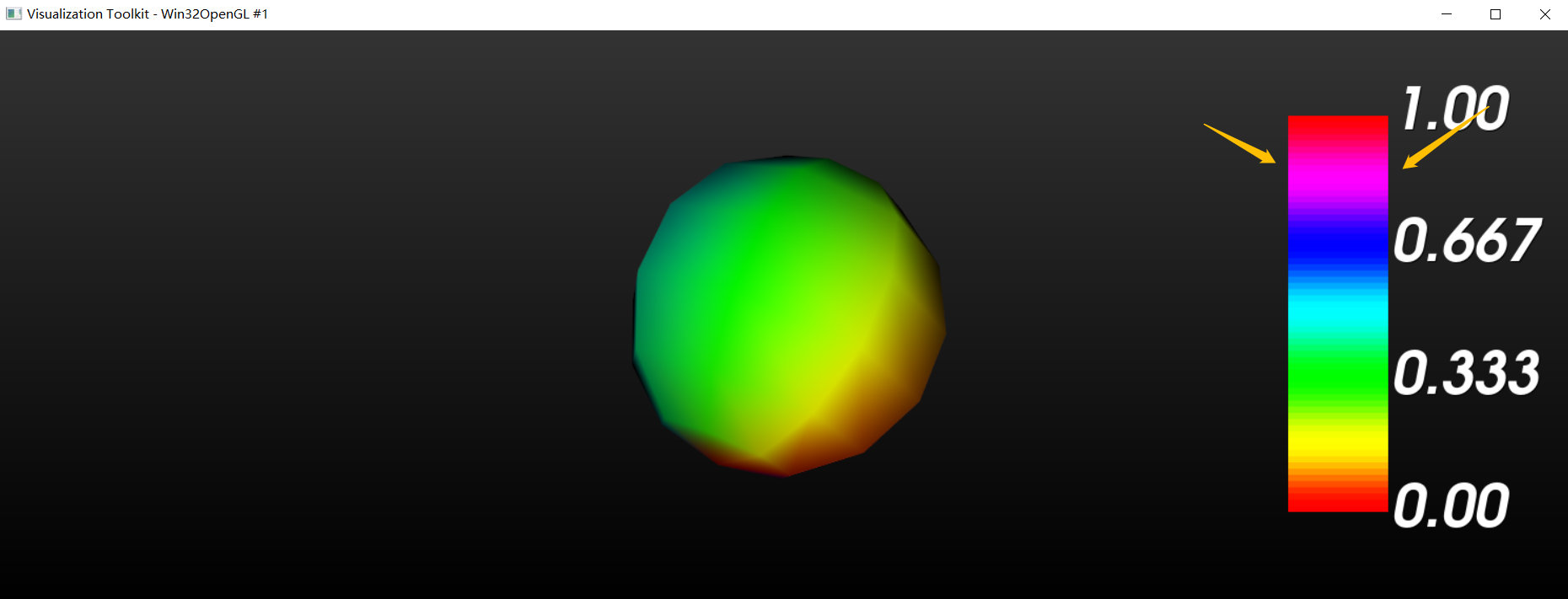
For example, the width of `vtkScalarBarActor` of second figure is much larger than that of first figure. And the large width of `vtkScalarBarActor` in second figure is ugly.
Is there any method to set fixed width for `vtkScalarBarActor`? I hope it is not changed when the window size is changed.
---
### Author:  [@Paulo\_Carvalho](https://discourse.vtk.org/u/Paulo_Carvalho)
#### Post date: [October 26, 2022, 7:15pm UTC](https://discourse.vtk.org/t/how-to-set-the-fixed-width-height-for-vtkscalarbaractor/9676/2 "2022-10-26T19:15:20Z")
Hi,
The placement of those 2D widgets is a proportion of the viewport, so it expectedly changes as the latter’s aspect ratio changes. To have a fixed apparent width regardless of viewport aspect ratio, you have to change the scalar bar’s relative width on each viewport resize event.
Alternativelly, you can try `SetMaximum[Width|Height]InPixels(value)` to impose limits to avoid such undesirable effects. Calling `AnnotationTextScalingOff()` will switch of text resize so you won’t get huge characters in your scalar bar.
There are several other methods available in `vtkScalarBarActor` to control its appearance: [https://vtk.org/doc/nightly/html/classvtkScalarBarActor.html](https://vtk.org/doc/nightly/html/classvtkScalarBarActor.html) .
take care,
Paulo
---
### Author:  [@zhang-qiang-github](https://discourse.vtk.org/u/zhang-qiang-github)
#### Post date: [October 27, 2022, 9:42am UTC](https://discourse.vtk.org/t/how-to-set-the-fixed-width-height-for-vtkscalarbaractor/9676/3 "2022-10-27T09:42:52Z")
@Paulo_Carvalho Many thanks for such kindly reply.