# How to set the font size for vtkLegendScaleActor
**URL:** https://discourse.vtk.org/t/how-to-set-the-font-size-for-vtklegendscaleactor/11732
**Category:** Support
**Created:** [June 15, 2023, 1:46pm UTC](https://discourse.vtk.org/t/how-to-set-the-font-size-for-vtklegendscaleactor/11732 "2023-06-15T13:46:15Z")
**Posts on this page:** 4
**Page:** 1
### Author:  [@zhang-qiang-github](https://discourse.vtk.org/u/zhang-qiang-github)
#### Post date: [June 15, 2023, 1:46pm UTC](https://discourse.vtk.org/t/how-to-set-the-font-size-for-vtklegendscaleactor/11732/1 "2023-06-15T13:46:16Z")
I want to use the `vtkLegendScaleActor` in my project, but I can not find a way to set the font size.
I have tested:
```auto
legendScaleActor.GetLegendLabelProperty().SetFontSize(20)
legendScaleActor.GetLeftAxis().GetLabelTextProperty().SetFontSize(20)
```
And they don’t help.
I hope to set the font size in the following region:
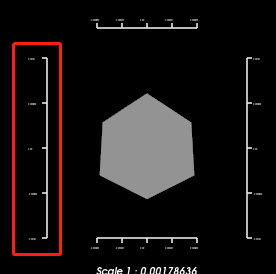
The complete code is:
```auto
import vtk
renderWindow = vtk.vtkRenderWindow()
renderer = vtk.vtkRenderer()
renderWindow.AddRenderer(renderer)
cubeSource = vtk.vtkCubeSource()
mapper = vtk.vtkPolyDataMapper()
mapper.SetInputConnection(cubeSource.GetOutputPort())
actor = vtk.vtkActor()
actor.SetMapper(mapper)
renderer.AddActor(actor)
legendScaleActor = vtk.vtkLegendScaleActor()
legendScaleActor.GetLegendLabelProperty().SetFontSize(20)
legendScaleActor.GetLeftAxis().GetLabelTextProperty().SetFontSize(20)
renderer.AddActor(legendScaleActor)
renderWindowInteractor = vtk.vtkRenderWindowInteractor()
renderWindowInteractor.SetRenderWindow(renderWindow)
renderWindow.Render()
renderWindowInteractor.Start()
```
My vtk version is `9.2.6`.
Any help is appreciated~~~
---
### Author:  [@zhang-qiang-github](https://discourse.vtk.org/u/zhang-qiang-github)
#### Post date: [June 15, 2023, 2:36pm UTC](https://discourse.vtk.org/t/how-to-set-the-font-size-for-vtklegendscaleactor/11732/2 "2023-06-15T14:36:24Z")
I find `legendScaleActor.GetLeftAxis().SetFontFactor(2)` works.
---
### Author:  [@mwestphal](https://discourse.vtk.org/u/mwestphal)
#### Post date: [June 19, 2023, 8:58am UTC](https://discourse.vtk.org/t/how-to-set-the-font-size-for-vtklegendscaleactor/11732/3 "2023-06-19T08:58:53Z")
@nicolas.vuaille
---
### Author:  [@nicolas.vuaille](https://discourse.vtk.org/u/nicolas.vuaille)
#### Post date: [June 19, 2023, 9:16am UTC](https://discourse.vtk.org/t/how-to-set-the-font-size-for-vtklegendscaleactor/11732/4 "2023-06-19T09:16:34Z")
Hi,
To configure font size from property, you should call `UseFontSizeFromPropertyOn()` on the axis (flag is off by default)
Unfortunately, this has effect only on the axis title in VTK 9.2.6. The next release will add support for tick labels (this was added in master branch a few days ago only), and a utility method to do that directly from the `vtkLegendScaleActor`