chart;
view->GetScene()->AddItem(chart);
vtkPlot *line = chart->AddPlot(vtkChart::LINE);
line->SetInputData(table, 0, 1);
line->SetColor(255, 0, 0, 255);
line->SetWidth(3.0);
// For dotted line, the line type can be from 2 to 5 for different dash/dot
// patterns (see enum in vtkPen containing DASH_LINE, value 2):
```
#ifndef WIN32
line-\>GetPen()-\>SetLineType(vtkPen::DASH\_LINE);
#endif
// (ifdef-ed out on Windows because DASH\_LINE does not work on Windows
// machines with built-in Intel HD graphics card…)
```
//view->GetRenderWindow()->SetMultiSamples(0);
// Start interactor
view->GetRenderWindow()->Render();
view->GetInteractor()->Initialize();
```
---
### Author:  [@Paulo\_Carvalho](https://discourse.vtk.org/u/Paulo_Carvalho)
#### Post date: [November 21, 2020, 9:17pm UTC](https://discourse.vtk.org/t/how-to-solve-the-line-plot-error/4691/2 "2020-11-21T21:17:22Z")
Hello,
Can you post the error message?
regards,
Paulo
---
### Author:  [@nia38](https://discourse.vtk.org/u/nia38)
#### Post date: [November 22, 2020, 11:44pm UTC](https://discourse.vtk.org/t/how-to-solve-the-line-plot-error/4691/3 "2020-11-22T23:44:40Z")
Hello, Paulo.
Thank you, reply the message.
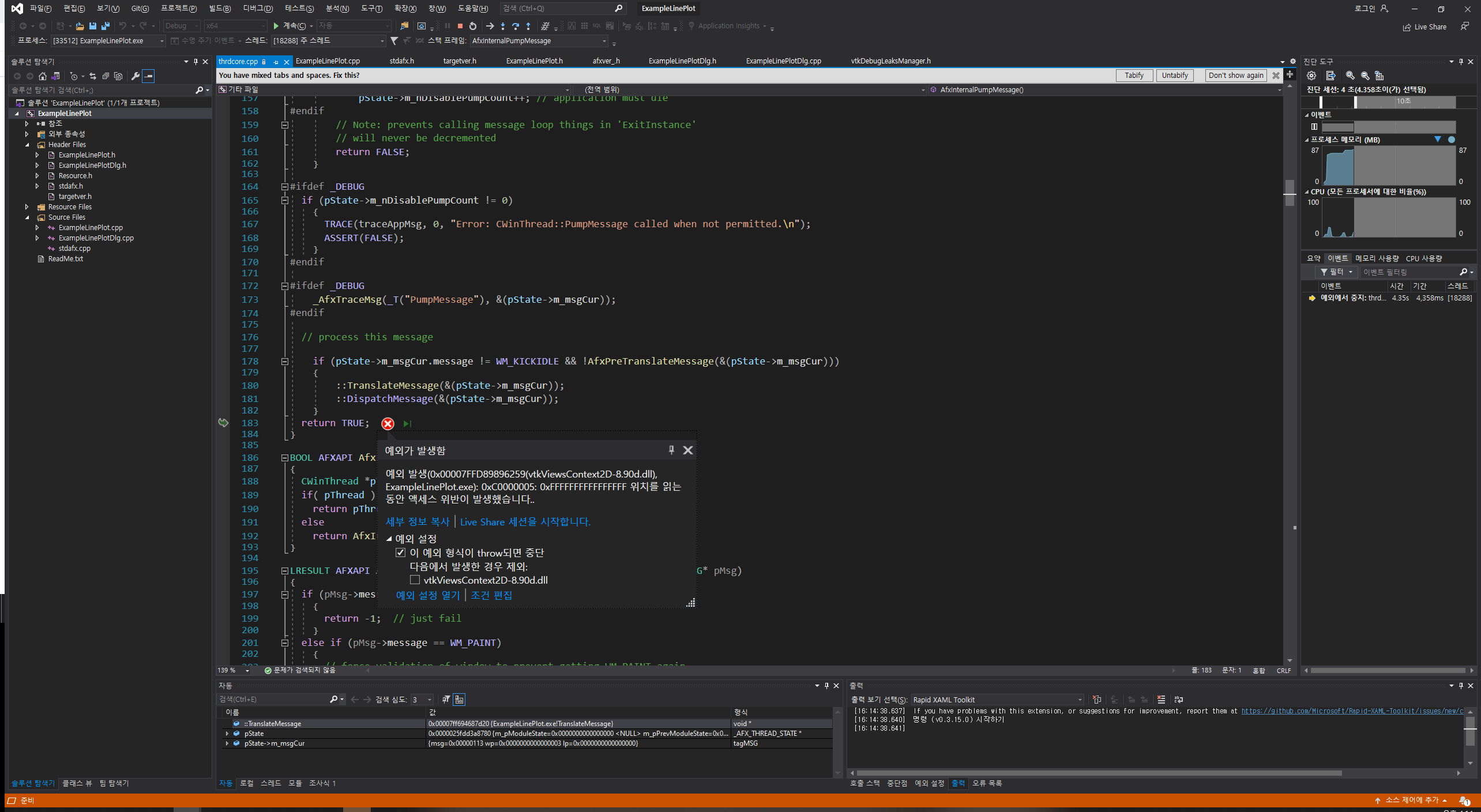
My error message is that…
Unhandled exception in “…exe”: 0x00007FFD650A6259(vtkViewsContext2D-8.90d.dll) Access violation reading location 0xC0000005: 0xFFFFFFFFFFFFFFFF.
i don’t know why the displaying the message. I just hope that the redrawing a chart.
---
### Author:  [@Paulo\_Carvalho](https://discourse.vtk.org/u/Paulo_Carvalho)
#### Post date: [November 23, 2020, 1:36pm UTC](https://discourse.vtk.org/t/how-to-solve-the-line-plot-error/4691/4 "2020-11-23T13:36:29Z")
Hi,
Can you post the stack trace whan the crash ensues, please?
regards,
Paulo
---
### Author:  [@nia38](https://discourse.vtk.org/u/nia38)
#### Post date: [November 24, 2020, 12:21am UTC](https://discourse.vtk.org/t/how-to-solve-the-line-plot-error/4691/5 "2020-11-24T00:21:52Z")
Hi,
My program’s stack trace window is that
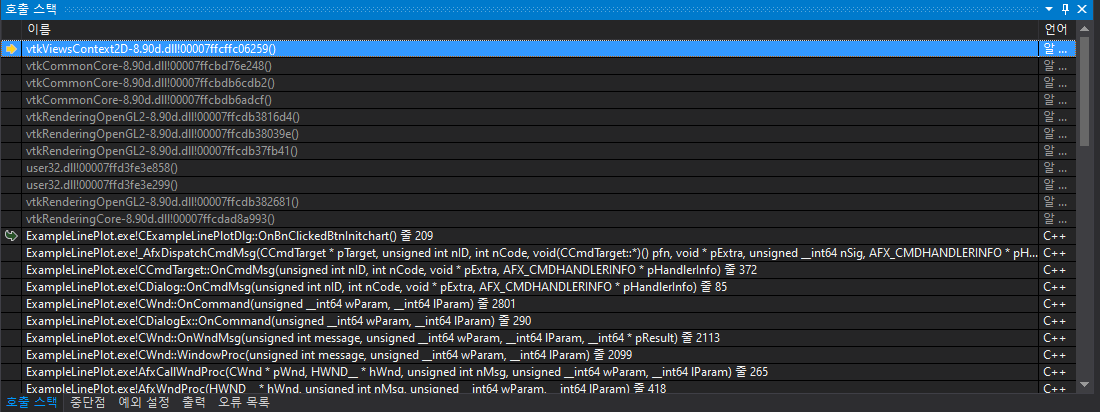
Thank you, Paulo.
---
### Author:  [@Paulo\_Carvalho](https://discourse.vtk.org/u/Paulo_Carvalho)
#### Post date: [November 26, 2020, 9:38pm UTC](https://discourse.vtk.org/t/how-to-solve-the-line-plot-error/4691/6 "2020-11-26T21:38:19Z")
Triple check you are not mixing debug and non-debug libraries/binaries. Mixing them is not good and often leads the program to do seemingly unexplainable behavior or crashes (such as crashing after a return instruction).
---
### Author:  [@nia38](https://discourse.vtk.org/u/nia38)
#### Post date: [November 27, 2020, 4:44am UTC](https://discourse.vtk.org/t/how-to-solve-the-line-plot-error/4691/7 "2020-11-27T04:44:39Z")
Thank you, Paulo.
I found this problem.
After initializing the chart, the render was resolved.
Thank you for spending a lot of time.
---
### Author:  [@Paulo\_Carvalho](https://discourse.vtk.org/u/Paulo_Carvalho)
#### Post date: [November 27, 2020, 11:40am UTC](https://discourse.vtk.org/t/how-to-solve-the-line-plot-error/4691/8 "2020-11-27T11:40:58Z")
Hello,
Can you, please, post the code to initualize the chart so others with the same issue can apply your solution?
thanks,
Paulo