# How to triangulate polygon with holes?
**URL:** https://discourse.vtk.org/t/how-to-triangulate-polygon-with-holes/11497
**Category:** Support
**Created:** [May 20, 2023, 5:02pm UTC](https://discourse.vtk.org/t/how-to-triangulate-polygon-with-holes/11497 "2023-05-20T17:02:41Z")
**Posts on this page:** 4
**Page:** 1
### Author:  [@gongwaner](https://discourse.vtk.org/u/gongwaner)
#### Post date: [May 20, 2023, 5:02pm UTC](https://discourse.vtk.org/t/how-to-triangulate-polygon-with-holes/11497/1 "2023-05-20T17:02:41Z")
I have a set of 3d points defining a polygon A, and a set of points defining polygon B. All these points are planar, and A is actually a loop within B.
My question is: how can i generate a triangulated polygon with hole? ie. the green region on the right.
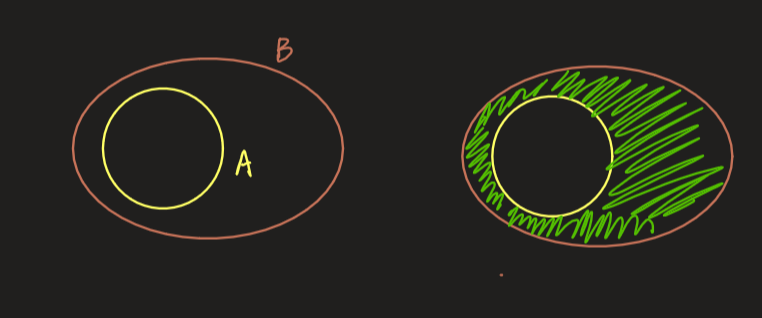
I searched relevant documentation and found that vtkContourTriangulator::TriangulateContours([https://vtk.org/doc/nightly/html/classvtkContourTriangulator.html#a69c679d25ea3ccad36ad9fcd45864a3a](https://vtk.org/doc/nightly/html/classvtkContourTriangulator.html#a69c679d25ea3ccad36ad9fcd45864a3a)) can do this. However, I don’t know how to use this function. Is there any example code for this?
Thanks.
---
### Author:  [@dgobbi](https://discourse.vtk.org/u/dgobbi)
#### Post date: [May 20, 2023, 8:28pm UTC](https://discourse.vtk.org/t/how-to-triangulate-polygon-with-holes/11497/2 "2023-05-20T20:28:49Z")
An example is here:
[https://examples.vtk.org/site/Cxx/Modelling/ContourTriangulator/](https://examples.vtk.org/site/Cxx/Modelling/ContourTriangulator/)
The typical usage of this class is
```c++
vtkNew triangulator;
triangulator->SetInputData(contourData);
triangulator->Update();
vtkPolyData *polygons = triangulator->GetOutput();
```
If you have concentric contours, you can append them before triangulating them. For good results, the contours should be in opposite directions. If B is counterclockwise, then A should be clockwise.
```c++
vtkNew appendData;
appendData->AddInputData(contourB);
appendData->AddInputData(contourA);
appendData->Update();
vtkNew triangulator;
triangulator->SetInputData(appendData->GetOutput());
triangulator->Update();
vtkPolyData *polygons = triangulator->GetOutput();
```
---
### Author:  [@gongwaner](https://discourse.vtk.org/u/gongwaner)
#### Post date: [May 21, 2023, 2:06am UTC](https://discourse.vtk.org/t/how-to-triangulate-polygon-with-holes/11497/3 "2023-05-21T02:06:48Z")
thanks! that’s exatcly what I’m looking for.
---
### Author:  [@gongwaner](https://discourse.vtk.org/u/gongwaner)
#### Post date: [May 23, 2023, 8:38am UTC](https://discourse.vtk.org/t/how-to-triangulate-polygon-with-holes/11497/6 "2023-05-23T08:38:47Z")
I tried the code above and encountered an empty result. After a bit of toggle I found that the root cause is I forgot to set the lines of polygon’s polydata. For anyone who needs to do the same, remember to set the lines before using vtkContourTriangulator.