# How to update ResliceCursorWidget after setCenter
**URL:** https://discourse.vtk.org/t/how-to-update-reslicecursorwidget-after-setcenter/7911
**Category:** Web
**Created:** [February 24, 2022, 12:15pm UTC](https://discourse.vtk.org/t/how-to-update-reslicecursorwidget-after-setcenter/7911 "2022-02-24T12:15:07Z")
**Posts on this page:** 5
**Page:** 1
### Author:  [@dexter](https://discourse.vtk.org/u/dexter)
#### Post date: [February 24, 2022, 12:15pm UTC](https://discourse.vtk.org/t/how-to-update-reslicecursorwidget-after-setcenter/7911/1 "2022-02-24T12:15:08Z")
Hey,
I’m using `ResliceCursorWidget` the same way used in the official website, I want to set the center with values I already have :
` widget.getWidgetState().setCenter(x,y,z);`
the problem is, in each render of the 3 views, the lines of the reslicer are not updated, but when I move the cursor then the lines are updated.
I tried to call `updateViews` or `updateReslice` (the methods that are in the official example) after the` setCenter()`, but it doesn’t update the lines!
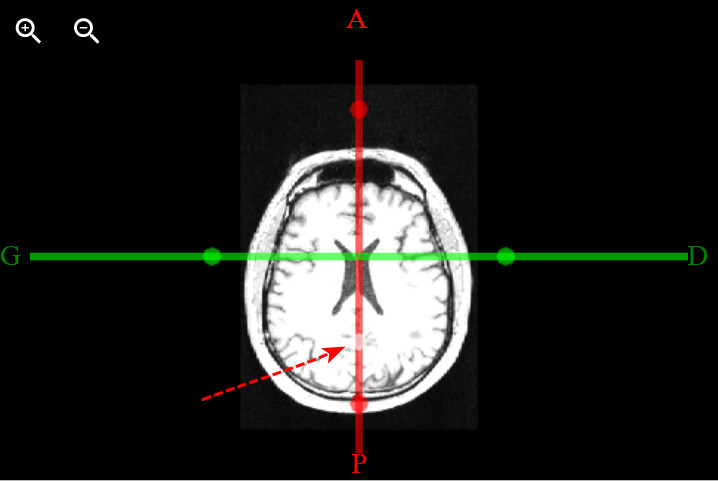
PS: if you can see, the white sphere of the cursor, it is updated after the render,but the lines are not,
This is a simplified code I used;
```auto
viewAttributes.forEach((obj, i) => {
const viewType = xyzToViewType[i];
viewAttributes
.forEach((v) => {
widget.getWidgetState().setCenter(x,y,z);
updateReslice({
viewType: viewType,
reslice: obj.reslice,
actor: obj.resliceActor,
renderer: obj.renderer,
resetFocalPoint: false,
keepFocalPointPosition: true,
computeFocalPointOffset: false,
sphereSources: obj.sphereSources,
});
}
})
```
---
### Author:  [@finetjul](https://discourse.vtk.org/u/finetjul)
#### Post date: [February 24, 2022, 12:28pm UTC](https://discourse.vtk.org/t/how-to-update-reslicecursorwidget-after-setcenter/7911/2 "2022-02-24T12:28:19Z")
In your simplified code, I do not see the `onInteractionEvent` part.
`updateReslice()` must be called each time there is an interaction.
---
### Author:  [@dexter](https://discourse.vtk.org/u/dexter)
#### Post date: [February 24, 2022, 1:24pm UTC](https://discourse.vtk.org/t/how-to-update-reslicecursorwidget-after-setcenter/7911/3 "2022-02-24T13:24:49Z")
Yes there is `onInteractionEvent` just after (I didn’t put it because it is the same as in the official example (with `updateReslice()` inside)).
yes but how to update the Reslice after setting the default center of the widget after each page refresh? because `onInteractionEvent` is requiring an interaction with the cursor
---
### Author:  [@finetjul](https://discourse.vtk.org/u/finetjul)
#### Post date: [February 24, 2022, 1:57pm UTC](https://discourse.vtk.org/t/how-to-update-reslicecursorwidget-after-setcenter/7911/4 "2022-02-24T13:57:47Z")
Did you try `widget.setCenter([x,y,z]);` instead of `widget.getWidgetState().setCenter(x,y,z);` ?
---
### Author:  [@dexter](https://discourse.vtk.org/u/dexter)
#### Post date: [February 24, 2022, 2:17pm UTC](https://discourse.vtk.org/t/how-to-update-reslicecursorwidget-after-setcenter/7911/5 "2022-02-24T14:17:56Z")
> [@finetjul](#):
>
> widget.setCenter([x,y,z])
Yes, it is working thank you so much