# How to use vtkRenderWindowInteractor in QVTKOpenGLNativeWidget

**URL:** https://discourse.vtk.org/t/how-to-use-vtkrenderwindowinteractor-in-qvtkopenglnativewidget/2499
**Category:** Support
**Created:** [January 26, 2020, 7:20am UTC](https://discourse.vtk.org/t/how-to-use-vtkrenderwindowinteractor-in-qvtkopenglnativewidget/2499 "2020-01-26T07:20:51Z")
**Posts on this page:** 5
**Page:** 1

<div class="post-metadata">

### Author: ![yuhuimoon](https://discourse.vtk.org/letter_avatar_proxy/v4/letter/y/c6cbf5/32.png) [@yuhuimoon](https://discourse.vtk.org/u/yuhuimoon)
#### Post date: [January 26, 2020, 7:20am UTC](https://discourse.vtk.org/t/how-to-use-vtkrenderwindowinteractor-in-qvtkopenglnativewidget/2499/1 "2020-01-26T07:20:51Z")

</div>

I want to use vtkOrientationMarkerWidget(named “widget”) in my viewer widget which is derived from QVTKOpenGLNativeWidget. I try to call widget-\>SetCurrentRenderer(m\_render). But widget can not display in my viewer. And alse, I try to call om-\>SetInteractor(GetInteractor()). But it’s failed. I can control the scene of my viewer with mouse and keyboard. That’s my part of the source code. Thanks in advance.

```
void MyViewer::init()
{
    vtkSmartPointer<vtkRenderer> m_render = vtkSmartPointer<vtkRenderer>::New();
    GetRenderWindow()->AddRenderer(m_render);

    ......

    vtkSmartPointer<vtkPropAssembly> axes = makeCubeActor(scale, xyzLabels, colors);
    vtkSmartPointer<vtkOrientationMarkerWidget> om = vtkSmartPointer<vtkOrientationMarkerWidget>::New();

    om->SetViewport(0.0, 0.8, 0.2, 1.0);
    om->EnabledOn();
    om->SetOrientationMarker(axes);
    om->SetInteractor(GetInteractor());
    om->InteractiveOn();
    om->SetCurrentRenderer(m_render);
}

```

The Qt Creator output:  
vtkOrientationMarkerWidget (0x1262f00): An orientation marker must be set prior to enabling/disabling widget

---

<div class="post-metadata">

### Author: ![Paulo\_Carvalho](https://discourse.vtk.org/user_avatar/discourse.vtk.org/paulo_carvalho/32/370_2.png) [@Paulo\_Carvalho](https://discourse.vtk.org/u/Paulo_Carvalho)
#### Post date: [January 26, 2020, 11:31pm UTC](https://discourse.vtk.org/t/how-to-use-vtkrenderwindowinteractor-in-qvtkopenglnativewidget/2499/2 "2020-01-26T23:31:55Z")

</div>

Hi, friend,

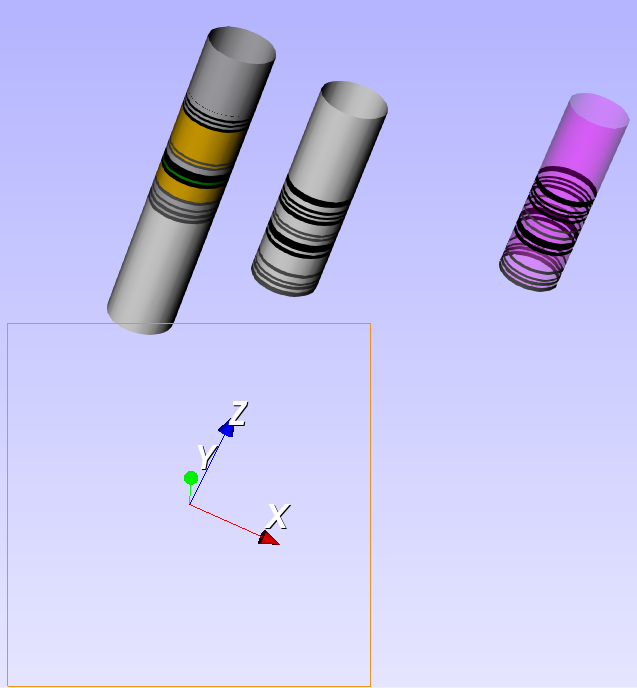
I think the catch is in your `SetInteractor()` call. In my project I do this:

```
//----------------------adding the orientation axes-------------------------
_vtkSmartPointer<vtkAxesActor> axes = vtkSmartPointer<vtkAxesActor>::New();
_vtkAxesWidget = vtkSmartPointer<vtkOrientationMarkerWidget>::New();
_vtkAxesWidget->SetOutlineColor(0.9300, 0.5700, 0.1300);
_vtkAxesWidget->SetOrientationMarker(axes);
_vtkAxesWidget->SetInteractor(_vtkwidget->GetRenderWindow()->GetInteractor());
_vtkAxesWidget->SetViewport(0.0, 0.0, 0.2, 0.2);
_vtkAxesWidget->SetEnabled(1);
_vtkAxesWidget->InteractiveOn();
//--------------------------------------------------------------------------

```

The complete code is [here](https://github.com/PauloCarvalhoRJ/gammaray/blob/master/viewer3d/view3dwidget.cpp).
 ![image](https://discourse.vtk.org/uploads/default/original/2X/2/270905e2262aadfdfd14d8173abbb698cde9bb54.png)

---

<div class="post-metadata">

### Author: ![yuhuimoon](https://discourse.vtk.org/letter_avatar_proxy/v4/letter/y/c6cbf5/32.png) [@yuhuimoon](https://discourse.vtk.org/u/yuhuimoon)
#### Post date: [January 27, 2020, 2:35am UTC](https://discourse.vtk.org/t/how-to-use-vtkrenderwindowinteractor-in-qvtkopenglnativewidget/2499/3 "2020-01-27T02:35:15Z")

</div>

According to your code, I define the oject ‘vtkOrientationMarkerWidget’ as a member variable of the class MyViewer instead of local variable in the function. It works! That’s the reason why I can not see the result. Thank you very much!

---

<div class="post-metadata">

### Author: ![Paulo\_Carvalho](https://discourse.vtk.org/user_avatar/discourse.vtk.org/paulo_carvalho/32/370_2.png) [@Paulo\_Carvalho](https://discourse.vtk.org/u/Paulo_Carvalho)
#### Post date: [January 27, 2020, 10:06pm UTC](https://discourse.vtk.org/t/how-to-use-vtkrenderwindowinteractor-in-qvtkopenglnativewidget/2499/4 "2020-01-27T22:06:11Z")

</div>

Yes… I took some time to realize that the smart pointer was being deallocated along with its scope and taking the object with it. The solution was to make it a member variable so it lives as long as the application is running.

good luck out there,

Paulo

---

<div class="post-metadata">

### Author: ![Hana](https://discourse.vtk.org/user_avatar/discourse.vtk.org/hana/32/8065_2.png) [@Hana](https://discourse.vtk.org/u/Hana)
#### Post date: [November 27, 2023, 4:23am UTC](https://discourse.vtk.org/t/how-to-use-vtkrenderwindowinteractor-in-qvtkopenglnativewidget/2499/5 "2023-11-27T04:23:02Z")

</div>

Thanks a lot! I’ve been debugging in PyQt version for a long time without success until I find your post.
