# how to visualizate the tetrahedron?
**URL:** https://discourse.vtk.org/t/how-to-visualizate-the-tetrahedron/10339
**Category:** Support
**Created:** [December 29, 2022, 1:23pm UTC](https://discourse.vtk.org/t/how-to-visualizate-the-tetrahedron/10339 "2022-12-29T13:23:24Z")
**Posts on this page:** 7
**Page:** 1
### Author:  [@zhang-qiang-github](https://discourse.vtk.org/u/zhang-qiang-github)
#### Post date: [December 29, 2022, 1:23pm UTC](https://discourse.vtk.org/t/how-to-visualizate-the-tetrahedron/10339/1 "2022-12-29T13:23:24Z")
I want to visualize a tetrahedron, and my code is:
```auto
nodes = [
[3.56000000e+02, 2.56000000e+02, 0.00000000e+00],
[1.56000000e+02, 1.56000000e+02, 1.22464676e-14],
[1.56000000e+02, 2.06000000e+02, -8.66025391e+01],
[1.56000000e+02, 3.06000000e+02, -8.66025391e+01],
[1.56000000e+02, 3.56000000e+02, -2.44929351e-14],
[1.56000000e+02, 3.06000000e+02, 8.66025391e+01],
[1.56000000e+02, 2.06000000e+02, 8.66025391e+01]
]
elem = [
[4, 0, 5, 3],
[1, 2, 6, 0],
[2, 5, 0, 3],
[2, 5, 6, 0]
]
import vtkmodules.all as vtk
points = vtk.vtkPoints()
for p in nodes:
points.InsertNextPoint(p[0], p[1], p[2])
unstructuredGrid = vtk.vtkUnstructuredGrid()
unstructuredGrid.SetPoints(points)
cellArray = vtk.vtkCellArray()
for tre in elem:
tetra = vtk.vtkTetra()
tetra.GetPointIds().SetId(0, tre[0])
tetra.GetPointIds().SetId(1, tre[1])
tetra.GetPointIds().SetId(2, tre[2])
tetra.GetPointIds().SetId(3, tre[3])
cellArray.InsertNextCell(tetra)
unstructuredGrid.SetCells(vtk.VTK_TETRA, cellArray)
mapper = vtk.vtkDataSetMapper()
mapper.SetInputData(unstructuredGrid)
actor = vtk.vtkActor()
actor.SetMapper(mapper)
actor.GetProperty().SetOpacity(0.3)
actor.GetProperty().SetColor(1, 1, 0)
renderer = vtk.vtkRenderer()
renderer.AddActor(actor)
renderer.SetBackground(1, 1, 1)
renWin = vtk.vtkRenderWindow()
renWin.AddRenderer(renderer)
iren = vtk.vtkRenderWindowInteractor()
iren.SetRenderWindow(renWin)
iren.SetInteractorStyle(vtk.vtkInteractorStyleTrackballCamera())
iren.Initialize()
iren.Start()
```
And the result is:
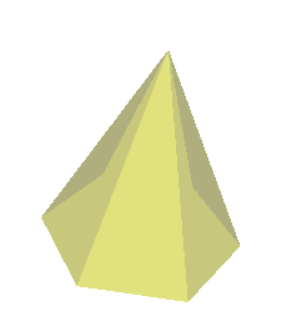
But, I expect the result figure could display the inner grid, for example:
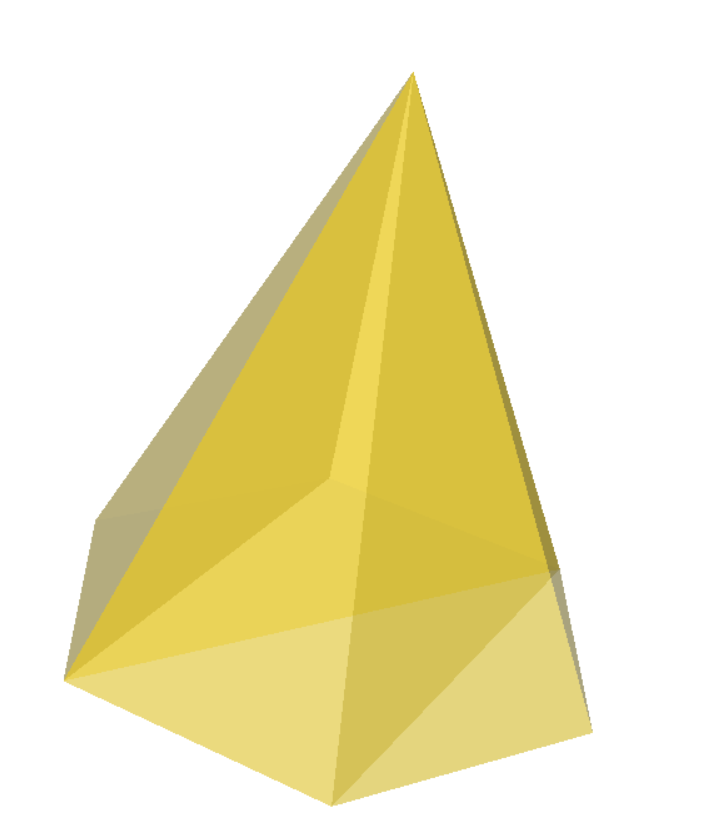
How can I obtain the second result? Any suggestion is appreciated~~~
---
### Author:  [@mau\_igna\_06](https://discourse.vtk.org/u/mau_igna_06)
#### Post date: [December 29, 2022, 7:23pm UTC](https://discourse.vtk.org/t/how-to-visualizate-the-tetrahedron/10339/2 "2022-12-29T19:23:54Z")
Hi
Maybe try the [triangleFilter](https://vtk.org/doc/nightly/html/classvtkTriangleFilter.html)
Hope it helps
---
### Author:  [@zhang-qiang-github](https://discourse.vtk.org/u/zhang-qiang-github)
#### Post date: [December 30, 2022, 2:36am UTC](https://discourse.vtk.org/t/how-to-visualizate-the-tetrahedron/10339/3 "2022-12-30T02:36:37Z")
Thanks for your kindly reply. I have tried `vtkTriangleFilter`, but a bug is reported:
```auto
vtkCompositeDataPipeline (000001E8834ED360): Input for connection index 0 on input port index 0 for algorithm vtkTriangleFilter(000001E883D74E20) is of type vtkUnstructuredGrid, but a vtkPolyData is required.
```
The `vtkTriangleFilter` do not accept `vtkUnstructuredGrid`.
---
### Author:  [@mau\_igna\_06](https://discourse.vtk.org/u/mau_igna_06)
#### Post date: [December 30, 2022, 12:46pm UTC](https://discourse.vtk.org/t/how-to-visualizate-the-tetrahedron/10339/4 "2022-12-30T12:46:07Z")
Please try using [vtkGeometryFilter](https://vtk.org/doc/nightly/html/classvtkGeometryFilter.html) before vtkTriangleFilter
Hope it helps
---
### Author:  [@zhang-qiang-github](https://discourse.vtk.org/u/zhang-qiang-github)
#### Post date: [December 30, 2022, 12:51pm UTC](https://discourse.vtk.org/t/how-to-visualizate-the-tetrahedron/10339/5 "2022-12-30T12:51:06Z")
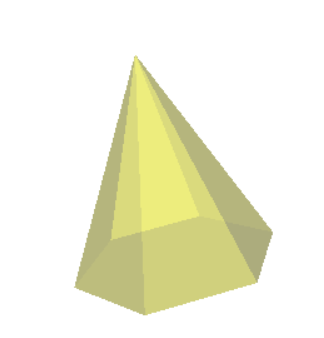
`vtkGeometryFilter & vtkTriangleFilter` still can not display the inner details.
---
### Author:  [@mau\_igna\_06](https://discourse.vtk.org/u/mau_igna_06)
#### Post date: [December 30, 2022, 5:03pm UTC](https://discourse.vtk.org/t/how-to-visualizate-the-tetrahedron/10339/6 "2022-12-30T17:03:08Z")
Maybe try using two props: wireframe and surface
[https://vtk.org/doc/nightly/html/classvtkProperty.html#a2a4bdf2f46dc499ead4011024eddde5c](https://vtk.org/doc/nightly/html/classvtkProperty.html#a2a4bdf2f46dc499ead4011024eddde5c)
---
### Author:  [@zhang-qiang-github](https://discourse.vtk.org/u/zhang-qiang-github)
#### Post date: [December 31, 2022, 3:04pm UTC](https://discourse.vtk.org/t/how-to-visualizate-the-tetrahedron/10339/7 "2022-12-31T15:04:31Z")
two props (wireframe and surface) should work, but it is inconvenient.
I find `vtkShrinkFilter` work in this situation:
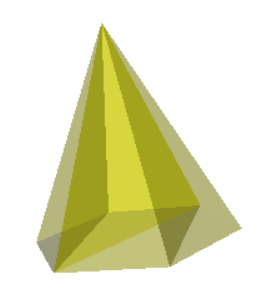
And the complete code is:
```auto
nodes = [
[3.56000000e+02, 2.56000000e+02, 0.00000000e+00],
[1.56000000e+02, 1.56000000e+02, 1.22464676e-14],
[1.56000000e+02, 2.06000000e+02, -8.66025391e+01],
[1.56000000e+02, 3.06000000e+02, -8.66025391e+01],
[1.56000000e+02, 3.56000000e+02, -2.44929351e-14],
[1.56000000e+02, 3.06000000e+02, 8.66025391e+01],
[1.56000000e+02, 2.06000000e+02, 8.66025391e+01]
]
elem = [
[4, 0, 5, 3],
[1, 2, 6, 0],
[2, 5, 0, 3],
[2, 5, 6, 0]
]
import vtkmodules.all as vtk
points = vtk.vtkPoints()
for p in nodes:
points.InsertNextPoint(p[0], p[1], p[2])
unstructuredGrid = vtk.vtkUnstructuredGrid()
unstructuredGrid.SetPoints(points)
cellArray = vtk.vtkCellArray()
for tre in elem:
tetra = vtk.vtkTetra()
tetra.GetPointIds().SetId(0, tre[0])
tetra.GetPointIds().SetId(1, tre[1])
tetra.GetPointIds().SetId(2, tre[2])
tetra.GetPointIds().SetId(3, tre[3])
cellArray.InsertNextCell(tetra)
unstructuredGrid.SetCells(vtk.VTK_TETRA, cellArray)
sf = vtk.vtkShrinkFilter()
sf.SetInputData(unstructuredGrid)
sf.SetShrinkFactor(1)
sf.Update()
gf = vtk.vtkGeometryFilter()
gf.SetInputData(sf.GetOutput())
gf.Update()
# mapper = vtk.vtkDataSetMapper()
# mapper.SetInputData(unstructuredGrid)
tf = vtk.vtkTriangleFilter()
tf.SetInputData(gf.GetOutput())
tf.Update()
mapper = vtk.vtkPolyDataMapper()
mapper.SetInputData(tf.GetOutput())
actor = vtk.vtkActor()
actor.SetMapper(mapper)
actor.GetProperty().SetOpacity(0.3)
actor.GetProperty().SetColor(1, 1, 0)
renderer = vtk.vtkRenderer()
renderer.AddActor(actor)
renderer.SetBackground(1, 1, 1)
renWin = vtk.vtkRenderWindow()
renWin.AddRenderer(renderer)
iren = vtk.vtkRenderWindowInteractor()
iren.SetRenderWindow(renWin)
iren.SetInteractorStyle(vtk.vtkInteractorStyleTrackballCamera())
iren.Initialize()
iren.Start()
```
But, I don’t know why `vtkShrinkFilter` would work in this situation.