# ImageData make black transparent
**URL:** https://discourse.vtk.org/t/imagedata-make-black-transparent/5393
**Category:** Support
**Created:** [March 17, 2021, 1:02am UTC](https://discourse.vtk.org/t/imagedata-make-black-transparent/5393 "2021-03-17T01:02:52Z")
**Posts on this page:** 2
**Page:** 1
### Author:  [@ctfirman](https://discourse.vtk.org/u/ctfirman)
#### Post date: [March 17, 2021, 1:02am UTC](https://discourse.vtk.org/t/imagedata-make-black-transparent/5393/1 "2021-03-17T01:02:52Z")
Hi,
I have an ImageData object in which I would like to replace the black area with a transparent area.
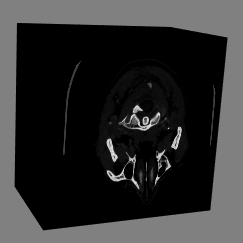
I am new to VTK so sorry if this is trivial. Also is there any good python documentation regarding with working in ImageData?
Thanks in advance for the help.
---
### Author:  [@Andrew](https://discourse.vtk.org/u/Andrew)
#### Post date: [March 17, 2021, 4:57pm UTC](https://discourse.vtk.org/t/imagedata-make-black-transparent/5393/2 "2021-03-17T16:57:41Z")
Here’s the example you’ll want to look at: [https://lorensen.github.io/VTKExamples/site/Python/Medical/MedicalDemo4/](https://lorensen.github.io/VTKExamples/site/Python/Medical/MedicalDemo4/)
Your image is made up of intensities, they are looked up using the volumeScalarOpacity function in this example. So if it finds black (0 intensity) while sampling your image it will look up its corresponding opacity (0.0 is transparent, 1.0 is fully opaque). So assign opacity appropriately.
Example: If air/black is 0.0 and your structure lies at 100.0. Then you could set (0.0, 0.0) and (100.0, 1.0), where (intensity, opacity). Note that the function is linear and if it samples 50.0 you will get 0.5 (half transparency)