# ImageSlicing operation error
**URL:** https://discourse.vtk.org/t/imageslicing-operation-error/1276
**Category:** Support
**Created:** [July 5, 2019, 2:17am UTC](https://discourse.vtk.org/t/imageslicing-operation-error/1276 "2019-07-05T02:17:31Z")
**Posts on this page:** 5
**Page:** 1
### Author:  [@1111](https://discourse.vtk.org/u/1111)
#### Post date: [July 5, 2019, 2:17am UTC](https://discourse.vtk.org/t/imageslicing-operation-error/1276/1 "2019-07-05T02:17:31Z")
I have run the ImageSlicing sample.
However, the following error was displayed.
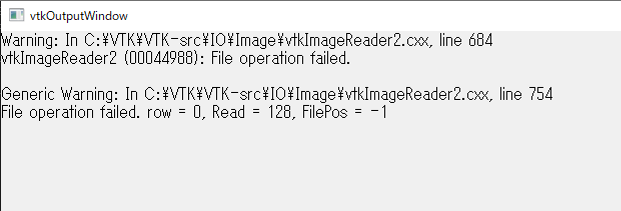
I understand that it is a vtkImageReader2 error, but I don’t know how to cope.
please tell me.
---
### Author:  [@dgobbi](https://discourse.vtk.org/u/dgobbi)
#### Post date: [July 5, 2019, 8:54pm UTC](https://discourse.vtk.org/t/imageslicing-operation-error/1276/2 "2019-07-05T20:54:02Z")
Maybe the file is smaller than expected. For example,
```
reader->SetDataExtent(0, 63, 0, 63, 1, 93);
reader->SetDataScalarTypeToUnsignedShort();
```
This means each slice is 64\*64 pixels, and each pixel is 2 bytes.
So each file (quarter.1, quarter.2 … quarter.93) must be 8192 bytes.
Here is another example:
```
reader->SetDataExtent(0, 511, 0, 511, 0, 191);
reader->SetDataScalarTypeToUnsignedChar();
reader->SetFileDimensionality(3):
```
This expects one file that is 512\*512\*192\*1 bytes, or 50331648 bytes.
---
### Author:  [@1111](https://discourse.vtk.org/u/1111)
#### Post date: [July 6, 2019, 7:32am UTC](https://discourse.vtk.org/t/imageslicing-operation-error/1276/3 "2019-07-06T07:32:07Z")
Thank you for your reply and the detailed explanation.
I could understand the example.
What kind of correction do you need in this case?
---
### Author:  [@dgobbi](https://discourse.vtk.org/u/dgobbi)
#### Post date: [July 6, 2019, 2:24pm UTC](https://discourse.vtk.org/t/imageslicing-operation-error/1276/4 "2019-07-06T14:24:44Z")
To use vtkImageReader2,
- The file must be a raw image (the file must not have a header)
- The data type of the pixels must be known (short, unsigned short, unsigned char)
- The dimensionality of the file must be known (2D or 3D)
- The dimensions of the file must be known (Xsize, Ysize) or (Xsize, Ysize, Zsize)
Then the reader must be set up correctly. For 2D files:
```
reader->SetDataExtent(0, Xsize-1, 0, Ysize-1, 1, NumberOfFiles);
reader->SetDataScalarTypeToUnsignedShort(); // or Short or UnsignedChar etc.
reader->SetFileDimensionality(2); // 2D is the default, so this is optional
reader->SetFilePrefix(...); // or SetFileNames(), please see class documentation
```
For 3D files:
```
reader->SetDataExtent(0, Xsize-1, 0, Ysize-1, 0, Zsize-1);
reader->SetDataScalarTypeTo...(); // same as 2D example
reader->SetFileDimensionality(3);
reader->SetFileName(...); // path to the file
```
---
### Author:  [@1111](https://discourse.vtk.org/u/1111)
#### Post date: [July 9, 2019, 2:09am UTC](https://discourse.vtk.org/t/imageslicing-operation-error/1276/5 "2019-07-09T02:09:53Z")
Thank you for your reply.
In your explanation, I was able to learn more about vtkImageReader2.
I was able to output the raw data (3D) I have.
I want to output an oblique tomographic image by specifying an angle in the future.
I think to add data rotation as follows.
//Data rotation
vtkSmartPointer transform =
vtkSmartPointer ::New();
transform-\> RotateY (90);
transform-\> RotateZ (0);
Please tell me if you know how to add it.