# In VTK, if the transparency of the image is modified, the depth value of the image will also change.
**URL:** https://discourse.vtk.org/t/in-vtk-if-the-transparency-of-the-image-is-modified-the-depth-value-of-the-image-will-also-change/4102
**Category:** Support
**Created:** [August 31, 2020, 7:51am UTC](https://discourse.vtk.org/t/in-vtk-if-the-transparency-of-the-image-is-modified-the-depth-value-of-the-image-will-also-change/4102 "2020-08-31T07:51:46Z")
**Posts on this page:** 13
**Page:** 1
### Author:  [@Pandapan](https://discourse.vtk.org/u/Pandapan)
#### Post date: [August 31, 2020, 7:51am UTC](https://discourse.vtk.org/t/in-vtk-if-the-transparency-of-the-image-is-modified-the-depth-value-of-the-image-will-also-change/4102/1 "2020-08-31T07:51:46Z")
In VTK, if the transparency of the image is modified, the depth value of the image will also change. Is there any way to keep the depth unchanged?
---
### Author:  [@lassoan](https://discourse.vtk.org/u/lassoan)
#### Post date: [August 31, 2020, 8:37pm UTC](https://discourse.vtk.org/t/in-vtk-if-the-transparency-of-the-image-is-modified-the-depth-value-of-the-image-will-also-change/4102/2 "2020-08-31T20:37:44Z")
Which image actor class do you use? Does calling `SetForceOpaque` on the image actor help?
---
### Author:  [@Pandapan](https://discourse.vtk.org/u/Pandapan)
#### Post date: [September 1, 2020, 2:39am UTC](https://discourse.vtk.org/t/in-vtk-if-the-transparency-of-the-image-is-modified-the-depth-value-of-the-image-will-also-change/4102/3 "2020-09-01T02:39:53Z")
Thanks for your help,i use the **vtkActor** class.
---
### Author:  [@lassoan](https://discourse.vtk.org/u/lassoan)
#### Post date: [September 1, 2020, 2:40am UTC](https://discourse.vtk.org/t/in-vtk-if-the-transparency-of-the-image-is-modified-the-depth-value-of-the-image-will-also-change/4102/4 "2020-09-01T02:40:29Z")
And which mapper do you use?
---
### Author:  [@Pandapan](https://discourse.vtk.org/u/Pandapan)
#### Post date: [September 1, 2020, 2:42am UTC](https://discourse.vtk.org/t/in-vtk-if-the-transparency-of-the-image-is-modified-the-depth-value-of-the-image-will-also-change/4102/5 "2020-09-01T02:42:23Z")
vtkDataSetMapper
---
### Author:  [@lassoan](https://discourse.vtk.org/u/lassoan)
#### Post date: [September 1, 2020, 2:45am UTC](https://discourse.vtk.org/t/in-vtk-if-the-transparency-of-the-image-is-modified-the-depth-value-of-the-image-will-also-change/4102/6 "2020-09-01T02:45:12Z")
I’m not sure how vtkDataSetMapper maps vtkImageData. Using volume raycasting? Using surface rendering? Can you attach a few screenshots of how your rendering looks and illustrate what do you mean by different depth value?
---
### Author:  [@Pandapan](https://discourse.vtk.org/u/Pandapan)
#### Post date: [September 1, 2020, 7:28am UTC](https://discourse.vtk.org/t/in-vtk-if-the-transparency-of-the-image-is-modified-the-depth-value-of-the-image-will-also-change/4102/8 "2020-09-01T07:28:59Z")
Using surface rendering,vtkDataSetMapper can render the data of vtkimagedata . In fact, it is rendered the vtkStructuredGrid data.We have four pieces of data. When I set the transparency to {1,1,1,1}, the result is correct.We have four pieces of data. When I set the transparency to {1,1,1,1}, the result is correct. However, when I set the transparency to {0.6,1,1,1}, the result is not correct due to the depth value.
---
### Author:  [@Pandapan](https://discourse.vtk.org/u/Pandapan)
#### Post date: [September 1, 2020, 7:30am UTC](https://discourse.vtk.org/t/in-vtk-if-the-transparency-of-the-image-is-modified-the-depth-value-of-the-image-will-also-change/4102/10 "2020-09-01T07:30:51Z")
```
int main( int argc, char *argv[] )
{
if (argc < 2)
{
std::cout << "Required parameters: /YourPath" << std::endl;
return -1;
}
vtkMPIController* mpiController = vtkMPIController::New();
mpiController->Initialize( &argc, &argv );
vtkMultiProcessController::SetGlobalController( mpiController );
int rankId = mpiController->GetLocalProcessId();
int numProcess = mpiController->GetNumberOfProcesses();
if( numProcess > 4 )
{
std::cout << "error: numberOfProcess > numberOfBlock" << std::endl;
return 0;
}
vtkRenderWindowInteractor* iren = vtkRenderWindowInteractor::New();
vtkRenderWindow* renWin = vtkRenderWindow::New();
vtkRenderer* render = vtkRenderer::New();
iren->SetRenderWindow( renWin );
renWin->AddRenderer( render );
vtkTreeCompositer* compositer = vtkTreeCompositer::New();
vtkCompositeRenderManager* parallelRender = vtkCompositeRenderManager::New();
parallelRender->SetController( mpiController );
parallelRender->SetRenderWindow( renWin );
parallelRender->SetCompositer( compositer );
compositer->Delete();
double color[4][3] = { {1, 0, 0}, {0, 1, 0}, {0, 0, 1}, {1, 1, 0} };
double opacity[4] = { 0.6, 1, 1, 1 };
char* dataFilePath = argv[1];
vtkPTecplotReaderBinary* reader = vtkPTecplotReaderBinary::New();
reader->SetFileName(dataFilePath);
reader->Update();
vtkMultiBlockDataSet* mbds = reader->GetOutput();
int numBlock = mbds->GetNumberOfBlocks();
int blocksLeft = 4 / numProcess;
int res = 4 % numProcess;
int count = rankId * blocksLeft;
int index;
for( int i = 0; i < numBlock; ++i )
{
vtkDataSetMapper* dsMapper = vtkDataSetMapper::New();
dsMapper->SetInputDataObject( mbds->GetBlock( i ) );
vtkActor* actor = vtkActor::New();
actor->SetMapper( dsMapper );
if( res )
{
index = rankId ? (count + i + 1) : (count + i);
}
else
{
index = count + i;
}
actor->GetProperty()->SetColor( color[index] );
actor->GetProperty()->SetOpacity( opacity[index] );
render->AddActor( actor );
dsMapper->Delete();
actor->Delete();
}
double bounds[6] = {2710, 44200, -2700, 2660, 548, 17800};
render->ResetCamera( bounds );
render->ResetCameraClippingRange( bounds );
renWin->Delete();
render->Delete();
if( rankId )
{
parallelRender->InitializePieces();
parallelRender->InitializeRMIs();
mpiController->ProcessRMIs();
}
else
{
resetCameraCallback* callback = resetCameraCallback::New();
callback->SetBounds( bounds );
callback->SetRenderer( render );
iren->AddObserver( vtkCommand::InteractionEvent, callback );
renWin->SetSize( 600, 600 );
renWin->Render();
vtkInteractorStyleTrackballCamera* irenStyle2 = vtkInteractorStyleTrackballCamera::New();
iren->SetInteractorStyle(irenStyle2);
iren->Start();
}
return 0;
}
```
---
### Author:  [@Pandapan](https://discourse.vtk.org/u/Pandapan)
#### Post date: [September 1, 2020, 7:41am UTC](https://discourse.vtk.org/t/in-vtk-if-the-transparency-of-the-image-is-modified-the-depth-value-of-the-image-will-also-change/4102/11 "2020-09-01T07:41:25Z")
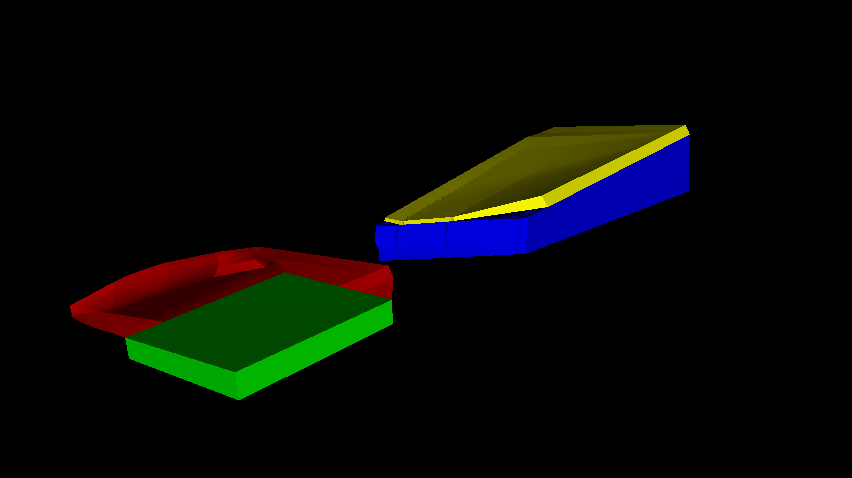 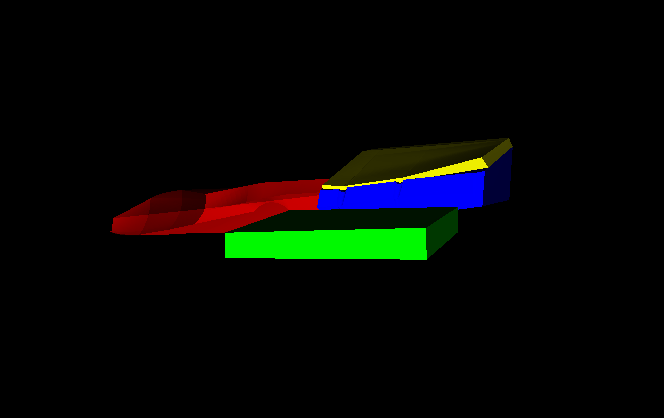
The red block is above the green block with a transparency of 0.6, but it does not display properly as shown in the results of the two images.I think it’s because the transparency has been changed, resulting in the change of image depth, so the result is not correct.
---
### Author:  [@lassoan](https://discourse.vtk.org/u/lassoan)
#### Post date: [September 1, 2020, 1:49pm UTC](https://discourse.vtk.org/t/in-vtk-if-the-transparency-of-the-image-is-modified-the-depth-value-of-the-image-will-also-change/4102/12 "2020-09-01T13:49:21Z")
It seems that you haven’t enabled depth peeling. Without that, semi-transparent objects are not rendered correctly.
---
### Author:  [@Pandapan](https://discourse.vtk.org/u/Pandapan)
#### Post date: [September 1, 2020, 1:59pm UTC](https://discourse.vtk.org/t/in-vtk-if-the-transparency-of-the-image-is-modified-the-depth-value-of-the-image-will-also-change/4102/13 "2020-09-01T13:59:28Z")
How can I enable depth peeling? Could you give me some advice? Thank you.
---
### Author:  [@lassoan](https://discourse.vtk.org/u/lassoan)
#### Post date: [September 2, 2020, 4:02pm UTC](https://discourse.vtk.org/t/in-vtk-if-the-transparency-of-the-image-is-modified-the-depth-value-of-the-image-will-also-change/4102/14 "2020-09-02T16:02:42Z")
Search for “VTK depth peeling” on Google. You should be able to find documentation and examples.
---
### Author:  [@Pandapan](https://discourse.vtk.org/u/Pandapan)
#### Post date: [September 3, 2020, 10:25am UTC](https://discourse.vtk.org/t/in-vtk-if-the-transparency-of-the-image-is-modified-the-depth-value-of-the-image-will-also-change/4102/15 "2020-09-03T10:25:56Z")
Thank you!