# Inconsistent Render of Colored PolyData
**URL:** https://discourse.vtk.org/t/inconsistent-render-of-colored-polydata/5396
**Category:** Support
**Created:** [March 17, 2021, 9:28pm UTC](https://discourse.vtk.org/t/inconsistent-render-of-colored-polydata/5396 "2021-03-17T21:28:39Z")
**Posts on this page:** 2
**Page:** 1
### Author:  [@ksh\_co](https://discourse.vtk.org/u/ksh_co)
#### Post date: [March 17, 2021, 9:28pm UTC](https://discourse.vtk.org/t/inconsistent-render-of-colored-polydata/5396/1 "2021-03-17T21:28:39Z")
Hi,
I have a number of unstructured meshes (of right ventricles) converted to PolyData on which I am attempting to identify physiologically relevant regions (septal wall, free wall, valves, etc). Based on location, curvature, and cell normals, I create a scalar array of cell data that contains integers for each region.
To check the accuracy of my approach, I’ve created a render object to take a PolyData input and write a PNG of the render. I can also write out a vtk file at the same point in the code and visualize the PolyData in Paraview. These yield inconsistent results (Paraview is correct).
Some code snippets (the render object first)
```auto
class DebugRender:
def __init__ (self):
self.mapper = vtkPolyDataMapper()
self.actor = vtkActor()
self.actor.SetMapper(self.mapper)
self.render = vtkRenderer()
self.render.AddActor(self.actor)
self.window = vtkRenderWindow()
self.window.AddRenderer(self.render)
self.window.OffScreenRenderingOn()
def set_map_input(self, meshdata):
self.mapper.SetInputData(meshdata)
self.mapper.Update()
def call_render(self):
self.window.Render()
def write_render(self, name):
winfilt = vtkWindowToImageFilter()
winfilt.SetInput(self.window)
w = vtkPNGWriter()
w.SetInputConnection(winfilt.GetOutputPort())
w.SetFileName(name)
w.Update()
w.Write()
```
and the actual use of this (note `g.meshdata` is the polydata object and `self.regions` contains the values I want to visualize):
```auto
g.meshdata.GetCellData().AddArray(self.regions)
g.meshdata.GetCellData().SetScalars(self.regions)
db = DebugRender()
db.set_map_input(g.meshdata)
db.call_render()
db.write_render('TestOutput.png')
```
Again, using the debugger I also wrote out the polydata to a vtk file, and loaded it up into Paraview.
The results are:
(from the render) 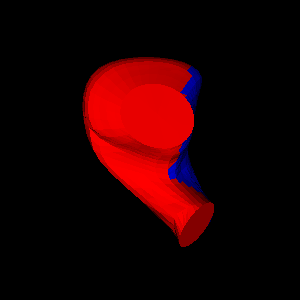
(viewed in Paraview) 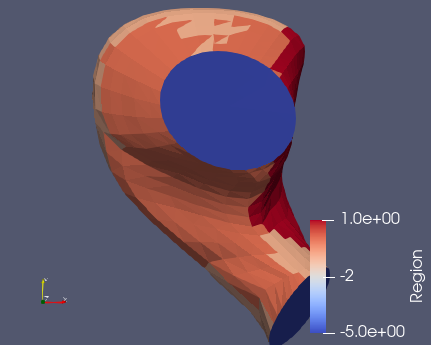
The particular problem is that the oval regions (top middle and seen from edge at bottom) are not the right color - the render colors them the same as the left side of the mesh, unlike the correct values shown in the Paraview window.
---
### Author:  [@ksh\_co](https://discourse.vtk.org/u/ksh_co)
#### Post date: [April 1, 2021, 7:25pm UTC](https://discourse.vtk.org/t/inconsistent-render-of-colored-polydata/5396/2 "2021-04-01T19:25:23Z")
I figured this out myself. I forgot that Paraview transparently does a lot of great stuff, whereas in vtk, you gotta do it all. It is what it is 😁
First, I took the render process out of a class (I originally had it there because I thought I’d build the pipeline and then use it frequently, but I’m actually only calling it once now). So that code is now:
```auto
def DebugRender(meshdata, name):
""" Render function for debugging regions """
transf = vtkColorTransferFunction()
transf.AddRGBPoint(0.0, 0.231373, 0.298039, 0.752941)
transf.AddRGBPoint(2.5, 0.865003, 0.865003, 0.865003)
transf.AddRGBPoint(5.0, 0.705882, 0.0155863, 0.14902)
# I yoinked these values from Paraview's transfer function!
transf.Build()
mapper = vtkPolyDataMapper()
mapper.SetInputData(meshdata)
mapper.SetLookupTable(transf)
mapper.Update()
actor = vtkActor()
actor.SetMapper(mapper)
render = vtkRenderer()
render.AddActor(actor)
window = vtkRenderWindow()
window.AddRenderer(render)
window.OffScreenRenderingOn()
window.Render()
winfilt = vtkWindowToImageFilter()
winfilt.SetInput(window)
w = vtkPNGWriter()
w.SetInputConnection(winfilt.GetOutputPort())
w.SetFileName(name)
w.Update()
w.Write()
```
where the function inputs `meshdata` and `names` are a `vtkPolyData` object and a filename string and the actual call looks like:
```auto
g.meshdata.GetCellData().AddArray(self.regions)
g.meshdata.GetCellData().SetActiveScalars('Region')
DebugRender(g.meshdata, names.outimg[0])
```
where again from before `g.meshdata` is the `vtkPolyData` object and `self.regions` is the `vtkDoubleArray` I want to visualize on cells. Now I get:
(vtk render) 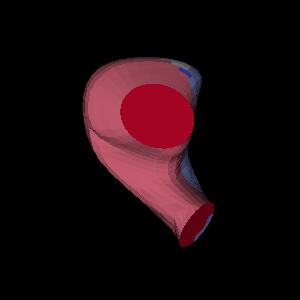
(paraview) 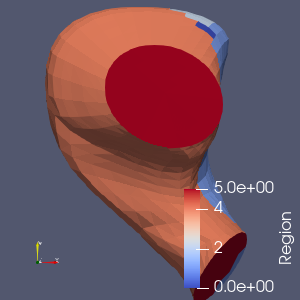
Hope this helps someone in the future…