# Increase the 3D image dimension
**URL:** https://discourse.vtk.org/t/increase-the-3d-image-dimension/4019
**Category:** Support
**Created:** [August 19, 2020, 12:56pm UTC](https://discourse.vtk.org/t/increase-the-3d-image-dimension/4019 "2020-08-19T12:56:50Z")
**Posts on this page:** 5
**Page:** 1
### Author:  [@isuruwi](https://discourse.vtk.org/u/isuruwi)
#### Post date: [August 19, 2020, 12:56pm UTC](https://discourse.vtk.org/t/increase-the-3d-image-dimension/4019/1 "2020-08-19T12:56:50Z")
I first created a volumetric mesh. Then extract the surface mesh using vtkGeometryFilter and use vtkPolyDataToImageStencil to generate the 3D image. I have got the image dimension as (200, 200, 320). But now I want to increase the height and width of the 3D image to (512, 512, 320). The image dimension array is calculated using the bounds of the ellipsoid. The ellipsoid should be located at the center of the 3D image volume like the image created from the below code.
//read all the data from the file
vtkSmartPointer reader =
vtkSmartPointer::New();
reader-\>SetFileName(ref\_volumetric\_mesh\_path.c\_str());
reader-\>Update();
vtkSmartPointer geometryFilter =
vtkSmartPointer::New();
geometryFilter-\>SetInputData(reader-\>GetOutput());
geometryFilter-\>Update();
vtkSmartPointer pd = geometryFilter-\>GetOutput();
// Mesh voxelization code
vtkSmartPointer whiteImage =
vtkSmartPointer::New();
double bounds[6];
pd-\>GetBounds(bounds);
double spacing[3]; // desired volume spacing
spacing[0] = 0.5;
spacing[1] = 0.5;
spacing[2] = 0.5;
whiteImage-\>SetSpacing(spacing);
// compute dimensions
int dim[3];
for (int i = 0; i \< 3; i++)
{
dim[i] = static\_cast(ceil((bounds[i \* 2 + 1] - bounds[i \* 2]) / spacing[i]));
}
whiteImage-\>SetDimensions(dim);
whiteImage-\>SetExtent(0, dim[0] - 1, 0, dim[1] - 1, 0, dim[2] - 1);
double origin[3];
origin[0] = bounds[0] + spacing[0] / 2;
origin[1] = bounds[2] + spacing[1] / 2;
origin[2] = bounds[4] + spacing[2] / 2;
whiteImage-\>SetOrigin(origin);
whiteImage-\>AllocateScalars(VTK\_UNSIGNED\_CHAR, 1);
// fill the image with foreground voxels:
unsigned char inval = 255;
unsigned char outval = 0;
vtkIdType count = whiteImage-\>GetNumberOfPoints();
for (vtkIdType i = 0; i \< count; ++i)
{
whiteImage-\>GetPointData()-\>GetScalars()-\>SetTuple1(i, inval);
}
// polygonal data --\> image stencil:
vtkSmartPointer pol2stenc =
vtkSmartPointer::New();
pol2stenc-\>SetInputData(pd);
pol2stenc-\>SetOutputOrigin(origin);
pol2stenc-\>SetOutputSpacing(spacing);
pol2stenc-\>SetOutputWholeExtent(whiteImage-\>GetExtent());
pol2stenc-\>Update();
// cut the corresponding white image and set the background:
vtkSmartPointer imgstenc =
vtkSmartPointer::New();
imgstenc-\>SetInputData(whiteImage);
imgstenc-\>SetStencilConnection(pol2stenc-\>GetOutputPort());
imgstenc-\>ReverseStencilOff();
imgstenc-\>SetBackgroundValue(outval);
imgstenc-\>Update();
vtkSmartPointer writer =
vtkSmartPointer::New();
writer-\>SetFileName(ref\_volumetric\_mesh\_voxelized\_path.c\_str());
writer-\>SetInputData(imgstenc-\>GetOutput());
writer-\>Write();
---
### Author:  [@isuruwi](https://discourse.vtk.org/u/isuruwi)
#### Post date: [August 20, 2020, 10:13am UTC](https://discourse.vtk.org/t/increase-the-3d-image-dimension/4019/2 "2020-08-20T10:13:58Z")
My lower and upper bounds of the poly data are as below. Here I calculated the dimension of the 3D image using these bounds. I have got the dimensions (200, 200, 320) of the output 3D image.
Now I want to increase the bounds of my output image volume to (512, 512, 320).
bounds[0] = min\_x = -49.8716
bounds[1] = max\_x = 49.9743
bounds[2] = min\_y = -49.9486
bounds[3] = max\_y = 49.9486
bounds[4] = min\_z = -80
bounds[5] = max\_z = 80
In order to increase the width and height I have applied changes to the bounds[0], bounds[1], bounds[2] and bounds[3] so that my output image volume gives its dimension as (512, 512, 320).
bounds[0] = bounds[0] - 78;
bounds[1] = bounds[1] + 78;
bounds[2] = bounds[2] - 78;
bounds[3] = bounds[3] + 78;
My question is that is this OK or did I perform something wrong ? or any other way to do this ?
---
### Author:  [@dave3d](https://discourse.vtk.org/u/dave3d)
#### Post date: [August 20, 2020, 3:07pm UTC](https://discourse.vtk.org/t/increase-the-3d-image-dimension/4019/3 "2020-08-20T15:07:04Z")
Change the world space bounding box of the image does not do anything to the pixel dimensions. If you want top change the resolution of your image, you need to resample it. VTK has a vtkResampleImage class for that purpose. Here’s the documentation:
[https://vtk.org/doc/nightly/html/classvtkImageResample.html](https://vtk.org/doc/nightly/html/classvtkImageResample.html)
---
### Author:  [@isuruwi](https://discourse.vtk.org/u/isuruwi)
#### Post date: [August 20, 2020, 4:20pm UTC](https://discourse.vtk.org/t/increase-the-3d-image-dimension/4019/4 "2020-08-20T16:20:04Z")
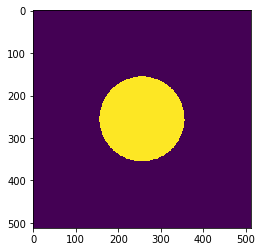
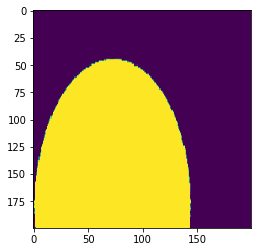
No, actually I don’t need to change the image resolution. My problem is this. I have produced a sample 3D image (reference 3D image) with a dimension of (200, 200, 320). After that, I have applied some set of transformations to it using vtkImageReslice filter and get deformed versions of it. Now I have set of deformed 3D images.
But the problem is when I visualize them, the full deformed ellipsoids did not appear in some 3D images since it exceeds the bounds. I need actually to capture the whole deformation of the ellipsoid region.
Here I attached two sample slices one is for the reference 3D image (see first image) and the other slice is for a deformed version of the reference 3D image (see last image).
---
### Author:  [@dave3d](https://discourse.vtk.org/u/dave3d)
#### Post date: [August 20, 2020, 4:30pm UTC](https://discourse.vtk.org/t/increase-the-3d-image-dimension/4019/5 "2020-08-20T16:30:31Z")
Oh, my bad for not understanding your question.