### Author:  [@simonesneault](https://discourse.vtk.org/u/simonesneault)
#### Post date: [September 4, 2019, 1:55pm UTC](https://discourse.vtk.org/t/intel-uhd-620-vtk-qt-bug-with-new-drivers-on-windows/1694/1 "2019-09-04T13:55:36Z")
Hello community,
We are affected by a bug on windows after some recent Intel drivers update (versions superior to 26.20.100.6708). It is no longer possible to have a QVTKOpenGLWidget and a QWebEngineView working in the same app.
It looks like both the QWebEngineView and VTK requires a valid context OpenGL, but for some unknown reason the QWebEngineView is no longer able to initialize its OpenGL context correctly when there is already a VTK window in the app. The QWebEngineView alone (without the vtk view) works perfectly, the VTK view alone also, but the 2 together won’t work properly.
Reproductible with :
- Windows 10 64 bit version
- Intel UHD 620 and intel UHD 630
- VTK 8.1 or 8.2 (build with VS studio 2015, 64 bits)
- Qt 5.9.4 64 bits
As soon as we downgrade the Intel driver version on the affected computers, it works fine. But one of our customer has bought a Lenovo ThinkPad X1 (7th Gen) that won’t let us downgrade the Intel driver…
I think some people are affected in Slicer, and this thread is probably related
> [@Problem with view update since Intel UHD Graphics 620 driver update](https://discourse.vtk.org/t/problem-with-view-update-since-intel-uhd-graphics-620-driver-update/1224):
>
> Since the update of the intel graphics driver this morning (to driver version 26.20.100.6859) the background color is no more applied to my VTK View and when moving the camera the old shapes are not removed. View with intel driver: [image] Expected View: [image] When I resize the view only the current position is displayed. I am working with Windows 10. When I activate the NVIDIA driver everything is fine, as it also used to be with the intel driver. All installed versions of our applica…
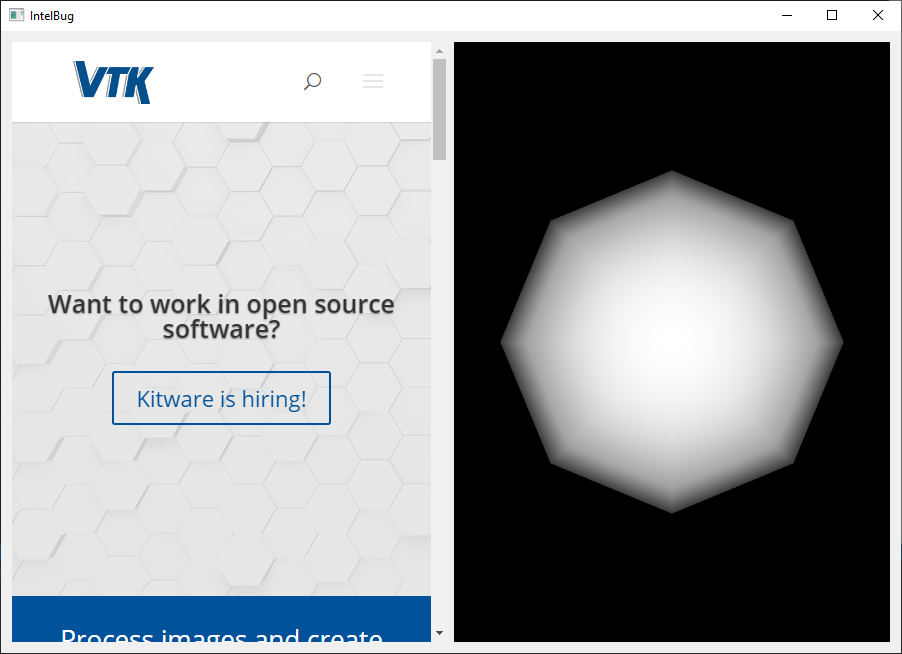
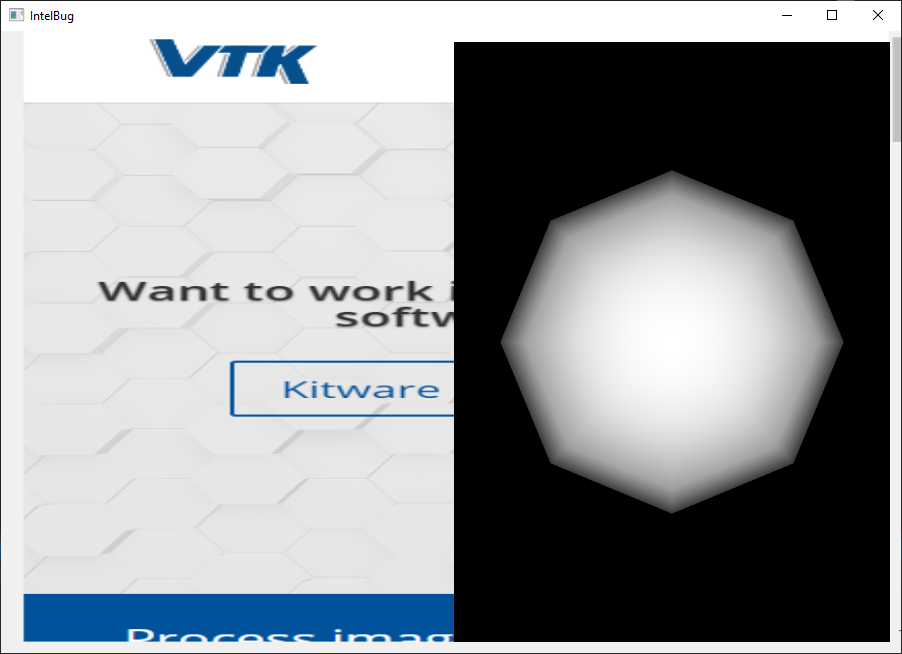
Attached is a minimal code that reproduces the problem. On the left a sphere is created in a vtk view, on the right a web view that should load [http://www.vtk.org](http://www.vtk.org). It works fine with an old driver, but with a new driver, the right part is empty, ie no webview…
Any clue ?
[CMakeLists.txt](https://discourse.vtk.org/uploads/short-url/o6Pvwg0VO1HAoUcg91gz9OW3HSu.txt) (397 Bytes) [main.cpp](https://discourse.vtk.org/uploads/short-url/phtz6EQ4jvUNRbli7etU3BVIzd1.cpp) (1.7 KB)
---
### Author:  [@lassoan](https://discourse.vtk.org/u/lassoan)
#### Post date: [September 4, 2019, 3:09pm UTC](https://discourse.vtk.org/t/intel-uhd-620-vtk-qt-bug-with-new-drivers-on-windows/1694/2 "2019-09-04T15:09:14Z")
Setting up the surface format is not trivial. Simply calling `QSurfaceFormat::setDefaultFormat( QVTKOpenGLWidget::defaultFormat() );` is certainly not enough. We received many problem reports with various configurations (OS, graphics card, etc.) since the OpenGL2 backend switch and ended up with this initialization sequence, which seems to work well (for computers that are not older than about 5 years):
>
---
### Author:  [@simonesneault](https://discourse.vtk.org/u/simonesneault)
#### Post date: [September 5, 2019, 7:47am UTC](https://discourse.vtk.org/t/intel-uhd-620-vtk-qt-bug-with-new-drivers-on-windows/1694/3 "2019-09-05T07:47:44Z")
Thanks @lassoan for your answer !
Indeed, we are aware that setting the default format like this is not enough. In fact, in our app we do something very similar than you do in Slicer to initialize properly our views in all different configurations (OSX, Windows, HiDPI display, etc).
However, asking for a `CompatibilityProfile` and all other option visible in your file does not solve the pb on the minimal example that is attached above.
On the affected machines, If we redirect qt errors to the standard output, we can see lines like this in the console
`composeAndFlush: makeCurrent() failed`
`composeAndFlush: makeCurrent() failed`
`composeAndFlush: makeCurrent() failed`
Anybody is facing the same error (with recent Intel driver on windows) ?
Thanks 🙂
---
### Author:  [@simonesneault](https://discourse.vtk.org/u/simonesneault)
#### Post date: [September 5, 2019, 9:03am UTC](https://discourse.vtk.org/t/intel-uhd-620-vtk-qt-bug-with-new-drivers-on-windows/1694/4 "2019-09-05T09:03:11Z")
And if i use a **QVTKOpenGLNativeWidget** instead of a **QVTKOpenGLWidget** it works just fine ☹
---
### Author:  [@estan](https://discourse.vtk.org/u/estan)
#### Post date: [September 5, 2019, 10:01am UTC](https://discourse.vtk.org/t/intel-uhd-620-vtk-qt-bug-with-new-drivers-on-windows/1694/5 "2019-09-05T10:01:42Z")
We ran into some problems with the new non-native widget, and in the end decided to revert to using `QVTKOpenGLNativeWidget` everywhere (see the thread at [How to decide between QVTKOpenGL{Native}Widget?](https://discourse.vtk.org/t/how-to-decide-between-qvtkopengl-native-widget/1070/4)). The common wisdom right now seems to be to use `QVTKOpenGLNativeWidget` unless you need stereo rendering.
I can have a go with your test case + latest drivers on my test Windows laptop after lunch. It has an older Intel GPU though. Do you know if you only saw this with UDH 620/630, not with older GPUs? I have a laptop with UHD620 as well, but I recently switched it to Linux 😕
---
### Author:  [@lassoan](https://discourse.vtk.org/u/lassoan)
#### Post date: [September 5, 2019, 12:30pm UTC](https://discourse.vtk.org/t/intel-uhd-620-vtk-qt-bug-with-new-drivers-on-windows/1694/6 "2019-09-05T12:30:56Z")
In Slicer, we always use QVTKOpenGLNativeWidget, too.
Windowed stereo rendering has become mostly irrelevant since immersive stereo virtual reality rendering is available in VTK, so there does not seem to be any reason to use QVTKOpenGLWidget.
If QVTKOpenGLWidget will keep having problems then probably VTK examples and documentation should be updated to suggest usage of QVTKOpenGLNativeWidget in Qt applications.
---
### Author:  [@simonesneault](https://discourse.vtk.org/u/simonesneault)
#### Post date: [September 5, 2019, 12:42pm UTC](https://discourse.vtk.org/t/intel-uhd-620-vtk-qt-bug-with-new-drivers-on-windows/1694/7 "2019-09-05T12:42:04Z")
Hello @estan, thanks for answering.
Yes, unfortunately migrating back to the QVTKOpenGLNativeWidget seems to be the correct solution. That’s a pain because it took us sooo much time to get all things right with the new QVTKOpenGLWidget when it came out a year ago.
Anyway thanks for your answer, we know what to do now 🙂
---
### Author:  [@estan](https://discourse.vtk.org/u/estan)
#### Post date: [September 5, 2019, 1:00pm UTC](https://discourse.vtk.org/t/intel-uhd-620-vtk-qt-bug-with-new-drivers-on-windows/1694/8 "2019-09-05T13:00:28Z")
I first tried running the testcase with the drivers that happened to be installed there (20.19.15.4531, as reported by Device Manager). The test case worked as expected, but there was a warning printout:
```
An OpenGL Core Profile was requested, but it is not supported on the current platform. Falling back to a non-Core profile. Note that this might cause rendering issues.
```
I then ran the Intel Driver & Support Assistant, but it said there were no newer driver available (this is an old Thinkpad T440s).
So I couldn’t really test what I wanted ☹
But yea, even if it hurts, going back to QVTKNativeOpenGLWidget is probably the best course of action. It has given us much less trouble than the native one.
---
### Author:  [@lassoan](https://discourse.vtk.org/u/lassoan)
#### Post date: [September 5, 2019, 1:05pm UTC](https://discourse.vtk.org/t/intel-uhd-620-vtk-qt-bug-with-new-drivers-on-windows/1694/9 "2019-09-05T13:05:34Z")
> [@simonesneault](#):
>
> Yes, unfortunately migrating back to the QVTKOpenGLNativeWidget seems to be the correct solution. That’s a pain because it took us sooo much time to get all things right with the new QVTKOpenGLWidget when it came out a year ago.
Switching to OpenGL2 rendering backend was indeed a big change, but did you have to update anything to work specifically with QVTKOpenGLWidget? My understanding is that QVTKOpenGLWidget and QVTKOpenGLNativeWidget are drop-in replacements.
QVTKOpenGLWidget may have been developed later, but it is not better than QVTKOpenGLNativeWidget - it is only for very special cases: when stereo rendering is needed and your application can comply to a number of restrictions. The conclusion of lengthy discussions on this topic is that [QVTKOpenGLNativeWidget is what people should use by default](https://discourse.vtk.org/t/how-to-decide-between-qvtkopengl-native-widget/1070/4). Current class names misleading but not changed to prevent further frustration of application developers.
---
### Author:  [@simonesneault](https://discourse.vtk.org/u/simonesneault)
#### Post date: [September 5, 2019, 2:34pm UTC](https://discourse.vtk.org/t/intel-uhd-620-vtk-qt-bug-with-new-drivers-on-windows/1694/10 "2019-09-05T14:34:54Z")
Thanks for trying the app !
In our tests we found that this problem only occurs for drivers superior to 26.20.100.6708 (this is the last one that is working here). With the latest 26.20.100.7000 from [intel website](https://downloadcenter.intel.com/fr/download/28991/C-ur-graphique-Intel-Windows-10-DCH?product=126789)
It no longer works. Here is what is should look like :
And what we get with the new driver :
---
### Author:  [@simonesneault](https://discourse.vtk.org/u/simonesneault)
#### Post date: [September 5, 2019, 2:40pm UTC](https://discourse.vtk.org/t/intel-uhd-620-vtk-qt-bug-with-new-drivers-on-windows/1694/11 "2019-09-05T14:40:47Z")
@lassoan
Yes we faced various problems with QVTKOpenGLWidget when we needed to enable MSAA along with the new dual depth peeling, and the compatibility with HiDPI displays was also quite complex to achieve.
Anyway, we will have to switch to a QVTKOpenGLNativeWidget in order to solve that particular problem (we don’t need stereo rendering either 🙂 )
+1 for choosing a new name
QVTKOpenGLWidget and QVTKOpenGLWidgetWarningOnlyForStereoRendering seems like a good one 🤣
---
### Author:  [@mwestphal](https://discourse.vtk.org/u/mwestphal)
#### Post date: [November 12, 2019, 12:16pm UTC](https://discourse.vtk.org/t/intel-uhd-620-vtk-qt-bug-with-new-drivers-on-windows/1694/12 "2019-11-12T12:16:10Z")
For reference, ParaView is tracking this here, but it should be a VTK issue:
[https://gitlab.kitware.com/paraview/paraview/issues/19364](https://gitlab.kitware.com/paraview/paraview/issues/19364)
---
### Author:  [@mwestphal](https://discourse.vtk.org/u/mwestphal)
#### Post date: [November 13, 2019, 6:01am UTC](https://discourse.vtk.org/t/intel-uhd-620-vtk-qt-bug-with-new-drivers-on-windows/1694/13 "2019-11-13T06:01:38Z")
@simonesneault : Do you mind sharing your minimal example ?
Edit : Nevermind, you already did.
---
### Author:  [@mwestphal](https://discourse.vtk.org/u/mwestphal)
#### Post date: [November 13, 2019, 6:33am UTC](https://discourse.vtk.org/t/intel-uhd-620-vtk-qt-bug-with-new-drivers-on-windows/1694/14 "2019-11-13T06:33:15Z")
I took the liberty to transcribe this topic into an actual issue. Do not hesitate to answer there in order to find the right resolution for this.
[https://gitlab.kitware.com/vtk/vtk/issues/17727](https://gitlab.kitware.com/vtk/vtk/issues/17727)
Thanks @lassoan @estan @simonesneault for your investigation and debugs.
This somehow passed under my radar in september.
> QVTKOpenGLWidgetWarningOnlyForStereoRendering
🤣
---
### Author:  [@mwestphal](https://discourse.vtk.org/u/mwestphal)
#### Post date: [November 13, 2019, 10:15pm UTC](https://discourse.vtk.org/t/intel-uhd-620-vtk-qt-bug-with-new-drivers-on-windows/1694/15 "2019-11-13T22:15:28Z")
In the issue, we discuss the actual possibility of renaming the widget (yet again). Please comment if you have any advice.