### Author:  [@rexthor](https://discourse.vtk.org/u/rexthor)
#### Post date: [July 26, 2024, 3:46pm UTC](https://discourse.vtk.org/t/is-ipyvtklink-still-maintained/14305/1 "2024-07-26T15:46:31Z")
Is [ipyvtklink](https://github.com/Kitware/ipyvtklink) still maintained? I ran into an issue which was exactly [this issue](https://github.com/Kitware/ipyvtklink/issues/37).
```auto
ipyvtklink. __version__ # is 0.2.3
vtk. __version__ # is 9.3.1
[rexthor@dogbearer geometry]$ jupyter --version
Selected Jupyter core packages...
IPython : 8.25.0
ipykernel : 6.29.4
ipywidgets : 7.8.2
jupyter_client : 8.6.2
jupyter_core : 5.7.2
jupyter_server : 2.14.1
jupyterlab : 4.2.2
nbclient : 0.10.0
nbconvert : 7.16.4
nbformat : 5.10.4
notebook : 7.2.1
qtconsole : not installed
traitlets : 5.14.3
```
---
### Author:  [@danlipsa](https://discourse.vtk.org/u/danlipsa)
#### Post date: [July 29, 2024, 5:57pm UTC](https://discourse.vtk.org/t/is-ipyvtklink-still-maintained/14305/2 "2024-07-29T17:57:01Z")
I don’t think it is. I suggest using Trame instead. Besides running a VTK or paraview script in jupyter, Trame allows you to create your own interface in the Web browser and maintains and synchronizes state between client and server.
[https://github.com/Kitware/trame](https://github.com/Kitware/trame)
Dan
---
### Author:  [@rexthor](https://discourse.vtk.org/u/rexthor)
#### Post date: [July 30, 2024, 1:03pm UTC](https://discourse.vtk.org/t/is-ipyvtklink-still-maintained/14305/3 "2024-07-30T13:03:17Z")
Thanks, Trame looks great.
---
### Author:  [@rexthor](https://discourse.vtk.org/u/rexthor)
#### Post date: [July 30, 2024, 5:51pm UTC](https://discourse.vtk.org/t/is-ipyvtklink-still-maintained/14305/4 "2024-07-30T17:51:53Z")
I’m sure Trame is fine, I’ll look at it. However, I was trying to pare down `ipyvtklink` to the bare minimum in order to figure out why things were crashing Jupyter. I think the call that crashes it is `Render()` … test Jupyter code is below. Jupyter is launched from a WSL2 window and viewed in Chrome from Windows. Jupyter sees the renderer as:
``
```python
from vtkmodules.vtkFiltersSources import vtkCylinderSource
from vtkmodules.vtkRenderingCore import (
vtkActor,
vtkPolyDataMapper,
vtkRenderer,
vtkRenderWindow,
vtkRenderWindowInteractor)
from vtkmodules.vtkInteractionStyle import vtkInteractorStyleTrackballCamera
import numpy as np
from ipycanvas import Canvas
from ipyevents import Event
from ipywidgets import Image
from vtkmodules.vtkCommonCore import vtkUnsignedCharArray
from vtk.util.numpy_support import vtk_to_numpy
cylinder = vtkCylinderSource()
cylinder.SetResolution(8)
mapper = vtkPolyDataMapper()
mapper.SetInputConnection(cylinder.GetOutputPort())
actor = vtkActor()
actor.SetMapper(mapper)
ren = vtkRenderer()
ren_win = vtkRenderWindow()
ren_win.SetOffScreenRendering(1)
ren_win.SetSize(600, 600)
ren_win.AddRenderer(ren)
iren = vtkRenderWindowInteractor()
iren.SetRenderWindow(ren_win)
style = vtkInteractorStyleTrackballCamera()
iren.SetInteractorStyle(style)
ren.AddActor(actor)
ren.ResetCamera()
# ren.Render() # <-- crashes if I run this
# iren.Start()
```
---
### Author:  [@dgobbi](https://discourse.vtk.org/u/dgobbi)
#### Post date: [July 30, 2024, 6:26pm UTC](https://discourse.vtk.org/t/is-ipyvtklink-still-maintained/14305/5 "2024-07-30T18:26:48Z")
Just a side-comment about imports, totally unrelated to ipyvtklink:
> [@](#):
>
> `from vtk.util.numpy_support import vtk_to_numpy`
It’s best not to import from both `vtk` and `vtkmodules` in the same program. You can do this instead:
```python
from vtkmodules.util.numpy_support import vtk_to_numpy
```
The issue that “`from vtk.util... import ...`” causes “`vtk`” to be imported, which imports all 100+ VTK modules. This negates any advantage of using “`vtkmodules`”.
Also, importing “`vtk`” will import `vtkRenderingOpenGL2`, `vtkRenderingFreeType`, `vtkInteractionStyle` etc. as a side-effect. When using “`vtkmodules`”, it’s best to import these factory implementation modules explicitly.
---
### Author:  [@rexthor](https://discourse.vtk.org/u/rexthor)
#### Post date: [July 30, 2024, 6:47pm UTC](https://discourse.vtk.org/t/is-ipyvtklink-still-maintained/14305/6 "2024-07-30T18:47:12Z")
Ok changing the import to `from vtkmodules.util.numpy_support import vtk_to_numpy` fixed the problem with `ren.Render()` crashing the notebook. Now it seems like extracting the render image gives no output:
```python
cylinder = vtkCylinderSource()
cylinder.SetResolution(8)
mapper = vtkPolyDataMapper()
mapper.SetInputConnection(cylinder.GetOutputPort())
actor = vtkActor()
actor.SetMapper(mapper)
ren = vtkRenderer()
ren_win = vtkRenderWindow()
ren_win.SetOffScreenRendering(1)
ren_win.SetSize(600, 600)
ren_win.AddRenderer(ren)
iren = vtkRenderWindowInteractor()
iren.SetRenderWindow(ren_win)
style = vtkInteractorStyleTrackballCamera()
iren.SetInteractorStyle(style)
ren.AddActor(actor)
ren.ResetCamera()
ren.Render()
iren.Start()
w, h = ren_win.GetSize()
arr = vtkUnsignedCharArray()
ren_win.GetRGBACharPixelData(0, 0, w - 1, h - 1, 0, arr)
arr.GetNumberOfTuples()
# ^^^ prints 0
# data = vtk_to_numpy(arr).reshape(h, w, -1)[::-1]
# img = Image(value=data.tobytes(), width=w, height=h)
# c = Canvas()
# c.draw_image(img)
```
---
### Author:  [@dgobbi](https://discourse.vtk.org/u/dgobbi)
#### Post date: [July 30, 2024, 7:00pm UTC](https://discourse.vtk.org/t/is-ipyvtklink-still-maintained/14305/7 "2024-07-30T19:00:06Z")
That’s because the program doesn’t import `vtkmodules.vtkRenderingOpenGL2`. Before, it was imported as a side-effect when you imported from the “`vtk`” package.
Unless `vtkRenderingOpenGL2` is imported, either explicitly or as a side-effect, VTK cannot render anything.
The crash is probably because the `DISPLAY` variable is not set on the remote system, therefore VTK can’t create an OpenGL context to render into. An X display is needed even for off-screen rendering (except maybe if VTK is compiled to use osmesa, but I don’t use osmesa so I can’t really say for sure).
---
### Author:  [@rexthor](https://discourse.vtk.org/u/rexthor)
#### Post date: [July 30, 2024, 7:08pm UTC](https://discourse.vtk.org/t/is-ipyvtklink-still-maintained/14305/8 "2024-07-30T19:08:38Z")
Indeed, the crash is back with the addition of `import vtkmodules.vtkRenderingOpenGL2`. On the WSL2 terminal, `echo $DISPLAY` gives `:0`. It’s also possible for things like `xeyes &` to pop up windows from WSL2 …
---
### Author:  [@dgobbi](https://discourse.vtk.org/u/dgobbi)
#### Post date: [July 30, 2024, 7:11pm UTC](https://discourse.vtk.org/t/is-ipyvtklink-still-maintained/14305/9 "2024-07-30T19:11:20Z")
Is the DISPLAY variable set when VTK is run from within Jupyter? Try `print(os.environ['DISPLAY'])` to be sure.
Also make sure the WSL2 environment supports OpenGL 3.2 or greater. Use `glxinfo` to check.
---
### Author:  [@rexthor](https://discourse.vtk.org/u/rexthor)
#### Post date: [July 30, 2024, 7:26pm UTC](https://discourse.vtk.org/t/is-ipyvtklink-still-maintained/14305/10 "2024-07-30T19:26:25Z")
Yes, from inside of Jupyter, `print(os.environ["DISPLAY"))` prints `:0`.
The output from Jupyter of `print(os.system("glxinfo"))` is huge, but I tried to chop out things that had version in them.
I can also show vtkRenderWindows from the console in WSL2 … it should have the right versions.
```auto
name of display: :0
display: :0 screen: 0
direct rendering: Yes
server glx vendor string: SGI
server glx version string: 1.4
client glx vendor string: Mesa Project and SGI
client glx version string: 1.4
GLX version: 1.4
Extended renderer info (GLX_MESA_query_renderer):
Vendor: Microsoft Corporation (0xffffffff)
Device: D3D12 (Intel(R) Iris(R) Xe Graphics) (0xffffffff)
Version: 23.2.1
Accelerated: yes
Video memory: 16354MB
Unified memory: yes
Preferred profile: core (0x1)
Max core profile version: 4.1
Max compat profile version: 4.1
Max GLES1 profile version: 1.1
Max GLES[23] profile version: 3.0
OpenGL vendor string: Microsoft Corporation
OpenGL renderer string: D3D12 (Intel(R) Iris(R) Xe Graphics)
OpenGL core profile version string: 4.1 (Core Profile) Mesa 23.2.1-1ubuntu3.1~22.04.2
OpenGL version string: 4.1 (Compatibility Profile) Mesa 23.2.1-1ubuntu3.1~22.04.2
OpenGL shading language version string: 4.10
OpenGL ES profile version string: OpenGL ES 3.0 Mesa 23.2.1-1ubuntu3.1~22.04.2 OpenGL ES profile shading language version string: OpenGL ES GLSL ES 3.00
```
---
### Author:  [@dgobbi](https://discourse.vtk.org/u/dgobbi)
#### Post date: [July 30, 2024, 7:59pm UTC](https://discourse.vtk.org/t/is-ipyvtklink-still-maintained/14305/11 "2024-07-30T19:59:47Z")
Yes, OpenGL 4.1 should suffice. If you want to go further down this rabbit-hole, [https://gitlab.kitware.com/vtk/vtk/-/issues/18791](https://gitlab.kitware.com/vtk/vtk/-/issues/18791) might have some useful info. But don’t be surprised if it’s not possible to make it work.
---
### Author:  [@rexthor](https://discourse.vtk.org/u/rexthor)
#### Post date: [July 30, 2024, 8:06pm UTC](https://discourse.vtk.org/t/is-ipyvtklink-still-maintained/14305/12 "2024-07-30T20:06:13Z")
I’m pretty sure the driver isn’t the problem. I can run VTK without Jupyter and it works just fine from inside of WSL2, and `glxgears` also works fine … Jupyter seems to eat all of the errors that I might otherwise use to debug it.
Thanks a bunch for looking at it.
---
### Author:  [@rexthor](https://discourse.vtk.org/u/rexthor)
#### Post date: [July 31, 2024, 7:31pm UTC](https://discourse.vtk.org/t/is-ipyvtklink-still-maintained/14305/13 "2024-07-31T19:31:30Z")
For whoever might be looking at this in the future, I did find a solution with a package called `panel`:
```python
import panel as pn
# This did NOT WORK with the module imports ... that's why I:
import vtk
cylinder = vtk.vtkCylinderSource()
cylinder.SetResolution(8)
mapper = vtk.vtkPolyDataMapper()
mapper.SetInputConnection(cylinder.GetOutputPort())
actor = vtk.vtkActor()
actor.SetMapper(mapper)
ren = vtk.vtkRenderer()
ren_win = vtk.vtkRenderWindow()
ren_win.SetOffScreenRendering(1)
ren_win.SetSize(600, 600)
ren_win.AddRenderer(ren)
iren = vtk.vtkRenderWindowInteractor()
iren.SetRenderWindow(ren_win)
style = vtk.vtkInteractorStyleTrackballCamera()
iren.SetInteractorStyle(style)
ren.AddActor(actor)
ren.ResetCamera()
ren.Render()
pn.extension('vtk')
pn.pane.VTK(ren_win)
```
---
### Author:  [@dgobbi](https://discourse.vtk.org/u/dgobbi)
#### Post date: [July 31, 2024, 8:21pm UTC](https://discourse.vtk.org/t/is-ipyvtklink-still-maintained/14305/14 "2024-07-31T20:21:59Z")
Nice. Just a note that it should work with modules if you
```python
import vtkmodules.vtkRenderingOpenGL2
import vtkmodules.vtkInteractionStyle
```
There’s nothing fundamentally different about vtkmodules vs vtk, except that the latter autoloads all VTK modules in the background.
* * *
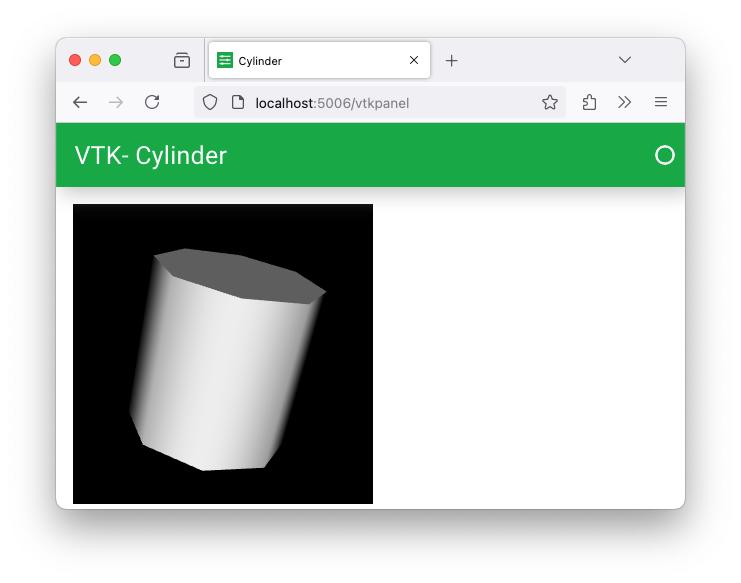
Yeah, panel seems to work nicely. I guess it uses vtk.js in the browser? For me, the basic operation was to insert the following at the end of a simple VTK program:
```python
# VTK code that creates renWin goes here
import panel as pn
pn.extension('vtk')
vtk_pane = pn.pane.VTK(renWin)
pn.template.MaterialTemplate(
site="VTK", title="Cylinder", main=[vtk_pane],
).servable();
```
then in the shell
```auto
panel serve program.py
```
And finally, go to the provided URL:
---
### Author:  [@Sebastien\_Jourdain](https://discourse.vtk.org/u/Sebastien_Jourdain)
#### Post date: [August 7, 2024, 4:32pm UTC](https://discourse.vtk.org/t/is-ipyvtklink-still-maintained/14305/15 "2024-08-07T16:32:11Z")
Using panel works here because it rely on vtk.js and not on VTK (C++) for rendering.