### Author:  [@jie\_baoer](https://discourse.vtk.org/u/jie_baoer)
#### Post date: [December 15, 2025, 9:12am UTC](https://discourse.vtk.org/t/is-it-necessary-to-call-vtkrenderwindow-render-after-adjusting-the-camera/16183/1 "2025-12-15T09:12:59Z")
Hello, everyone
After adjusting the position of the vtkCamera, I need to call vtkRenderWindow::Render() to refresh the view. However, in my application scenario (1 million nodes in Debug mode), each call to Render() takes about 4 seconds. The object I drew remained unchanged; I merely adjusted the camera perspective.
```
vtkSmartPointer camera = renderer->GetActiveCamera();
camera->SetPosition(newX, newY, newZ);
*// camera->SetFocalPoint(...); // or other camera parameter adjustments*
renderWindow->Render(); *// This call takes about 4 seconds*
My question:
```
- When only the camera parameters are adjusted without changing the scene content, is it necessary to call Render()? Is there a more efficient way to refresh?
- Is it normal for each Render() call to take 4 seconds in a scenario with 1 million nodes? Or does it indicate that there is a problem with my rendering pipeline?
---
### Author:  [@Paulo\_Carvalho](https://discourse.vtk.org/u/Paulo_Carvalho)
#### Post date: [December 15, 2025, 3:50pm UTC](https://discourse.vtk.org/t/is-it-necessary-to-call-vtkrenderwindow-render-after-adjusting-the-camera/16183/2 "2025-12-15T15:50:50Z")
Hello,
1. Yes, any changes made to the camera requires a re-rendering;
2. It depends on far too many factors. I had wireframe scenes rendering in thousand-some FPS, on the other hand, I had a scene once that took hours to photorealistically render using a ray-casting algorithm. Both normal cases. But if your scene requires 4s to render, you may need to switch to a simplified data and/or rendering pipeline during interaction and switch back after user releases the mouse.
best,
PC
---
### Author:  [@dgobbi](https://discourse.vtk.org/u/dgobbi)
#### Post date: [December 15, 2025, 4:54pm UTC](https://discourse.vtk.org/t/is-it-necessary-to-call-vtkrenderwindow-render-after-adjusting-the-camera/16183/3 "2025-12-15T16:54:52Z")
VTK uses timestamps to check whether to reload the geometry onto the GPU. So if the timestamp on the points array doesn’t change, calling Render() after moving the camera should be quick, since the buffers are re-used.
A million nodes isn’t much. Slow rendering in VTK is more often caused by the use of a large number of actors (even 1000 actors would be considered excessive) rather than the use of large datasets.
---
### Author:  [@jie\_baoer](https://discourse.vtk.org/u/jie_baoer)
#### Post date: [December 15, 2025, 5:02pm UTC](https://discourse.vtk.org/t/is-it-necessary-to-call-vtkrenderwindow-render-after-adjusting-the-camera/16183/4 "2025-12-15T17:02:56Z")
> [@dgobbi](#):
>
> the points array doesn’t change
Is there any way to check if the timestamp has changed? What I can confirm is that only one Actor was added to carry the node object, and the adjustment to the camera was only to change the position and focus. However, the time consumed by calling render in the end is basically the same as that of initially adding the actor
---
### Author:  [@jie\_baoer](https://discourse.vtk.org/u/jie_baoer)
#### Post date: [December 15, 2025, 5:07pm UTC](https://discourse.vtk.org/t/is-it-necessary-to-call-vtkrenderwindow-render-after-adjusting-the-camera/16183/5 "2025-12-15T17:07:08Z")
> [@Paulo\_Carvalho](#):
>
> you may need to switch to a simplified data and/or rendering pipeline during interaction and switch back after user releases the mouse
Are there any relevant filters or examples for the generation of this simplified model? Or add examples of multiple rendering pipelines. This is indeed a good idea
---
### Author:  [@Paulo\_Carvalho](https://discourse.vtk.org/u/Paulo_Carvalho)
#### Post date: [December 15, 2025, 6:59pm UTC](https://discourse.vtk.org/t/is-it-necessary-to-call-vtkrenderwindow-render-after-adjusting-the-camera/16183/6 "2025-12-15T18:59:57Z")
Without sharing your code, it’s hard to tell.
---
### Author:  [@dgobbi](https://discourse.vtk.org/u/dgobbi)
#### Post date: [December 15, 2025, 7:32pm UTC](https://discourse.vtk.org/t/is-it-necessary-to-call-vtkrenderwindow-render-after-adjusting-the-camera/16183/7 "2025-12-15T19:32:15Z")
> [@jie\_baoer](#):
>
> Is there any way to check if the timestamp has changed?
Call `GetMTime()` on the `vtkPoints` object for your dataset, e.g. `data->GetPoints()->GetMTime()` if your dataset is `vtkPolyData` or `vtkUnstructuredGrid`. Call it after the first Render(), and call it again after the next Render(). The returned value should not change. You can do the same check with any scalar arrays that are in your dataset.
---
### Author:  [@jie\_baoer](https://discourse.vtk.org/u/jie_baoer)
#### Post date: [December 24, 2025, 1:59am UTC](https://discourse.vtk.org/t/is-it-necessary-to-call-vtkrenderwindow-render-after-adjusting-the-camera/16183/8 "2025-12-24T01:59:54Z")
> [@dgobbi](#):
>
> VTK uses timestamps to check whether to reload the geometry onto the GPU. So if the timestamp on the points array doesn’t change, calling Render() after moving the camera should be quick, since the buffers are re-used.
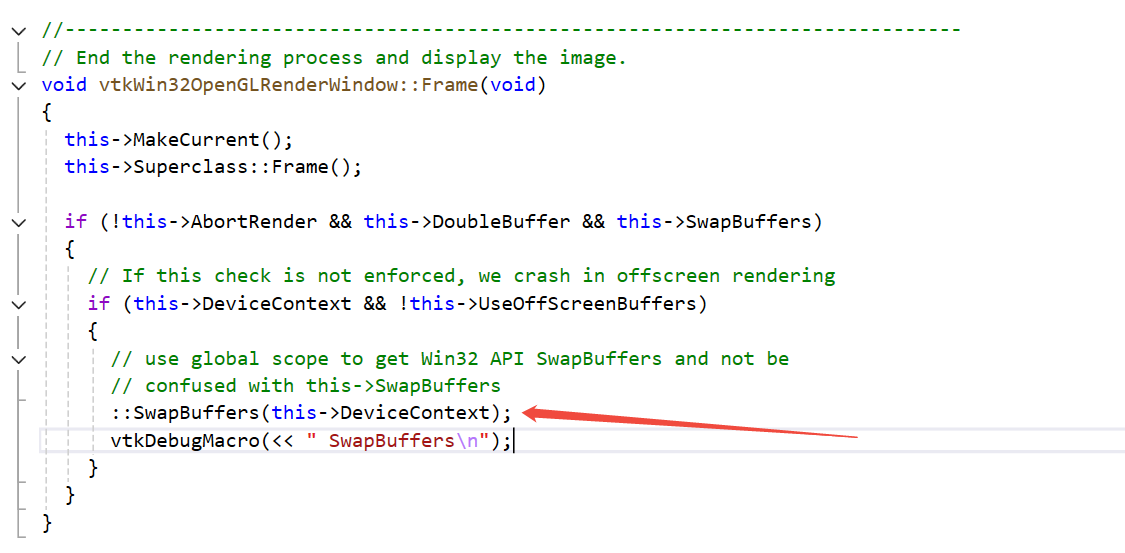
I found the rendering time consuming is associated with the configuration of the computer, I use a vtkWin32OpenGLRenderWindow, draw the same test code 1 million nodes, just adjust the camera position, take on different computers difference is very big, a within 10 ms, a time-consuming 4-5 s. I know that the performance of a computer can affect rendering efficiency, but is it normal for there to be such a big difference? Could it be a problem with the computer environment configuration? Could you please offer me some ideas for troubleshooting
The specific location of the time-consuming code:
vtkWin32OpenGLRenderWindow::Frame::SwapBuffers(this-\>DeviceContext)
Computer configuration
It took 10ms
Processor: 12th Gen Intel(R) Core™ i5-12500 3.00 GHz
The device is equipped with 16.0GB of RAM
GPU: Intel(R) UHD Graphics 770
It takes 4 to 5 seconds
Processor: Intel Xeon(R) Platinum 2.50 GHz
The device is equipped with 16.0GB of RAM
No GPU
---
### Author:  [@jie\_baoer](https://discourse.vtk.org/u/jie_baoer)
#### Post date: [December 24, 2025, 3:40am UTC](https://discourse.vtk.org/t/is-it-necessary-to-call-vtkrenderwindow-render-after-adjusting-the-camera/16183/9 "2025-12-24T03:40:34Z")
My problem should be caused by the server computer not having a GPU
---
### Author:  [@dgobbi](https://discourse.vtk.org/u/dgobbi)
#### Post date: [December 24, 2025, 3:46am UTC](https://discourse.vtk.org/t/is-it-necessary-to-call-vtkrenderwindow-render-after-adjusting-the-camera/16183/10 "2025-12-24T03:46:09Z")
When you change the camera parameters, the world-to-view transformation needs to be applied on all your nodes. With a GPU this is fast, because GPUs have dedicated massively-parallel hardware for doing this. But if you have no GPU, then OpenGL falls back to software rendering and these transformations are done on the CPU, which is much slower for this kind of math.
---
### Author:  [@jie\_baoer](https://discourse.vtk.org/u/jie_baoer)
#### Post date: [December 24, 2025, 3:49am UTC](https://discourse.vtk.org/t/is-it-necessary-to-call-vtkrenderwindow-render-after-adjusting-the-camera/16183/11 "2025-12-24T03:49:53Z")
Yes, I overlooked this point. Thank you for your explanation