# Is there a way to convert a view of a 3D Actor (for example: a view in the X-Z direction) to a 2D Actor.
**URL:** https://discourse.vtk.org/t/is-there-a-way-to-convert-a-view-of-a-3d-actor-for-example-a-view-in-the-x-z-direction-to-a-2d-actor/2684
**Category:** Support
**Created:** [February 23, 2020, 9:37am UTC](https://discourse.vtk.org/t/is-there-a-way-to-convert-a-view-of-a-3d-actor-for-example-a-view-in-the-x-z-direction-to-a-2d-actor/2684 "2020-02-23T09:37:55Z")
**Posts on this page:** 8
**Page:** 1
### Author:  [@kknnnyy](https://discourse.vtk.org/u/kknnnyy)
#### Post date: [February 23, 2020, 9:37am UTC](https://discourse.vtk.org/t/is-there-a-way-to-convert-a-view-of-a-3d-actor-for-example-a-view-in-the-x-z-direction-to-a-2d-actor/2684/1 "2020-02-23T09:37:55Z")
I need to get a 3D view in the X-Y, X-Z, Y-Z directions, so I need to convert a 3D Actor to a 2D Actor. How to get a 2D view (not locking the 3d Actor camera)
---
### Author:  [@lassoan](https://discourse.vtk.org/u/lassoan)
#### Post date: [February 25, 2020, 5:47am UTC](https://discourse.vtk.org/t/is-there-a-way-to-convert-a-view-of-a-3d-actor-for-example-a-view-in-the-x-z-direction-to-a-2d-actor/2684/2 "2020-02-25T05:47:38Z")
There is no difference between 2D and 3D renderers: everything is 3D, you just make it feel like 2D by restricting 3D camera rotation. There are 2D actors and mappers, but probably you don’t need those if you just want to show a 3D object from different viewpoints.
---
### Author:  [@kknnnyy](https://discourse.vtk.org/u/kknnnyy)
#### Post date: [February 26, 2020, 2:01am UTC](https://discourse.vtk.org/t/is-there-a-way-to-convert-a-view-of-a-3d-actor-for-example-a-view-in-the-x-z-direction-to-a-2d-actor/2684/3 "2020-02-26T02:01:27Z")
Yes, thank you very much, 3d actor can also represent 2d actor.
---
### Author:  [@Paulo\_Carvalho](https://discourse.vtk.org/u/Paulo_Carvalho)
#### Post date: [February 26, 2020, 12:30pm UTC](https://discourse.vtk.org/t/is-there-a-way-to-convert-a-view-of-a-3d-actor-for-example-a-view-in-the-x-z-direction-to-a-2d-actor/2684/4 "2020-02-26T12:30:01Z")
Hello, friend,
If I understood correctly you want to point the camera at the Cartesian planes:
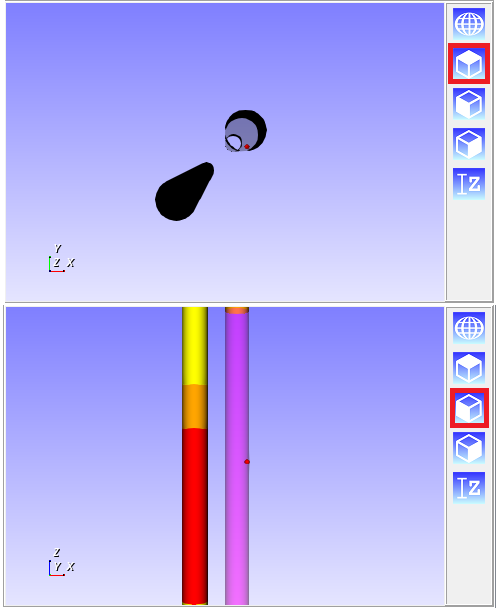
Here’s the code I use:
```auto
void View3DWidget::onLookAtXY()
{
//_renderer->ResetCamera();
double *fp = _renderer->GetActiveCamera()->GetFocalPoint();
double *p = _renderer->GetActiveCamera()->GetPosition();
double dist
= std::sqrt((p[0] - fp[0]) * (p[0] - fp[0]) + (p[1] - fp[1]) * (p[1] - fp[1])
+ (p[2] - fp[2]) * (p[2] - fp[2]));
_renderer->GetActiveCamera()->SetPosition(fp[0], fp[1], fp[2] + dist);
_renderer->GetActiveCamera()->SetViewUp(0.0, 1.0, 0.0);
// redraw the scene
_vtkwidget->GetRenderWindow()->Render();
}
void View3DWidget::onLookAtXZ()
{
double *fp = _renderer->GetActiveCamera()->GetFocalPoint();
double *p = _renderer->GetActiveCamera()->GetPosition();
double dist
= std::sqrt((p[0] - fp[0]) * (p[0] - fp[0]) + (p[1] - fp[1]) * (p[1] - fp[1])
+ (p[2] - fp[2]) * (p[2] - fp[2]));
_renderer->GetActiveCamera()->SetPosition(fp[0], fp[1] - dist, fp[2]);
_renderer->GetActiveCamera()->SetViewUp(0.0, 0.0, 1.0);
// redraw the scene
_vtkwidget->GetRenderWindow()->Render();
}
void View3DWidget::onLookAtYZ()
{
double *fp = _renderer->GetActiveCamera()->GetFocalPoint();
double *p = _renderer->GetActiveCamera()->GetPosition();
double dist
= std::sqrt((p[0] - fp[0]) * (p[0] - fp[0]) + (p[1] - fp[1]) * (p[1] - fp[1])
+ (p[2] - fp[2]) * (p[2] - fp[2]));
_renderer->GetActiveCamera()->SetPosition(fp[0] + dist, fp[1], fp[2]);
_renderer->GetActiveCamera()->SetViewUp(0.0, 0.0, 1.0);
// redraw the scene
_vtkwidget->GetRenderWindow()->Render();
}
```
Complete code here: [https://github.com/PauloCarvalhoRJ/gammaray/blob/master/viewer3d/view3dwidget.cpp](https://github.com/PauloCarvalhoRJ/gammaray/blob/master/viewer3d/view3dwidget.cpp)
I hope this helps.
regards,
Paulo
---
### Author:  [@kknnnyy](https://discourse.vtk.org/u/kknnnyy)
#### Post date: [March 8, 2020, 4:22pm UTC](https://discourse.vtk.org/t/is-there-a-way-to-convert-a-view-of-a-3d-actor-for-example-a-view-in-the-x-z-direction-to-a-2d-actor/2684/6 "2020-03-08T16:22:03Z")
I’m sorry I didn’t clarify the problem, so I made a video. In the video, I have a UGrid composed of Hex. I need to read the 2D plot by IJK. How should the 2D function be implemented? Or any good suggestions?
[/uploads/default/original/2X/8/86460c74c0bf76f6b3c1e0137676301468594fbf.mp4](https://discourse.vtk.org/uploads/default/original/2X/8/86460c74c0bf76f6b3c1e0137676301468594fbf.mp4)
---
### Author:  [@Paulo\_Carvalho](https://discourse.vtk.org/u/Paulo_Carvalho)
#### Post date: [March 9, 2020, 11:28am UTC](https://discourse.vtk.org/t/is-there-a-way-to-convert-a-view-of-a-3d-actor-for-example-a-view-in-the-x-z-direction-to-a-2d-actor/2684/7 "2020-03-09T11:28:50Z")
So you want to render IJ, JK, or IK slices? I do somethig close to that:
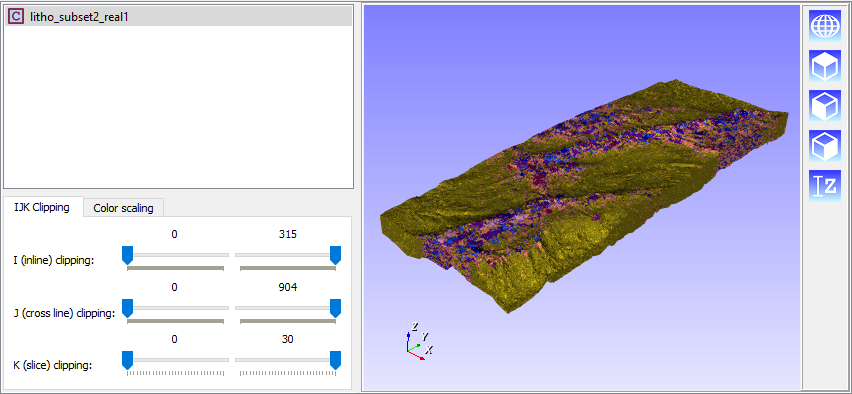
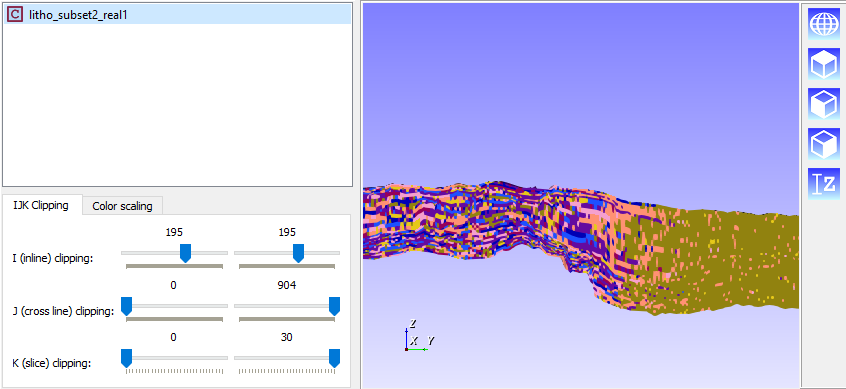
In your case, you just want one slice instead of an interval of slices. The code for this is here:
```auto
//Since it is an Attribute of a GeoGrid, get the corresponding VTK object.
vtkSmartPointer unstructuredGrid =
dynamic_cast(_viewObjects.threshold->GetInputDataObject(0,0));
if( ! unstructuredGrid ){
Application::instance()->logError("V3DCfgWidForAttributeIn3DCartesianGrid::onUserMadeChanges(): unstructured grid not found. Check View3DBuilders::buildForAttributeGeoGrid().");
return;
}
//Get visibility array
vtkSmartPointer visibilityArray =
dynamic_cast( unstructuredGrid->GetCellData()->GetArray( "Visibility" ) );
if( ! visibilityArray ){
Application::instance()->logError("V3DCfgWidForAttributeIn3DCartesianGrid::onUserMadeChanges(): visibility array not found. Check View3DBuilders::buildForAttributeGeoGrid().");
return;
}
//Set transparency values for those cells outside clippling limits
// convention:
// 1 = visible
// 0 = invisible due to null value
// -1 = invisible due to being outside IJK clipping limits
int nI = m_gridFile->getNI();
int nJ = m_gridFile->getNJ();
int nK = m_gridFile->getNK();
for( int k = 0; k < nK; ++k )
for( int j = 0; j < nJ; ++j )
for( int i = 0; i < nI; ++i ) {
int cellIndex = k*nJ*nI + j*nI + i;
InvisibiltyFlag currentFlag = (InvisibiltyFlag)
( visibilityArray->GetValue( cellIndex ) );
if( i >= ui->sldILowClip->value() &&
i <= ui->sldIHighClip->value() &&
j >= ui->sldJLowClip->value() &&
j <= ui->sldJHighClip->value() &&
k >= ui->sldKLowClip->value() &&
k <=ui->sldKHighClip->value() ){
if( currentFlag == InvisibiltyFlag::INVISIBLE_NDV_AND_UVW_CLIPPING )
visibilityArray->SetValue( cellIndex, (int)InvisibiltyFlag::INVISIBLE_NDV_VALUE );
else if( currentFlag == InvisibiltyFlag::INVISIBLE_UVW_CLIPPING )
visibilityArray->SetValue( cellIndex, (int)InvisibiltyFlag::VISIBLE );
} else {
if( currentFlag == InvisibiltyFlag::VISIBLE )
visibilityArray->SetValue( cellIndex, (int)InvisibiltyFlag::INVISIBLE_UVW_CLIPPING );
else if( currentFlag == InvisibiltyFlag::INVISIBLE_NDV_VALUE )
visibilityArray->SetValue( cellIndex, (int)InvisibiltyFlag::INVISIBLE_NDV_AND_UVW_CLIPPING );
}
}
unstructuredGrid->GetCellData()->Modified();
```
This doesn’t sound very elegant, but that was the way I found to perform IJK clipping in a `vtkUnstructuredGrid`, which I believe is your case. For regular grids we have `vtkExtractGrid` which requires much less lines of code. Complete code here: [https://github.com/PauloCarvalhoRJ/gammaray/blob/master/viewer3d/view3dconfigwidgets/v3dcfgwidforattributein3dcartesiangrid.cpp](https://github.com/PauloCarvalhoRJ/gammaray/blob/master/viewer3d/view3dconfigwidgets/v3dcfgwidforattributein3dcartesiangrid.cpp) .
---
### Author:  [@kknnnyy](https://discourse.vtk.org/u/kknnnyy)
#### Post date: [March 9, 2020, 5:28pm UTC](https://discourse.vtk.org/t/is-there-a-way-to-convert-a-view-of-a-3d-actor-for-example-a-view-in-the-x-z-direction-to-a-2d-actor/2684/8 "2020-03-09T17:28:47Z")
Thank you very much. My program also implements the IJK Clip function by using a similar method to yours. However, I need to find a suitable method to render 2D, or the area behind will be displayed if it is larger than the front area.
---
### Author:  [@Paulo\_Carvalho](https://discourse.vtk.org/u/Paulo_Carvalho)
#### Post date: [March 9, 2020, 9:35pm UTC](https://discourse.vtk.org/t/is-there-a-way-to-convert-a-view-of-a-3d-actor-for-example-a-view-in-the-x-z-direction-to-a-2d-actor/2684/9 "2020-03-09T21:35:52Z")
As stated by @lassoan, there is no strictly 2D canvas in VTK. You achive a 2D look and feel by: 1) looking at one of the Cartesian planes; 2) disable rotation in camera movement; 3) Enable parallel projection; 4) Disable rendering of other actors that you may have in your scene.
Either this or getting into the trouble of extracting a slice, parsing its topology and rendering it in a dedicated 2D API like Qt’s QPainter.