# Issue with vtkActor in different screen sizes
**URL:** https://discourse.vtk.org/t/issue-with-vtkactor-in-different-screen-sizes/10847
**Category:** Support
**Created:** [March 2, 2023, 1:32am UTC](https://discourse.vtk.org/t/issue-with-vtkactor-in-different-screen-sizes/10847 "2023-03-02T01:32:27Z")
**Posts on this page:** 11
**Page:** 1
### Author:  [@WailmerPail](https://discourse.vtk.org/u/WailmerPail)
#### Post date: [March 2, 2023, 1:32am UTC](https://discourse.vtk.org/t/issue-with-vtkactor-in-different-screen-sizes/10847/1 "2023-03-02T01:32:27Z")
Hi teams,
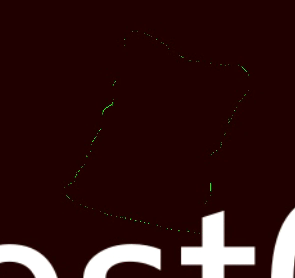
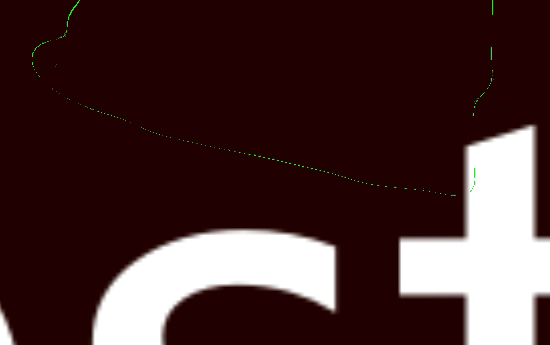
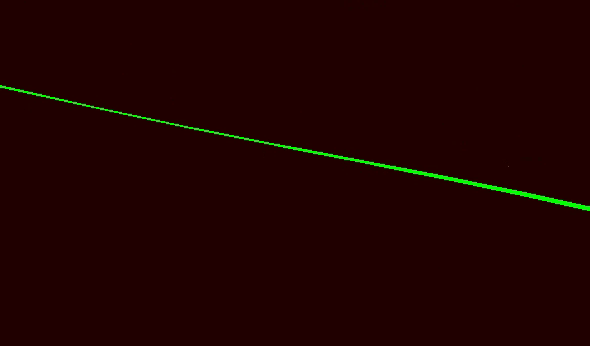
I am currently facing an issue while using vtkActor. The problem is that the actor is not clearly visible on different screen sizes. For instance, when viewed from a distance, it appears to be broken or fragmented. I am using a regular vtkActor and not the optimized version.
Is there a way to keep the actor’s thickness consistent across different screen sizes? I have tried adjusting the line width, but it doesn’t seem to have any effect.
Can anyone suggest a solution to this issue?
Thanks!
As shown in the figure below, when it zooms in to the maximum of screen, and you will find that it has a very clear surface actually .

---
### Author:  [@Paulo\_Carvalho](https://discourse.vtk.org/u/Paulo_Carvalho)
#### Post date: [March 4, 2023, 8:54pm UTC](https://discourse.vtk.org/t/issue-with-vtkactor-in-different-screen-sizes/10847/2 "2023-03-04T20:54:42Z")
Hello,
Is there a reason for it being so thin? Very thin objects expectedly disappear in the distance. Maybe you want a polyline instead of a surface. A line will be rendered with the given thickness in pixels regardless of distance/zoom level.
regards,
Paulo
---
### Author:  [@WailmerPail](https://discourse.vtk.org/u/WailmerPail)
#### Post date: [March 5, 2023, 11:47am UTC](https://discourse.vtk.org/t/issue-with-vtkactor-in-different-screen-sizes/10847/3 "2023-03-05T11:47:10Z")
I am using glsl shader to clip the surface in fact.
So, it must should be a mesh poly. I think that property of polyline is also comes from shader?
If it is true, do you have any idea to ensure the thickness using glsl?
Thanks!
Best regards
---
### Author:  [@Paulo\_Carvalho](https://discourse.vtk.org/u/Paulo_Carvalho)
#### Post date: [March 5, 2023, 1:59pm UTC](https://discourse.vtk.org/t/issue-with-vtkactor-in-different-screen-sizes/10847/4 "2023-03-05T13:59:05Z")
There’s no need to use shaders to draw a polygonal line, unless you want some fancy effect. Please, take a look at this example on how to render polylines: [https://kitware.github.io/vtk-examples/site/Cxx/GeometricObjects/PolyLine/](https://kitware.github.io/vtk-examples/site/Cxx/GeometricObjects/PolyLine/)
best,
Paulo
---
### Author:  [@WailmerPail](https://discourse.vtk.org/u/WailmerPail)
#### Post date: [March 5, 2023, 2:08pm UTC](https://discourse.vtk.org/t/issue-with-vtkactor-in-different-screen-sizes/10847/5 "2023-03-05T14:08:35Z")
Yes, but what I mean is that when render a line, it may use some kind of rendering method (like shader) in the source code to maintains the thickness of the displayed lines. And it may also useful in this scenario?
I have to use shader here to extract the polyline, which is much faster than vtkCutter.
---
### Author:  [@Paulo\_Carvalho](https://discourse.vtk.org/u/Paulo_Carvalho)
#### Post date: [March 5, 2023, 2:21pm UTC](https://discourse.vtk.org/t/issue-with-vtkactor-in-different-screen-sizes/10847/6 "2023-03-05T14:21:28Z")
Which shader are you customizing? Vertex, geometry or fragment?
---
### Author:  [@WailmerPail](https://discourse.vtk.org/u/WailmerPail)
#### Post date: [March 5, 2023, 2:27pm UTC](https://discourse.vtk.org/t/issue-with-vtkactor-in-different-screen-sizes/10847/7 "2023-03-05T14:27:45Z")
The fragment, I discard the data when they are not in the plane.
I think it would be useful if we customize the geometry shader?
maybe we can calculate the distance between vert & camera position and then add some stuffs onto the vertex?
But honestly, as a shader beginner, I don’t know how to write it, and I failed to find examples related to vtk geometry shader. Do you have any relevant examples or suggestions? Maybe I can just use the geometry shader to make a line thicker.
Thanks!
Best regards.
---
### Author:  [@Paulo\_Carvalho](https://discourse.vtk.org/u/Paulo_Carvalho)
#### Post date: [March 5, 2023, 2:37pm UTC](https://discourse.vtk.org/t/issue-with-vtkactor-in-different-screen-sizes/10847/8 "2023-03-05T14:37:39Z")
> [@WailmerPail](#):
>
> Do you have any relevant examples or suggestions?
None that I’m aware of. The geometry shader is the last step in the rendering pipeline that sees vectorized geometry. I guess you can start by googling “geometry shader example” to try to find something that suits your need. I also recommend reading some GLSL primer, cookbook or short course (e.g. Udemy).
take care,
Paulo
---
### Author:  [@WailmerPail](https://discourse.vtk.org/u/WailmerPail)
#### Post date: [March 5, 2023, 2:38pm UTC](https://discourse.vtk.org/t/issue-with-vtkactor-in-different-screen-sizes/10847/9 "2023-03-05T14:38:44Z")
Thanks
---
### Author:  [@Paulo\_Carvalho](https://discourse.vtk.org/u/Paulo_Carvalho)
#### Post date: [March 5, 2023, 2:43pm UTC](https://discourse.vtk.org/t/issue-with-vtkactor-in-different-screen-sizes/10847/10 "2023-03-05T14:43:07Z")
I’d search for “geometry shader cross section” or “geometry shader intersection”.
Here’s an example: [algorithm - How to Render Cross Section without Slicing the Mesh Geometry? - Stack Overflow](https://stackoverflow.com/questions/42992084/how-to-render-cross-section-without-slicing-the-mesh-geometry)
---
### Author:  [@Paulo\_Carvalho](https://discourse.vtk.org/u/Paulo_Carvalho)
#### Post date: [March 5, 2023, 2:52pm UTC](https://discourse.vtk.org/t/issue-with-vtkactor-in-different-screen-sizes/10847/11 "2023-03-05T14:52:22Z")
“Geometry shader boolean operation” may also bring you something to start from.