# Line elements cause missing edges in triangle cells
**URL:** https://discourse.vtk.org/t/line-elements-cause-missing-edges-in-triangle-cells/16521
**Category:** Development
**Tags:** python, code
**Created:** [August 31, 2026, 8:43pm UTC](https://discourse.vtk.org/t/line-elements-cause-missing-edges-in-triangle-cells/16521 "2026-08-31T20:43:28Z")
**Posts on this page:** 6
**Page:** 1
### Author:  [@raungst](https://discourse.vtk.org/u/raungst)
#### Post date: [August 31, 2026, 8:43pm UTC](https://discourse.vtk.org/t/line-elements-cause-missing-edges-in-triangle-cells/16521/1 "2026-08-31T20:43:28Z")
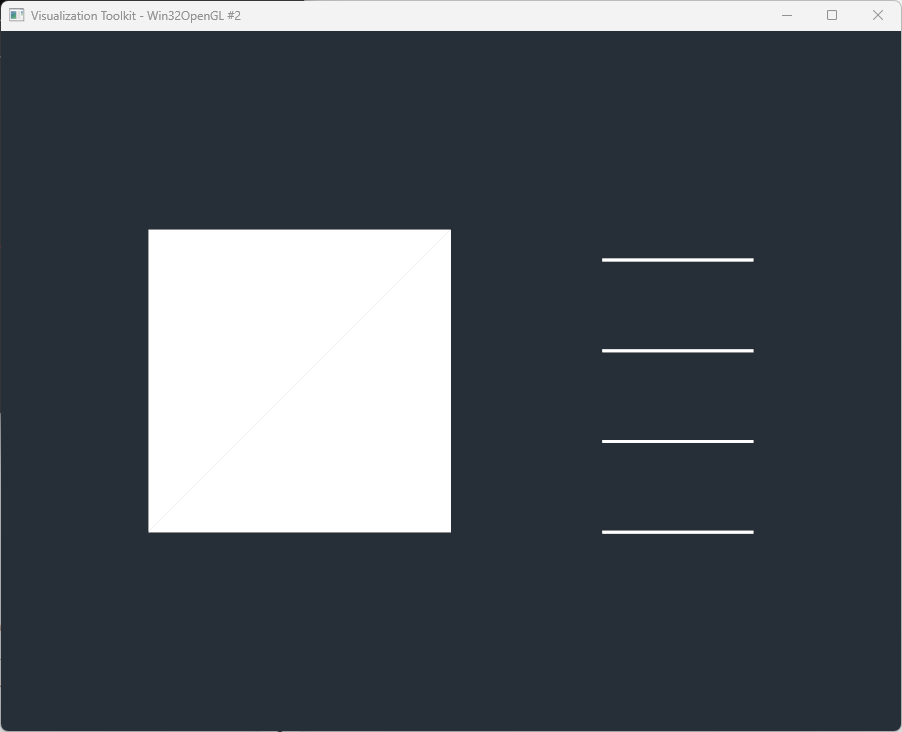
This started in VTK 9.6, but is present in 9.7 as well. I’m not sure how pervasive it is, but if I have an unstructured grid with only triangles and lines, the triangles don’t have edges shown. If I don’t have the lines, the triangles have edges with the same code.
With lines:
Without lines:
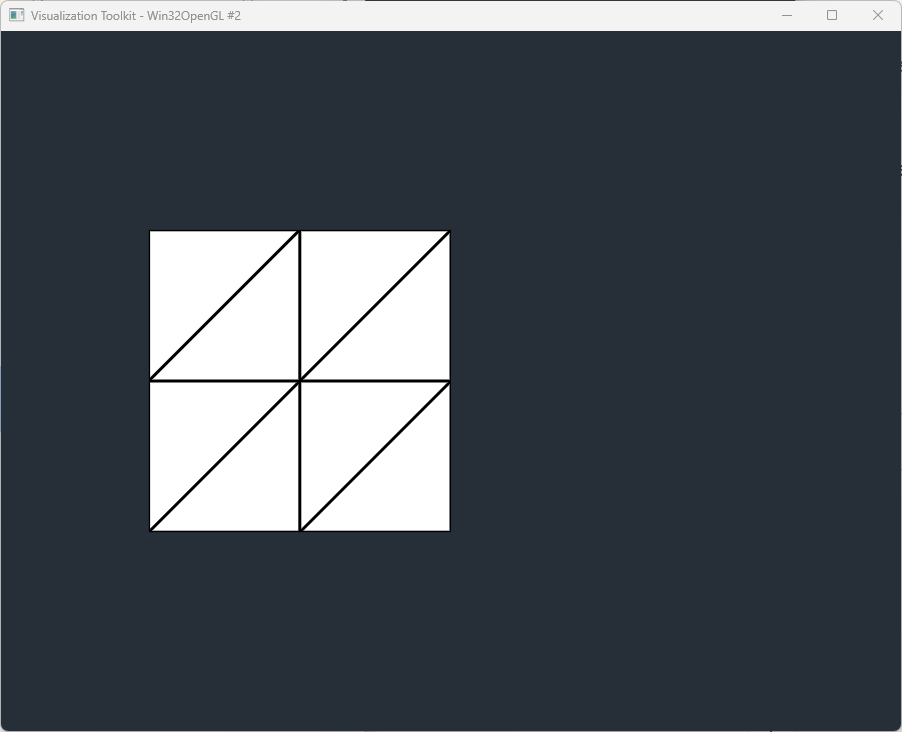
If I switch to quads instead of triangles, the quads have edges in both cases. So, its something about the interaction of triangles and lines that’s causing something weird to happen.
Is there any workaround for this?
example\_triangles.py below shows the issue if using VTK 9.6 or later. If you comment out the line creation on 116-119, the triangles will then have edges. example\_quads is the same as example\_tris but its has quads instead of tris and shows edges whether line elements are present or not.
If you run any of these in VTK 9.4 .1 or earlier, edges are shown for all cases.
Example code:
[example\_triangles.py](https://discourse.vtk.org/uploads/short-url/htjKI5xfgWNHljhyDgSuiV86Ue4.py) (4.5 KB)
[example\_quads.py](https://discourse.vtk.org/uploads/short-url/n4RBQBFC583cADmo8xpWZlIQ7h7.py) (4.3 KB)
---
### Author:  [@raungst](https://discourse.vtk.org/u/raungst)
#### Post date: [August 31, 2026, 9:04pm UTC](https://discourse.vtk.org/t/line-elements-cause-missing-edges-in-triangle-cells/16521/2 "2026-08-31T21:04:54Z")
Doing some more research, the edges of triangles show if there are any other cells with a quad face shown (quad, wedge, hex, etc). The same issue with edges not showing also pertains to tetrahedral elements, so its something to do with triangular faces that are causing the issue.
---
### Author:  [@ben.boeckel](https://discourse.vtk.org/u/ben.boeckel)
#### Post date: [September 2, 2026, 2:03am UTC](https://discourse.vtk.org/t/line-elements-cause-missing-edges-in-triangle-cells/16521/3 "2026-09-02T02:03:40Z")
> [@raungst](#):
>
> If you run any of these in VTK 9.4 .1 or earlier, edges are shown for all cases.
Sounds ripe for a bisect if anyone wants to go on an adventure…
---
### Author:  [@user27182](https://discourse.vtk.org/u/user27182)
#### Post date: [September 4, 2026, 7:07pm UTC](https://discourse.vtk.org/t/line-elements-cause-missing-edges-in-triangle-cells/16521/4 "2026-09-04T19:07:30Z")
> This started in VTK 9.6,
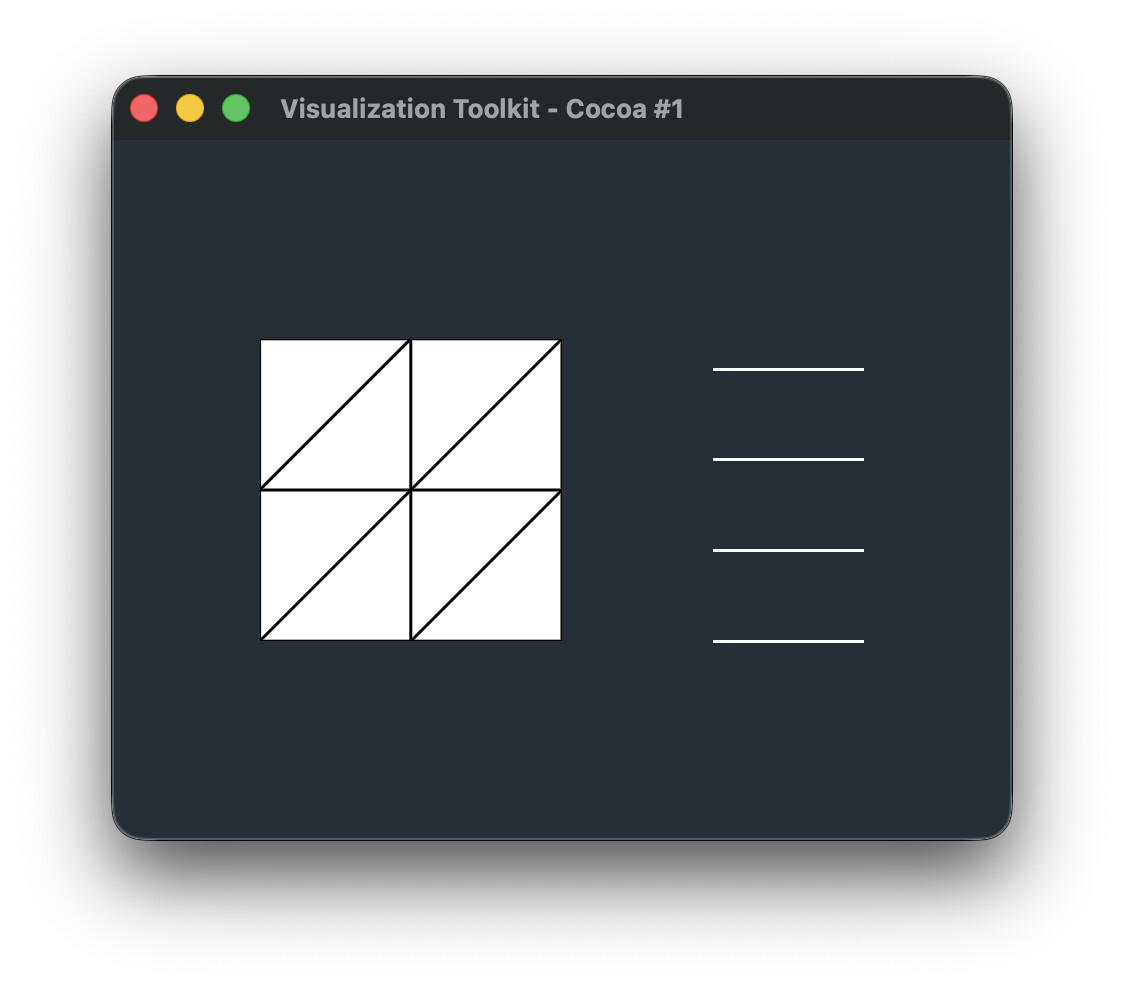
Very helpful hint. A change to rendering was made in 9.6 to use `vtkGeometryFilter` by default instead of `vtkDataSetSurfaceFilter`:
[https://gitlab.kitware.com/vtk/vtk/-/merge\_requests/12224](https://gitlab.kitware.com/vtk/vtk/-/merge_requests/12224)
As a workaround, you can use `vtkDataSetSurfaceFilter` before the mapper.
> ****
>
> ``` py import vtk
>
> # -----------------------------------------------------------------------------
>
> # Points
>
> # -----------------------------------------------------------------------------
>
> points = vtk.vtkPoints()
>
> point\_coordinates = [
> # Surface points
> (0.0, 0.0, 0.0), # 0
> (1.0, 0.0, 0.0), # 1
> (2.0, 0.0, 0.0), # 2
>
> ```
> (0.0, 1.0, 0.0), # 3
> (1.0, 1.0, 0.0), # 4
> (2.0, 1.0, 0.0), # 5
>
> (0.0, 2.0, 0.0), # 6
> (1.0, 2.0, 0.0), # 7
> (2.0, 2.0, 0.0), # 8
>
> # Separate bar points
> (3.0, 0.0, 0.0), # 9
> (4.0, 0.0, 0.0), # 10
>
> (3.0, 0.6, 0.0), # 11
> (4.0, 0.6, 0.0), # 12
>
> (3.0, 1.2, 0.0), # 13
> (4.0, 1.2, 0.0), # 14
>
> (3.0, 1.8, 0.0), # 15
> (4.0, 1.8, 0.0), # 16
>
> ```
>
> ]
>
> for p in point\_coordinates:
> points.InsertNextPoint(p)
>
> # -----------------------------------------------------------------------------
>
> # Unstructured grid
>
> # -----------------------------------------------------------------------------
>
> mesh = vtk.vtkUnstructuredGrid()
> mesh.SetPoints(points)
>
> # -----------------------------------------------------------------------------
>
> # Helper for adding triangles
>
> # -----------------------------------------------------------------------------
>
> def add\_triangle(mesh, p0, p1, p2):
>
> ```
> triangle = vtk.vtkTriangle()
>
> triangle.GetPointIds().SetId(0, p0)
> triangle.GetPointIds().SetId(1, p1)
> triangle.GetPointIds().SetId(2, p2)
>
> mesh.InsertNextCell(
> triangle.GetCellType(),
> triangle.GetPointIds()
> )
>
> ```
>
> # -----------------------------------------------------------------------------
>
> # Helper for adding lines
>
> # -----------------------------------------------------------------------------
>
> def add\_line(mesh, p0, p1):
>
> ```
> line = vtk.vtkLine()
>
> line.GetPointIds().SetId(0, p0)
> line.GetPointIds().SetId(1, p1)
>
> mesh.InsertNextCell(
> line.GetCellType(),
> line.GetPointIds()
> )
>
> ```
>
> # -----------------------------------------------------------------------------
>
> # Add 8 triangles
>
> #
>
> # 6 ----- 7 ----- 8
>
> # | \ | \ |
>
> # | \ | \ |
>
> # 3 ----- 4 ----- 5
>
> # | \ | \ |
>
> # | \ | \ |
>
> # 0 ----- 1 ----- 2
>
> # -----------------------------------------------------------------------------
>
> add\_triangle(mesh, 0, 1, 4)
> add\_triangle(mesh, 0, 4, 3)
>
> add\_triangle(mesh, 1, 2, 5)
> add\_triangle(mesh, 1, 5, 4)
>
> add\_triangle(mesh, 3, 4, 7)
> add\_triangle(mesh, 3, 7, 6)
>
> add\_triangle(mesh, 4, 5, 8)
> add\_triangle(mesh, 4, 8, 7)
>
> # -----------------------------------------------------------------------------
>
> # Add 4 disconnected lines
>
> #
>
> # Comment these out to test triangles without line elements.
>
> # -----------------------------------------------------------------------------
>
> add\_line(mesh, 9, 10)
> add\_line(mesh, 11, 12)
> add\_line(mesh, 13, 14)
> add\_line(mesh, 15, 16)
>
> mesh.Modified()
>
> # -----------------------------------------------------------------------------
>
> # Geometry extraction
>
> #
>
> # vtkUnstructuredGrid → vtkDataSetSurfaceFilter → vtkPolyData
>
> # -----------------------------------------------------------------------------
>
> surface\_filter = vtk.vtkDataSetSurfaceFilter()
> surface\_filter.SetInputData(mesh)
>
> # -----------------------------------------------------------------------------
>
> # Mapper
>
> #
>
> # Filtered:
>
> #
>
> # vtkDataSetSurfaceFilter → vtkPolyDataMapper
>
> # -----------------------------------------------------------------------------
>
> mapper = vtk.vtkPolyDataMapper()
> mapper.SetInputConnection(surface\_filter.GetOutputPort())
>
> # -----------------------------------------------------------------------------
>
> # Actor
>
> # -----------------------------------------------------------------------------
>
> actor = vtk.vtkActor()
> actor.SetMapper(mapper)
>
> actor.GetProperty().SetRepresentationToSurface()
> actor.GetProperty().EdgeVisibilityOn()
> actor.GetProperty().SetLineWidth(3.0)
>
> # -----------------------------------------------------------------------------
>
> # Renderer
>
> # -----------------------------------------------------------------------------
>
> renderer = vtk.vtkRenderer()
> renderer.AddActor(actor)
> renderer.SetBackground(0.15, 0.18, 0.22)
>
> # -----------------------------------------------------------------------------
>
> # Render window
>
> # -----------------------------------------------------------------------------
>
> render\_window = vtk.vtkRenderWindow()
> render\_window.AddRenderer(renderer)
> render\_window.SetSize(900, 700)
>
> # -----------------------------------------------------------------------------
>
> # Interactor
>
> # -----------------------------------------------------------------------------
>
> interactor = vtk.vtkRenderWindowInteractor()
> interactor.SetRenderWindow(render\_window)
>
> renderer.ResetCamera()
>
> render\_window.Render()
> interactor.Start()
>
> ```auto
>
> ```
---
### Author:  [@raungst](https://discourse.vtk.org/u/raungst)
#### Post date: [September 4, 2026, 7:30pm UTC](https://discourse.vtk.org/t/line-elements-cause-missing-edges-in-triangle-cells/16521/5 "2026-09-04T19:30:36Z")
I appreciate the help and insight. My full application already has a vtkGeometryFilter ahead of the mapper and switching to vtkDataSetSurfaceFilter does fix this rendering issue. I need to investigate if there’s any negative consequences to that switch.
Is the thought that this new behavior of vtkGeometryFilter is unintended?
Thank you!
---
### Author:  [@user27182](https://discourse.vtk.org/u/user27182)
#### Post date: [September 4, 2026, 7:54pm UTC](https://discourse.vtk.org/t/line-elements-cause-missing-edges-in-triangle-cells/16521/6 "2026-09-04T19:54:53Z")
> Is the thought that this new behavior of vtkGeometryFilter is unintended?
Seems like it! I’d call it a bug that should be fixed. There was another issue caused by this change too [https://gitlab.kitware.com/vtk/vtk/-/work\_items/19922](https://gitlab.kitware.com/vtk/vtk/-/work_items/19922), which is why I thought the mapper filter switch was likely the cause.