# Looking for a Python VTK equivalent to Matlab's Isosurface function
**URL:** https://discourse.vtk.org/t/looking-for-a-python-vtk-equivalent-to-matlabs-isosurface-function/5087
**Category:** Support
**Created:** [January 28, 2021, 11:51pm UTC](https://discourse.vtk.org/t/looking-for-a-python-vtk-equivalent-to-matlabs-isosurface-function/5087 "2021-01-28T23:51:56Z")
**Posts on this page:** 7
**Page:** 1
### Author:  [@Vardonir](https://discourse.vtk.org/u/Vardonir)
#### Post date: [January 28, 2021, 11:51pm UTC](https://discourse.vtk.org/t/looking-for-a-python-vtk-equivalent-to-matlabs-isosurface-function/5087/1 "2021-01-28T23:51:56Z")
I have the data as a (n\_x\*n\_y\*n\_z) array in Matlab, which I can easily transfer over to numpy using [scipy.io](http://scipy.io).
My code so far looks like this:
```
frommat = loadmat("thefile.mat")
the3d = frommat["appropriate header"]
vtk_data_array = numpy_support.numpy_to_vtk(num_array=export.ravel(), deep=True, array_type=vtk.VTK_FLOAT)
img_vtk = vtk.vtkImageData()
img_vtk.SetDimensions(export.shape)
img_vtk.GetPointData().SetScalars(vtk_data_array)
implicit_volume = vtk.vtkImplicitVolume()
implicit_volume.SetVolume(img_vtk)
thresholder = vtk.vtkImageThreshold()
thresholder.SetInputData(img_vtk)
thresholder.ThresholdByLower(isosurf_value)
thresholder.ReplaceInOn()
thresholder.SetInValue(0) #<- not sure what these do
thresholder.ReplaceOutOn()
thresholder.SetOutValue(1) #<- not sure what these do
thresholder.Update()
dmc = vtk.vtkDiscreteMarchingCubes()
dmc.SetInputConnection(thresholder.GetOutputPort())
dmc.GenerateValues(1, 1, 1) #<- not sure what these do
dmc.Update()
mapper = vtk.vtkPolyDataMapper()
mapper.SetInputConnection(dmc.GetOutputPort())
actor = vtk.vtkActor()
actor.SetMapper(mapper)
renderer.AddActor(actor)
```
But in matlab, I just run
```
surface = isosurface(the_3d_data, isosurf_value);
```
to get the same thing.
I’m kinda new to vtk so I’m not sure how to properly use vtkDiscreteMarchingCubes, but I know that’s the key function here.
References:
- [https://pyscience.wordpress.com/2014/09/11/surface-extraction-creating-a-mesh-from-pixel-data-using-python-and-vtk/](https://pyscience.wordpress.com/2014/09/11/surface-extraction-creating-a-mesh-from-pixel-data-using-python-and-vtk/)
- [https://gist.github.com/pangyuteng/facd430d0d9761fc67fff4ff2e5fffc3](https://gist.github.com/pangyuteng/facd430d0d9761fc67fff4ff2e5fffc3)
---
### Author:  [@lassoan](https://discourse.vtk.org/u/lassoan)
#### Post date: [January 29, 2021, 3:51am UTC](https://discourse.vtk.org/t/looking-for-a-python-vtk-equivalent-to-matlabs-isosurface-function/5087/2 "2021-01-29T03:51:57Z")
There is no need for thresholding. You can use vtkContourFilter directly on the input volume.
If you want to see less of VTK pipelines and instead use VTK via a more Pythonic wrapper then you can use [PyVista](https://docs.pyvista.org/examples/02-plot/isovalue.html#sphx-glr-examples-02-plot-isovalue-py).
---
### Author:  [@Vardonir](https://discourse.vtk.org/u/Vardonir)
#### Post date: [January 29, 2021, 10:29pm UTC](https://discourse.vtk.org/t/looking-for-a-python-vtk-equivalent-to-matlabs-isosurface-function/5087/3 "2021-01-29T22:29:03Z")
I removed the thresholder part to this:
```
img_vtk = vtk.vtkImageData()
img_vtk.SetDimensions(export.shape)
img_vtk.GetPointData().SetScalars(vtk_data_array)
implicit_volume = vtk.vtkImplicitVolume()
implicit_volume.SetVolume(img_vtk)
contours = vtk.vtkContourFilter()
contours.SetInputData(img_vtk)
contours.GenerateValues(8, 0.0, 1.2)
dmc = vtk.vtkDiscreteMarchingCubes()
dmc.SetInputData(contours)
dmc.GenerateValues(1, 1, 1)
dmc.Update()
mapper = vtk.vtkPolyDataMapper()
mapper.SetInputConnection(dmc.GetOutputPort())
actor = vtk.vtkActor()
actor.SetMapper(mapper)
```
But I’m getting an error with vtk.vtkDiscreteMarchingCubes(), it says
```
dmc.SetInputData(contours)
TypeError: SetInputData argument 1: method requires a vtkDataObject, a vtkContourFilter was provided.
```
I also tried changing SetInputData to SetInputConnection but I don’t know if that’s the right approach… I think I’m missing something very fundamental.
---
### Author:  [@lassoan](https://discourse.vtk.org/u/lassoan)
#### Post date: [January 29, 2021, 11:16pm UTC](https://discourse.vtk.org/t/looking-for-a-python-vtk-equivalent-to-matlabs-isosurface-function/5087/4 "2021-01-29T23:16:36Z")
This looks better, but you can also remove vtkImplicitVolume and vtkDiscreteMarchingCubes filters. You just need image data -\> contour filter -\> poly mapper. See this example: [https://kitware.github.io/vtk-examples/site/Python/Visualization/FrogReconstruction/](https://kitware.github.io/vtk-examples/site/Python/Visualization/FrogReconstruction/)
---
### Author:  [@Vardonir](https://discourse.vtk.org/u/Vardonir)
#### Post date: [January 29, 2021, 11:46pm UTC](https://discourse.vtk.org/t/looking-for-a-python-vtk-equivalent-to-matlabs-isosurface-function/5087/5 "2021-01-29T23:46:15Z")
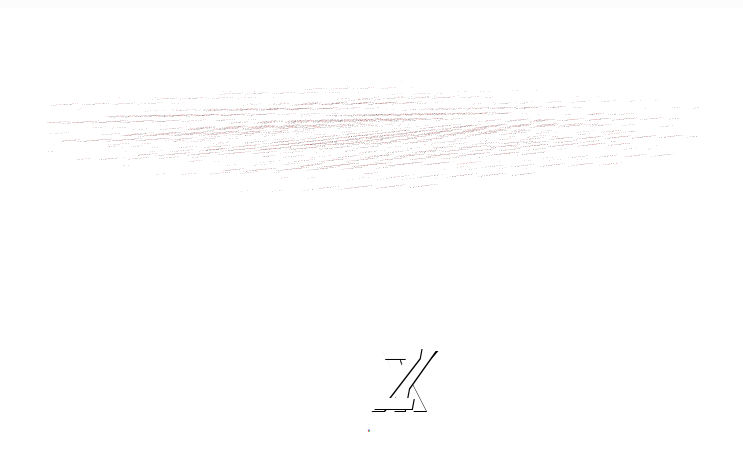
The code runs, but I’m not getting my expected result.
This is what I get:
and my expected result looks like this: (I’m drawing it in VTK through an exported STL)
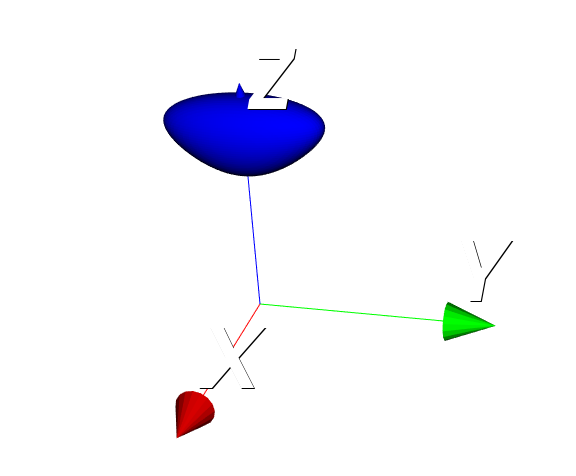
My code looks like this now
```
frommat = loadmat("matlab_file.mat")
export = frommat["export"]
isosurf_value = frommat["isosurf_value"]
vtk_data_array = numpy_support.numpy_to_vtk(num_array=export.ravel(), deep=True, array_type=vtk.VTK_FLOAT)
img_vtk = vtk.vtkStructuredPoints()
img_vtk.SetDimensions(export.shape)
img_vtk.GetPointData().SetScalars(vtk_data_array)
contours = vtk.vtkContourFilter()
contours.SetInputData(img_vtk)
contours.SetValue(0, isosurf_value)
mapper = vtk.vtkPolyDataMapper()
mapper.SetInputConnection(contours.GetOutputPort())
actor = vtk.vtkActor()
actor.SetMapper(mapper)
_axes_actor = vtk.vtkAxesActor()
self.ren.AddActor(_axes_actor)
self.ren.AddActor(actor)
```
The isosurf value I’m using in the code above is the same one I used in the matlab code.
Maybe I’m missing something with the numpy export…?
---
### Author:  [@lassoan](https://discourse.vtk.org/u/lassoan)
#### Post date: [January 30, 2021, 2:24am UTC](https://discourse.vtk.org/t/looking-for-a-python-vtk-equivalent-to-matlabs-isosurface-function/5087/6 "2021-01-30T02:24:34Z")
Numpy array shape is not the same as image dimensions: axis order is reversed in numpy arrays compared to C++ toolkits, such as VTK or ITK.
---
### Author:  [@Vardonir](https://discourse.vtk.org/u/Vardonir)
#### Post date: [January 30, 2021, 12:33pm UTC](https://discourse.vtk.org/t/looking-for-a-python-vtk-equivalent-to-matlabs-isosurface-function/5087/7 "2021-01-30T12:33:54Z")
I slapped a [::-1] and made the shape
```
img_vtk.SetDimensions(export.shape[::-1])
```
and now it works! Thank you very much.