# Mesh edges visible through a thin object - how to remove?
**URL:** https://discourse.vtk.org/t/mesh-edges-visible-through-a-thin-object-how-to-remove/6208
**Category:** Support
**Created:** [July 19, 2021, 11:26pm UTC](https://discourse.vtk.org/t/mesh-edges-visible-through-a-thin-object-how-to-remove/6208 "2021-07-19T23:26:40Z")
**Posts on this page:** 3
**Page:** 1
### Author:  [@michaelhogg](https://discourse.vtk.org/u/michaelhogg)
#### Post date: [July 19, 2021, 11:26pm UTC](https://discourse.vtk.org/t/mesh-edges-visible-through-a-thin-object-how-to-remove/6208/1 "2021-07-19T23:26:40Z")
Hi all,
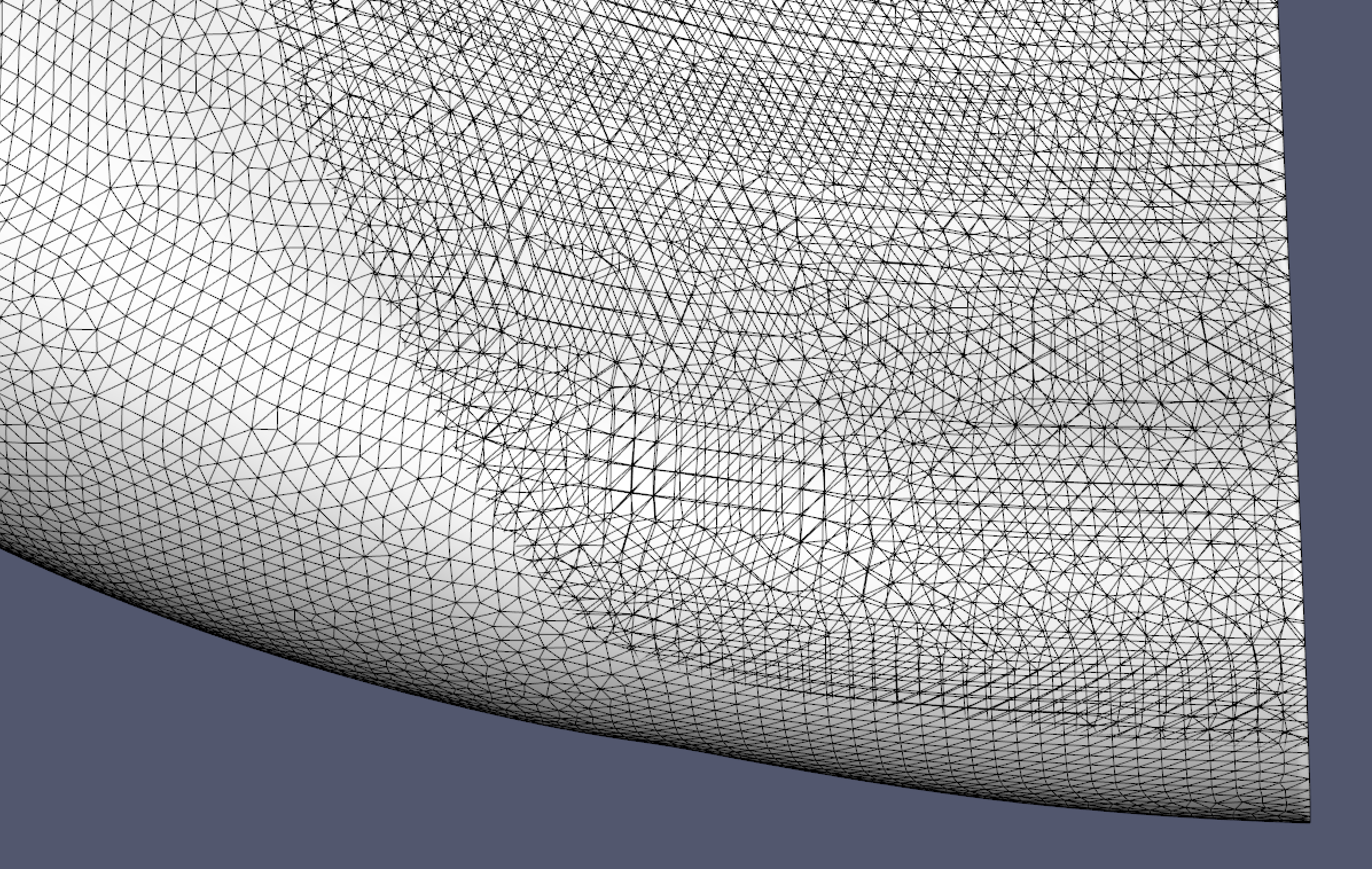
I have a polydata object that is thin in some regions. When I show edges, the edges on the back side of the object are visible. You can see this in the attached image. This does not happen in Paraview, so I assume there is a renderer setting that will fix this.
I have tried using `renderer.SetUseHiddenLineRemoval(True)` and `renderer.ResetCameraClippingRange()` but no luck there.
Any suggestions on how to fix this?
Note: I am using VTK 9.0.1 in Python.
Cheers,
Michael
---
### Author:  [@Aron\_Helser](https://discourse.vtk.org/u/Aron_Helser)
#### Post date: [July 20, 2021, 1:52pm UTC](https://discourse.vtk.org/t/mesh-edges-visible-through-a-thin-object-how-to-remove/6208/2 "2021-07-20T13:52:56Z")
I believe this is due to coincident topology resolution. In C++
`vtkMapper::SetResolveCoincidentTopologyToOff();` will disable it. However, some of your edges may then disappear. You can counteract this with
`myActor->GetProperty()->SetRenderLinesAsTubes(1);`
You can also adjust the coincident topology settings to match your data better, instead.
HTH,
Aron
---
### Author:  [@michaelhogg](https://discourse.vtk.org/u/michaelhogg)
#### Post date: [July 23, 2021, 6:47am UTC](https://discourse.vtk.org/t/mesh-edges-visible-through-a-thin-object-how-to-remove/6208/3 "2021-07-23T06:47:02Z")
Hi Aron,
I tried your suggestion, but unfortunately this did not help. I tried a few of the other mapper coincident topology settings, but nothing seemed to make any difference. Any other suggestions?
Cheers,
Michael