# Mesh Quality Degradation with vtkClipPolyData in Recent VTK Versions: PyVista & ParaView Behavior
**URL:** https://discourse.vtk.org/t/mesh-quality-degradation-with-vtkclippolydata-in-recent-vtk-versions-pyvista-paraview-behavior/14762
**Category:** Development
**Tags:** bug
**Created:** [October 24, 2024, 4:08pm UTC](https://discourse.vtk.org/t/mesh-quality-degradation-with-vtkclippolydata-in-recent-vtk-versions-pyvista-paraview-behavior/14762 "2024-10-24T16:08:15Z")
**Posts on this page:** 12
**Page:** 1
### Author:  [@gnikit](https://discourse.vtk.org/u/gnikit)
#### Post date: [October 24, 2024, 4:08pm UTC](https://discourse.vtk.org/t/mesh-quality-degradation-with-vtkclippolydata-in-recent-vtk-versions-pyvista-paraview-behavior/14762/1 "2024-10-24T16:08:15Z")
I recently noticed a deterioration in the mesh quality of the filter `vtkClipPolyData`. I was able to reproduce the exact same poor quality clip with PyVista and ParaView (`clip_scalar` in PyVista and `Clip>Clip Type=Scalar` in ParaView). I am mostly making this post because I am not sure how well-tracked this behaviour is.
## Description
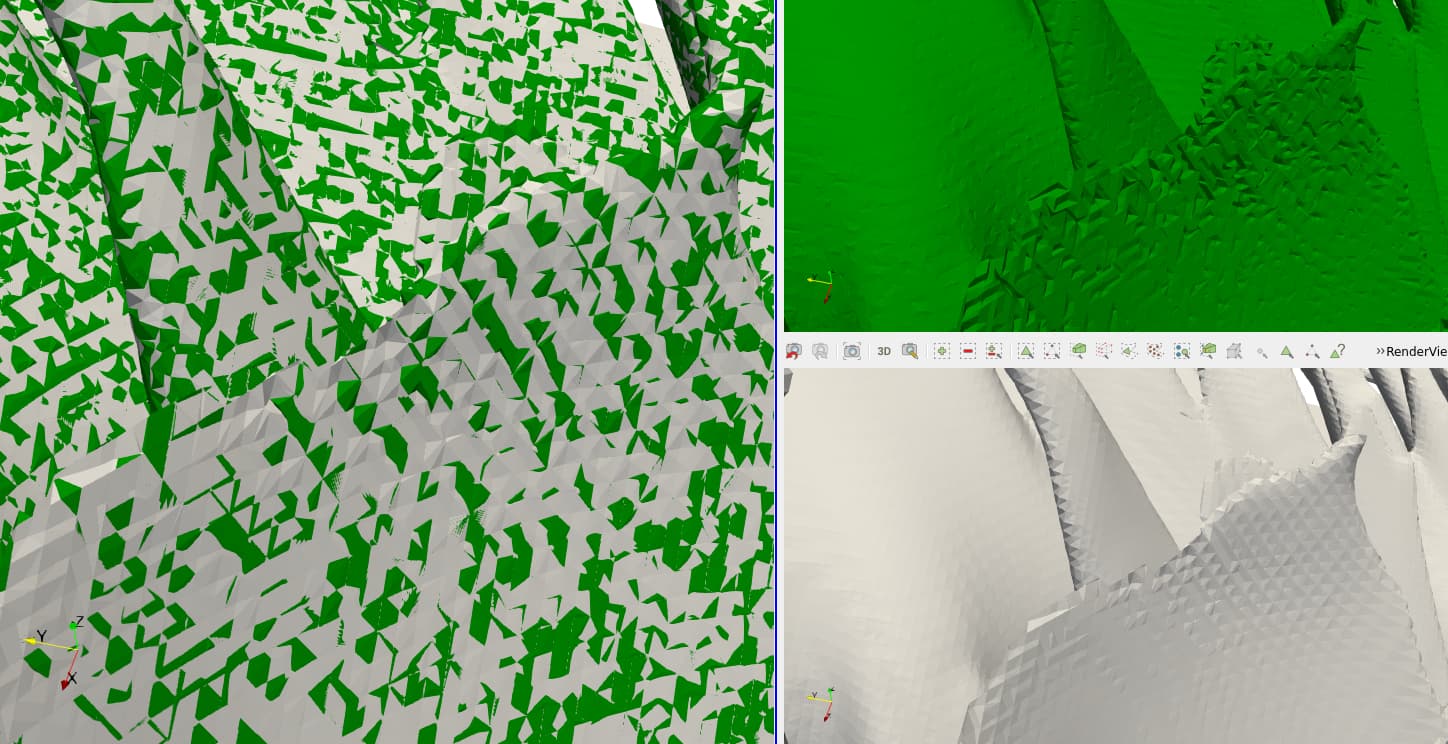
(green: poor quality clip, white: normal clip)
## Version Matrix
This is a table with the versions of VTK that reproduce/don’t reproduce this behaviour.
| VTK version | Issue present |
| --- | --- |
| 9.0.20210922 (ParaView 5.10.1) | No |
| 9.2.20220823 (ParaView 5.11.2) | Yes |
| 9.2.6 (PyPi) | No |
| 9.3.0 (PyPi, also rc1 and rc2) | Yes |
| 9.3.1 (PyPi, currently latest stable release) | Yes |
| 9.3.20230807rc0 (PyPi) | Yes |
| 9.3.20240617 (ParaView 5.13.1) | No |
| 9.4.0rc2 (pip via [wheels.vtk.org](http://wheels.vtk.org)) | No |
## Additional comments
When I try to make a Minimal Working Example, because my dataset is 8M cells + I can’t share it, the clips work as expected in all the listed versions of VTK which baffles me.
### Steps
- isolating with a box clip only this problematic section in ParaView,
- saving it as a VTM
- load to PyVista or ParaView and then perform a scalar clip e.g.
```py
import pyvista as pv
reader = pv.get_reader("mwe.vtm")
case = reader.read()
data = case["internal"]
clip = data.clip_scalar(scalars="field", value=0.5, invert=False)
clip = clip.extract_surface()
clip.save("clip_clean.stl")
```
For my case I am happy to drop down to VTK 9.2.6 and wait for a release that contains a fix, but I would still like to understand what’s going on under the hood. Any help or ideas about what’s going on would be appreciated.
---
### Author:  [@jaswantp](https://discourse.vtk.org/u/jaswantp)
#### Post date: [October 24, 2024, 4:25pm UTC](https://discourse.vtk.org/t/mesh-quality-degradation-with-vtkclippolydata-in-recent-vtk-versions-pyvista-paraview-behavior/14762/2 "2024-10-24T16:25:30Z")
Might be a point precision setting that’s not applied correctly in the implementation?
@spyridon97
---
### Author:  [@dgobbi](https://discourse.vtk.org/u/dgobbi)
#### Post date: [October 24, 2024, 5:01pm UTC](https://discourse.vtk.org/t/mesh-quality-degradation-with-vtkclippolydata-in-recent-vtk-versions-pyvista-paraview-behavior/14762/3 "2024-10-24T17:01:42Z")
From VTK 9.3 until recently (20240624), vtkPolygon was using single-precision to compute normals for single-precision points. Before and after, it used/uses double precision to compute normals regardless of precision of the points.
However, this fix doesn’t match your version dates. How did you come up with 20240617 as the VTK version date for ParaView 5.13.1? It seems that it should be 20240925.
---
### Author:  [@dgobbi](https://discourse.vtk.org/u/dgobbi)
#### Post date: [October 24, 2024, 5:06pm UTC](https://discourse.vtk.org/t/mesh-quality-degradation-with-vtkclippolydata-in-recent-vtk-versions-pyvista-paraview-behavior/14762/4 "2024-10-24T17:06:54Z")
Ah, that double-precision fix made it into 9.3.1, which you show as failing your clip test. So it can’t be the cause of the issue that you are seeing.
---
### Author:  [@spyridon97](https://discourse.vtk.org/u/spyridon97)
#### Post date: [October 24, 2024, 5:33pm UTC](https://discourse.vtk.org/t/mesh-quality-degradation-with-vtkclippolydata-in-recent-vtk-versions-pyvista-paraview-behavior/14762/5 "2024-10-24T17:33:46Z")
@dgobbi Do you know who worked on the polygon precision change?
---
### Author:  [@dgobbi](https://discourse.vtk.org/u/dgobbi)
#### Post date: [October 24, 2024, 5:44pm UTC](https://discourse.vtk.org/t/mesh-quality-degradation-with-vtkclippolydata-in-recent-vtk-versions-pyvista-paraview-behavior/14762/6 "2024-10-24T17:44:45Z")
It was me, [gitlab.kitware.com/vtk/vtk/merge\_requests/11237](https://gitlab.kitware.com/vtk/vtk/-/merge_requests/11237).
---
### Author:  [@spyridon97](https://discourse.vtk.org/u/spyridon97)
#### Post date: [October 24, 2024, 5:50pm UTC](https://discourse.vtk.org/t/mesh-quality-degradation-with-vtkclippolydata-in-recent-vtk-versions-pyvista-paraview-behavior/14762/7 "2024-10-24T17:50:02Z")
Is this change: [https://gitlab.kitware.com/vtk/vtk/-/merge\_requests/11237/diffs?file=4cf768d5c58d97a35f52bb8ef8fddf137b63f3d2#4cf768d5c58d97a35f52bb8ef8fddf137b63f3d2\_136\_135](https://gitlab.kitware.com/vtk/vtk/-/merge_requests/11237/diffs?file=4cf768d5c58d97a35f52bb8ef8fddf137b63f3d2#4cf768d5c58d97a35f52bb8ef8fddf137b63f3d2_136_135). the problem? If yes, could you revert it, or would it have a bad impact?
---
### Author:  [@dgobbi](https://discourse.vtk.org/u/dgobbi)
#### Post date: [October 24, 2024, 6:04pm UTC](https://discourse.vtk.org/t/mesh-quality-degradation-with-vtkclippolydata-in-recent-vtk-versions-pyvista-paraview-behavior/14762/8 "2024-10-24T18:04:33Z")
No, that wasn’t the problem. I thought it was the solution, according to my first glance at the dates given by the OP (note that he says the issue is gone the latest ParaView and in 9.4.0rc2). But now I think that it’s unrelated.
---
### Author:  [@spyridon97](https://discourse.vtk.org/u/spyridon97)
#### Post date: [October 24, 2024, 6:05pm UTC](https://discourse.vtk.org/t/mesh-quality-degradation-with-vtkclippolydata-in-recent-vtk-versions-pyvista-paraview-behavior/14762/9 "2024-10-24T18:05:57Z")
So if the issue has gone away, is there something to do about it @gnikit ?
---
### Author:  [@gnikit](https://discourse.vtk.org/u/gnikit)
#### Post date: [October 25, 2024, 3:19pm UTC](https://discourse.vtk.org/t/mesh-quality-degradation-with-vtkclippolydata-in-recent-vtk-versions-pyvista-paraview-behavior/14762/10 "2024-10-25T15:19:27Z")
Thanks for the quick reply guys
> [@dgobbi](#):
>
> How did you come up with 20240617 as the VTK version date for ParaView 5.13.1? It seems that it should be 20240925
My data should be 64bit (everything), as for the ParaView that’s interesting for me on Linux it shows 9.3.20240617.
> **Full ParaView 5.13.1 details**
>
> Client Information:
> Version: 5.13.1
> VTK Version: 9.3.20240617
> Qt Version: 5.15.10
> vtkIdType size: 64bits
> Embedded Python: On
> Python Library Path: /home/gn/Programs/ParaView-5.13.1/lib/python3.10
> Python Library Version: 3.10.13 (main, Sep 27 2024, 19:33:16) [GCC 10.2.1 20210130 (Red Hat 10.2.1-11)]
> Python Numpy Support: On
> Python Numpy Path: /home/gn/.local/lib/python3.10/site-packages/numpy
> Python Numpy Version: 1.26.4
> Python Matplotlib Support: On
> Python Matplotlib Path: /home/gn/.local/lib/python3.10/site-packages/matplotlib
> Python Matplotlib Version: 3.9.0
> Python Testing: Off
> MPI Enabled: On
> ParaView Build ID: superbuild abdf9aa5f109ffa3558a63d86365a0203aaab773 (!1224)
> Disable Registry: Off
> Test Directory:
> Data Directory:
> SMP Backend: TBB
> SMP Max Number of Threads: 32
> OpenGL Vendor: NVIDIA Corporation
> OpenGL Version: 3.2.0 NVIDIA 535.183.01
> OpenGL Renderer: NVIDIA RTX A2000 12GB/PCIe/SSE2
> Accelerated filters overrides available: No
>
> Connection Information:
> Remote Connection: No
* * *
> [@spyridon97](#):
>
> So if the issue has gone away, is there something to do about it @gnikit ?
From academic curiosity point of view I would like to know what caused it, that is, if that’s not a pain for you to locate the source of this behaviour. From a product point of view I am happy to pin to v9.4.0 when it comes out, I am just slightly worried that this behaviour is unintentional and untracked in VTK, which is why I thought I should reach out to your Discourse.
As a side note, doing the clip and extract surface on both paraview and pyvista with all the newer VTK versions 9.3+ (didn’t test the older versions), seemed to be resulting in inconsistent normal orientations when exported as an STL, OBJ, etc. The fix I found was calling Clean, but I am not sure if that should be a requirement. Recomputing normals and exporting to a surface mesh didn’t work, and visualising in ParaView/trame showed the normals correctly oriented. I am not sure if the 2 issues are connected
---
### Author:  [@dgobbi](https://discourse.vtk.org/u/dgobbi)
#### Post date: [October 25, 2024, 5:18pm UTC](https://discourse.vtk.org/t/mesh-quality-degradation-with-vtkclippolydata-in-recent-vtk-versions-pyvista-paraview-behavior/14762/11 "2024-10-25T17:18:52Z")
> [@gnikit](#):
>
> Full ParaView 5.13.1 details
The VTK version in the ParaView “About” box needs to be taken with a grain of salt. The ParaView releases have their own VTK branch, and the “About” box reports the branch point (between that branch and VTK’s master branch). Individual patches are constantly pulled from the VTK master branch to the ParaView release branch.
* * *
> [@gnikit](#):
>
> From academic curiosity point of view I would like to know what caused it
I’m also interested in tracking regressions in VTK, so are lots of people. Unwanted changes in VTK behavior from version to version can be a real burr in the saddle. Studying how they occur can help us to avoid them.
* * *
Regarding the clipping, the images that you posted look like 3D cells rather than polygons. Can you provide additional details about your input data?
---
### Author:  [@gnikit](https://discourse.vtk.org/u/gnikit)
#### Post date: [October 25, 2024, 5:58pm UTC](https://discourse.vtk.org/t/mesh-quality-degradation-with-vtkclippolydata-in-recent-vtk-versions-pyvista-paraview-behavior/14762/12 "2024-10-25T17:58:00Z")
> [@dgobbi](#):
>
> look like 3D cells rather than polygons. Can you provide additional details about your input data?
They are indeed 3D cells. The mesh is hexa-dominant, simulation results are cell data, interpolated in VTK to point data. The values of the field where I am doing the scalar clip, follow a bimodal distribution where the majority of the values are either 0 or 1. There are a few intermediate values at the interface between between 0 and 1 cells, in this specific case more than I am used to get, which is why the clips are of poor quality. Usually I get very well triangulated surfaces after the clip.
> [@dgobbi](#):
>
> The VTK version in the ParaView “About” box needs to be taken with a grain of salt.
Thanks, good to know. I’ll take it into account next time I’m debugging VTK issues