# Multi geometry interaction
**URL:** https://discourse.vtk.org/t/multi-geometry-interaction/9276
**Category:** Support
**Tags:** proposal
**Created:** [September 4, 2022, 9:02am UTC](https://discourse.vtk.org/t/multi-geometry-interaction/9276 "2022-09-04T09:02:31Z")
**Posts on this page:** 11
**Page:** 1
### Author:  [@rockydut](https://discourse.vtk.org/u/rockydut)
#### Post date: [September 4, 2022, 9:02am UTC](https://discourse.vtk.org/t/multi-geometry-interaction/9276/1 "2022-09-04T09:02:31Z")
I have multiple geometries, each of which is stored in vtkunstructuredGrid/vtkPolyData. I hope that when the mouse clicks on a geometry during interaction, the geometry can be selected.
Of course, I also want to be able to select facets, points and so on in the geometry.
I used a vtkActor to display each geometry currently.
That is, there are as many vtkActors as there are geometry, so the mouse can select the actor.
But this operation is very inconvenient.
Is it possible to display only one vtkActor, but it is convenient to select geometry.
---
### Author:  [@tmnku](https://discourse.vtk.org/u/tmnku)
#### Post date: [September 4, 2022, 9:26am UTC](https://discourse.vtk.org/t/multi-geometry-interaction/9276/2 "2022-09-04T09:26:36Z")
Hi Rockydut, what you’re trying sounds a bit like what I’m currently working on. For the selection part I had success with vtkMultiBlockDataSet and vtkCompositePolyDataMapper2. Then vtkHardwarePicker will return a blockId and a cellId which you can use to find out which geometry was selected and which cell of that geometry.
---
### Author:  [@rockydut](https://discourse.vtk.org/u/rockydut)
#### Post date: [September 4, 2022, 10:04am UTC](https://discourse.vtk.org/t/multi-geometry-interaction/9276/3 "2022-09-04T10:04:15Z")
@tmnku could you please paste an example to me?
This problem has puzzled me for a long time.
Thanks a lot.
---
### Author:  [@tmnku](https://discourse.vtk.org/u/tmnku)
#### Post date: [September 4, 2022, 10:13am UTC](https://discourse.vtk.org/t/multi-geometry-interaction/9276/4 "2022-09-04T10:13:27Z")
```auto
vtkNew root;
root->SetNumberOfBlocks(2);
root->SetBlock(0, createPolyData());
root->SetBlock(1, createPolyData());
vtkNew mapper;
mapper->SetInputDataObject(root);
vtkNew actor;
actor->SetMapper(mapper);
```
`createPolyData()` is your custom function which returns the polydata you want to display. Then in the interactor use something like
```auto
void OnLeftButtonDown() {
int* pos = this->GetInteractor()->GetEventPosition();
vtkNew picker;
int res = picker->Pick(pos[0], pos[1], 0, this->Interactor->GetRenderWindow()->GetRenderers()->GetFirstRenderer());
if (res == 1) {
std::cout << "picked polydata " << picker->GetFlatBlockIndex() << ", cell " << picker->GetCellId() << std::endl;
}
}
```
---
### Author:  [@rockydut](https://discourse.vtk.org/u/rockydut)
#### Post date: [September 4, 2022, 10:15am UTC](https://discourse.vtk.org/t/multi-geometry-interaction/9276/5 "2022-09-04T10:15:10Z")
Thank you very much. I’ll try it then give you a response.
---
### Author:  [@rockydut](https://discourse.vtk.org/u/rockydut)
#### Post date: [September 4, 2022, 1:44pm UTC](https://discourse.vtk.org/t/multi-geometry-interaction/9276/6 "2022-09-04T13:44:28Z")
I have a new problem.
How to set color for each geometry?
---
### Author:  [@tmnku](https://discourse.vtk.org/u/tmnku)
#### Post date: [September 5, 2022, 5:47am UTC](https://discourse.vtk.org/t/multi-geometry-interaction/9276/7 "2022-09-05T05:47:54Z")
I actually had the same problem. `SetBlockColor()` of the mapper did not seem to have any effect neither did `SetBlockVisibility()`. I found an example in the unittests and it turns out that you have to set
```auto
vtkNew cdsa;
mapper->SetCompositeDataDisplayAttributes(cdsa);
```
only then setting block attributes will work fine. When setting per block colors and visibility make sure to use its flat index which is not the same as the index when you use `SetBlock()`. In my case I had n polyDatas which I added to the root using `SetBlock(0), SetBlock(1)...` and then changed their color `SetBlockColor(1), SetBlockColor(2),...`.
You can also set colors within each polyData object as an alternative.
```auto
vtkNew colors;
colors->SetNumberOfComponents(3);
for (int i = 0; i < polyData->GetNumberOfCells(); ++i) {
colors->InsertNextTuple3(255, 0, 0);
}
polyData->GetCellData()->SetScalars(colors);
```
---
### Author:  [@rockydut](https://discourse.vtk.org/u/rockydut)
#### Post date: [September 6, 2022, 12:30pm UTC](https://discourse.vtk.org/t/multi-geometry-interaction/9276/8 "2022-09-06T12:30:26Z")
I’m confuse for the color setting for each block.
The following code show the method for setting color of each block. However, the final color is not show as the setting.
vtkSmartPointer CreateSphereDataSet(const vtkVector3d& center,
double radius)
{
vtkNew leaf;
leaf-\>SetCenter(center.GetData());
leaf-\>SetRadius(radius);
leaf-\>Update();
return leaf-\>GetOutput();
}
int main(int, char\*[])
{
```
vtkNew colors;
vtkNew root;
root->SetBlock(0, CreateSphereDataSet({0, 0, 0}, 1.0));
root->SetBlock(1, CreateSphereDataSet({5, 0, 0}, 2));
root->SetBlock(3, CreateSphereDataSet({10, 0, 0.0}, 3));
vtkNew mapper;
mapper->SetInputDataObject(root);
vtkNew cdsa;
mapper->SetCompositeDataDisplayAttributes(cdsa);
double color[3];
color[0] = 1; color[1] = 0; color[2] = 0;
cdsa->SetBlockColor(root->GetBlock(0), color);
color[0] = 0; color[1] = 1; color[2] = 0;
cdsa->SetBlockColor(root->GetBlock(1), color);
color[0] = 0; color[1] = 0; color[2] = 1;
cdsa->SetBlockColor(root->GetBlock(2), color);
//Another method for color setting
// mapper->SetBlockColor(0, 1, 0, 0);
// mapper->SetBlockColor(1, 0, 1, 0);
```
// mapper-\>SetBlockColor(2, 0, 0, 1);
```
// display the data
vtkNew aren;
vtkNew renWin;
renWin->AddRenderer(aren);
vtkNew iren;
iren->SetRenderWindow(renWin);
vtkNew actor;
actor->SetMapper(mapper);
aren->AddActor(actor);
aren->SetBackground(colors->GetColor3d("CornflowerBlue").GetData());
renWin->SetWindowName("MultiBLockDataSet");
renWin->Render();
iren->Start();
return 0;
```
}
---
### Author:  [@rockydut](https://discourse.vtk.org/u/rockydut)
#### Post date: [September 6, 2022, 12:35pm UTC](https://discourse.vtk.org/t/multi-geometry-interaction/9276/9 "2022-09-06T12:35:13Z")
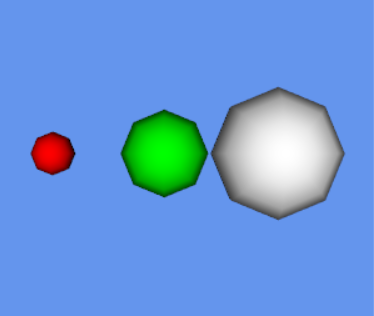
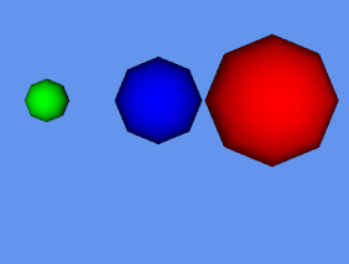
The two method to color the ball is not same as that of the setting.
---
### Author:  [@tmnku](https://discourse.vtk.org/u/tmnku)
#### Post date: [September 7, 2022, 9:03am UTC](https://discourse.vtk.org/t/multi-geometry-interaction/9276/10 "2022-09-07T09:03:32Z")
As I said before, you have to use the flat index in `SetBlockColor()` which starts at 1. Index 0 which you are using does not exist.
---
### Author:  [@rockydut](https://discourse.vtk.org/u/rockydut)
#### Post date: [September 26, 2022, 10:04am UTC](https://discourse.vtk.org/t/multi-geometry-interaction/9276/11 "2022-09-26T10:04:20Z")
Do you test the vtkMultiBlockDataSet sorted the vtkUnstructuredGrid data and show it?
When I do it, the data can not display. I don’t know why.
When I transform ugrid to vtkPolyData, it can display correctly.
as the below showing an example.
#include \
#include \
#include \
#include \
#include \
#include \
#include \
#include \
#include \
#include \
#include \
#include \
#include \
#include \
#include \
#include \
#include \
#include \
vtkSmartPointer MakeHexahedron()
{
int numberOfVertices = 8;
```
// Create the points
vtkSmartPointer points =
vtkSmartPointer::New();
points->InsertNextPoint(0.0, 0.0, 0.0);
points->InsertNextPoint(1.0, 0.0, 0.0);
points->InsertNextPoint(1.0, 1.0, 0.0);
points->InsertNextPoint(0.0, 1.0, 0.0);
points->InsertNextPoint(0.0, 0.0, 1.0);
points->InsertNextPoint(1.0, 0.0, 1.0);
points->InsertNextPoint(1.0, 1.0, 1.0);
points->InsertNextPoint(0.0, 1.0, 1.0);
// Create a hexahedron from the points
vtkSmartPointer hex =
vtkSmartPointer::New();
for (int i = 0; i < numberOfVertices; ++i)
{
hex->GetPointIds()->SetId(i, i);
}
// Add the points and hexahedron to an unstructured grid
vtkSmartPointer uGrid =
vtkSmartPointer::New();
uGrid->SetPoints(points);
uGrid->InsertNextCell(hex->GetCellType(), hex->GetPointIds());
return uGrid;
```
}
int main(int, char\*[])
{
vtkNew root;
```
vtkSmartPointer grid = MakeHexahedron();
vtkSmartPointer surfaceFilter = vtkSmartPointer::New();
surfaceFilter->SetInputData(grid);
surfaceFilter->Update();
vtkPolyData* poly = surfaceFilter->GetOutput();
//root->SetBlock(0, poly);
root->SetBlock(0, grid);
vtkNew mapper;
mapper->SetInputDataObject(root);
vtkNew cdsa;
mapper->SetCompositeDataDisplayAttributes(cdsa);
mapper->SetBlockColor(0, 1, 0, 0);
vtkNew aren;
vtkNew renWin;
renWin->AddRenderer(aren);
vtkNew iren;
iren->SetRenderWindow(renWin);
vtkNew actor;
actor->SetMapper(mapper);
aren->AddActor(actor);
vtkNew colors;
aren->SetBackground(colors->GetColor3d("CornflowerBlue").GetData());
renWin->SetWindowName("MultiBLockDataSet");
renWin->Render();
iren->Start();
return 0;
```
}