# Multi-texture OBJ
**URL:** https://discourse.vtk.org/t/multi-texture-obj/3775
**Category:** Support
**Created:** [July 14, 2020, 10:49pm UTC](https://discourse.vtk.org/t/multi-texture-obj/3775 "2020-07-14T22:49:37Z")
**Posts on this page:** 13
**Page:** 1
### Author:  [@panicbuttonvfx](https://discourse.vtk.org/u/panicbuttonvfx)
#### Post date: [July 14, 2020, 10:49pm UTC](https://discourse.vtk.org/t/multi-texture-obj/3775/1 "2020-07-14T22:49:38Z")
Hi,
I’m trying to load an OBJ file with more than one texture, and I can’t seem to find a way to do that in VTK. Searching for possible solutions, I’ve found a very [convoluted one](http://scylardor.fr/2013/05/06/making-multi-texturing-work-with-vtk/) to create an entity for each texture and using blending modes that I haven’t been able to make it work.
I’m even OK with splitting the OBJ in multiple meshes, and so I was trying that approach but I can’t seem to find all the necessary pieces to split the OBJ by material.
So eventually I thought I’d rather ask in case there’s a way to do this that I might be missing.
The faces in my OBJ file look something like this:
```
g texture_0
usemtl texture_0
f 34/1 10135/2 33/3
f 23940/86 10144/107 35/94
...
g texture_1
usemtl texture_1
f 22579/913 22614/914 20859/915
f 10607/1050 2649/1051 10612/1052
...
```
---
### Author:  [@Sebastien\_Jourdain](https://discourse.vtk.org/u/Sebastien_Jourdain)
#### Post date: [July 15, 2020, 12:01am UTC](https://discourse.vtk.org/t/multi-texture-obj/3775/2 "2020-07-15T00:01:06Z")
We do handle that path inside [vtk.js](https://kitware.github.io/vtk-js/examples/OBJViewer.html).
You could possibly use the same logic and apply it to its C++ counter part.
---
### Author:  [@panicbuttonvfx](https://discourse.vtk.org/u/panicbuttonvfx)
#### Post date: [July 15, 2020, 1:28am UTC](https://discourse.vtk.org/t/multi-texture-obj/3775/3 "2020-07-15T01:28:46Z")
Hi Sebastien,
Thanks for pointing me to the vtk.js OBJ viewer example, that’s pretty cool. Looking a bit into the code, it looks like there are parts that are custom of `vtk.js` and would need to be re-implemented on the Python side (or C++, but I’m currently on Python), like the `vtkMTLReader` (important bit in it seems to be `applyMaterialToActor`), some functionality in the actor wrapper, like `addTexture`, and a couple of other things, unless there’s some similar options already that I don’t know about. In my case it just seems quite more work than I hoped to justify the functionality.
I’ll keep digging into that code since it’s only lead I have at the moment, but if anybody knows of a Python (ideally) or C++ approach, I would appreciate it.
Thanks again!
---
### Author:  [@panicbuttonvfx](https://discourse.vtk.org/u/panicbuttonvfx)
#### Post date: [July 15, 2020, 2:04am UTC](https://discourse.vtk.org/t/multi-texture-obj/3775/4 "2020-07-15T02:04:40Z")
This class is based on the article I mentioned in the original post:
> **[Scylardor/vtkTexturingHelper](https://github.com/Scylardor/vtkTexturingHelper)**
>
> A class made to help texturing objects with many images, with the 3D rendering toolkit VTK, in C++. - Scylardor/vtkTexturingHelper
Is something similar implemented currently in VTK? Or does the vtkOBJReader provides something similar that I might be missing?
Thanks!
---
### Author:  [@lassoan](https://discourse.vtk.org/u/lassoan)
#### Post date: [July 15, 2020, 4:12am UTC](https://discourse.vtk.org/t/multi-texture-obj/3775/5 "2020-07-15T04:12:37Z")
I don’t think multitexturing is currently implemented in vtkOBJImporter, but it would be straightforward - using vtk.js or vtkTexturingHelper as examples. If you can implement it and send a merge request then I’m sure VTK developers would be happy to help reviewing and integrating it.
---
### Author:  [@Sebastien\_Jourdain](https://discourse.vtk.org/u/Sebastien_Jourdain)
#### Post date: [July 15, 2020, 2:02pm UTC](https://discourse.vtk.org/t/multi-texture-obj/3775/6 "2020-07-15T14:02:48Z")
It is true that it is specific code in vtk.js but the objects that get produced are the same as the C++ ones. In other words you have your various piece defined and available as example in JS so it create the proper vtk objects (vtkPolyData, vtkTexture, vtkActor, …).
And to me porting the JS code to Python should be fairly strait forward.
---
### Author:  [@panicbuttonvfx](https://discourse.vtk.org/u/panicbuttonvfx)
#### Post date: [July 15, 2020, 2:25pm UTC](https://discourse.vtk.org/t/multi-texture-obj/3775/7 "2020-07-15T14:25:50Z")
Thanks for your responses guys. I guess I was really hoping to be missing an easier hidden solution to something that feels like a quite fundamental feature to have. I understand that maybe it’s not so much for the purposes VTK was initially designed for, but seeing more recent features like PBR being implemented in an easy to use manner, for example, I thought multi-texturing would be a given.
Looking at `vtkTexturingHelper`, which initially looks like a more self-contained solution than `vtk.js`, so it would potentially be easier to re-implement, it seems to be using some methods that are deprecated (e.g. [`MapDataArrayToMultiTextureAttribute`](https://gitlab.kitware.com/vtk/vtk/commit/2f231fbd33fd936c23d5b4a375e6a2c542b771d3) ), so it hints to be not as straight forward as I was hoping for.
I guess I’ll have to bite the bullet and look into re-implementing in Python one of these solutions 🤦♂️ 🙂
---
### Author:  [@lassoan](https://discourse.vtk.org/u/lassoan)
#### Post date: [July 16, 2020, 6:04pm UTC](https://discourse.vtk.org/t/multi-texture-obj/3775/8 "2020-07-16T18:04:09Z")
`MapDataArrayToMultiTextureAttribute` does not seem to be deprecated (only one particular signature was deprecated, in favor of a new one). If you have a specific question about how to update the method call in `vtkTexturingHelper` then I’m sure there are people here who can help.
---
### Author:  [@panicbuttonvfx](https://discourse.vtk.org/u/panicbuttonvfx)
#### Post date: [July 18, 2020, 3:12am UTC](https://discourse.vtk.org/t/multi-texture-obj/3775/9 "2020-07-18T03:12:04Z")
Thanks Andras. I realized that the method was still available, and I’ve found an example [here](https://github.com/PointCloudLibrary/pcl/pull/2291) of how is currently used. I’m sure I’ll have a few more questions once I start to get my hands dirty
---
### Author:  [@panicbuttonvfx](https://discourse.vtk.org/u/panicbuttonvfx)
#### Post date: [July 20, 2020, 3:40am UTC](https://discourse.vtk.org/t/multi-texture-obj/3775/11 "2020-07-20T03:40:52Z")
I’ve been trying to implement `vtkTexturingHelper` in Python and I’m not sure what I’m missing but I can’t get the expected results. Below is the code and a simple example OBJ file. Any help would be much appreciated:
[obj.zip](https://discourse.vtk.org/uploads/short-url/jTnLSPLTJ6lbOSvVKCLNTvLkWJu.zip) (2.0 MB)
```
class ObjMultiTexture:
def __init__ (self, objFile):
self.objFile = objFile
self.m_TCoordsArrays: [vtk.vtkFloatArray()] = list()
self.m_textures: [vtk.vtkTexture()] = list()
self.m_polyData = vtk.vtkPolyData()
self.m_actor = vtk.vtkActor()
self.m_TCoordsCount = 0
self.m_mapper = vtk.vtkPolyDataMapper()
def ConvertImageToTexture(self, _imageReader: vtk.vtkImageReader2()):
newTexture = vtk.vtkTexture()
newTexture.SetInputConnection(_imageReader.GetOutputPort())
isFirst: bool = len(self.m_textures) == 0
if isFirst:
newTexture.SetBlendingMode(vtk.vtkTexture.VTK_TEXTURE_BLENDING_MODE_REPLACE)
else:
newTexture.SetBlendingMode(vtk.vtkTexture.VTK_TEXTURE_BLENDING_MODE_ADD)
self.m_textures.append(newTexture)
def ReadTextureFile(self, _fileName: str):
imageReader = vtk.vtkImageReader2Factory.CreateImageReader2(_fileName)
if not imageReader:
return
imageReader.SetFileName(_fileName)
imageReader.Update()
self.ConvertImageToTexture(imageReader)
def ReadTextureFiles(self, _textureFiles):
for fileName in _textureFiles:
self.ReadTextureFile(fileName)
def InsertNewTCoordsArray(self):
arrayName = "TCoords" + str(self.m_TCoordsCount)
newTCoords = vtk.vtkFloatArray()
newTCoords.SetName(arrayName)
newTCoords.SetNumberOfComponents(2)
self.m_TCoordsCount += 1
tuplesNumber = self.m_polyData.GetPointData().GetNumberOfTuples()
for i in range(tuplesNumber):
newTCoords.InsertNextTuple2(-1.0, -1.0)
self.m_TCoordsArrays.append(newTCoords)
def GeoReadOBJ(self):
reader = vtk.vtkOBJReader()
reader.SetFileName(self.objFile)
reader.Update()
self.m_polyData = reader.GetOutput()
self.m_mapper.SetInputData(reader.GetOutput())
self.RetrieveOBJFileTCoords()
def RetrieveOBJFileTCoords(self):
prevLineWord = ""
texPointsCount = 0
with open(self.objFile, "r") as f:
for line in f.readlines():
if line.split():
word = line.split()[0]
if word == "vt":
x = float(line.split()[1])
y = float(line.split()[2])
if prevLineWord != "vt":
self.InsertNewTCoordsArray()
arrayNbr = 0
for arrayNbr in range(len(self.m_TCoordsArrays)):
self.m_TCoordsArrays[arrayNbr].SetTuple2(texPointsCount, -1.0, -1.0)
self.m_TCoordsArrays[arrayNbr].SetTuple2(texPointsCount, x, y)
texPointsCount += 1
prevLineWord = word
def ApplyTextures(self, m_actor=None):
if not m_actor:
m_actor = self.m_actor
nbTextures = len(self.m_textures)
if not nbTextures:
return
if nbTextures > 1:
counter = 0
textureUnit = f"VTK_TEXTURE_UNIT_{counter}"
for m_TCoordsArray in self.m_TCoordsArrays:
self.m_mapper.MapDataArrayToMultiTextureAttribute(textureUnit,
m_TCoordsArray.GetName(),
vtk.vtkDataObject.FIELD_ASSOCIATION_POINTS)
self.m_polyData.GetPointData().AddArray(m_TCoordsArray)
counter += 1
textureUnit = f"VTK_TEXTURE_UNIT_{counter}"
counter = 0
textureUnit = f"VTK_TEXTURE_UNIT_{counter}"
for texIdx in range(len(self.m_textures)):
m_actor.GetProperty().SetTexture(textureUnit,
self.m_textures[texIdx])
counter += 1
textureUnit = f"VTK_TEXTURE_UNIT_{counter}"
m_actor.SetMapper(self.m_mapper)
# EXAMPLE
omt = ObjMultiTexture('path/to/model.obj')
omt.GeoReadOBJ()
omt.ReadTextureFiles(['/path/to/model_tex0.png', '/path/to/model_tex1.png'])
omt.ApplyTextures()
```
---
### Author:  [@panicbuttonvfx](https://discourse.vtk.org/u/panicbuttonvfx)
#### Post date: [July 20, 2020, 5:52pm UTC](https://discourse.vtk.org/t/multi-texture-obj/3775/12 "2020-07-20T17:52:16Z")
It looks like many OBJ’s are not formatted in the way the original code is assuming, so retrieving the texture coordinates that way (`RetrieveOBJFileTCoords`) is not generating the correct results. So I ended up retrieving the ‘material’ names from the object in a different way and pass that to `MapDataArrayToMultiTextureAttribute` instead of the current `m_TCoordsArray.GetName()`
---
### Author:  [@panicbuttonvfx](https://discourse.vtk.org/u/panicbuttonvfx)
#### Post date: [July 21, 2020, 3:08pm UTC](https://discourse.vtk.org/t/multi-texture-obj/3775/13 "2020-07-21T15:08:02Z")
Because of the need of using additive blending to map multiple textures, if the background is not black the brightness of the texture changes:
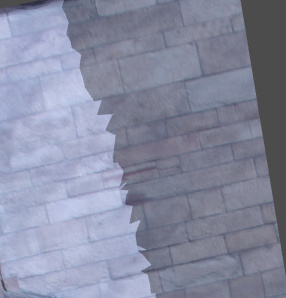
If the background is black, the texture brightness remains as expected:
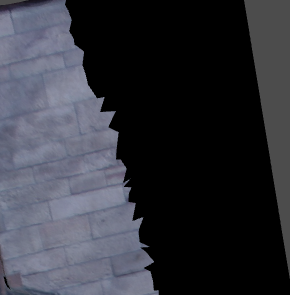
The issue is that when mapping the first texture it seems to add some color beyond the edges of the texture (dark blue/gray color):
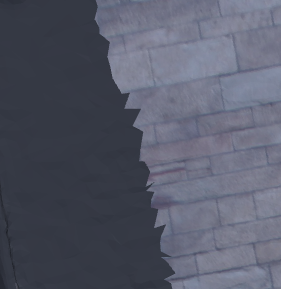
I’ve tried using `InterpolateOn()` on the texture, and that color got darker (the color shown above), but just a bit. Is there a way to set the behavior of the texture so beyond the mapped areas the background color can be set to black?
Thanks!
---
### Author:  [@panicbuttonvfx](https://discourse.vtk.org/u/panicbuttonvfx)
#### Post date: [July 23, 2020, 2:31am UTC](https://discourse.vtk.org/t/multi-texture-obj/3775/14 "2020-07-23T02:31:34Z")
This post pointed me in the right direction (I was setting the texture coordinate values to -1 instead of 1.1):
> [@Translucent texture for texture coordinates outside \[0,1\]](https://discourse.vtk.org/t/translucent-texture-for-texture-coordinates-outside-0-1/1791/9):
>
> Assigning values above 1 in the texture coordinates where you don’t have textures with setting repeat on the vtkTexture to False should do the trick. Here is an example using [PyVista](https://docs.pyvista.org) to show what this would look like: from pyvista import examples texture = examples.download\_puppy\_texture() texture.SetRepeat(False) mesh = examples.load\_random\_hills() mesh.texture\_map\_to\_plane(inplace=True) # Now turn off a region of the texture mapping idx = mesh.points[:,0] \> 5 mesh.t\_coords[idx] = [1.1, 1.1…