# multi vtkVolume rendering problem

**URL:** https://discourse.vtk.org/t/multi-vtkvolume-rendering-problem/5060
**Category:** Support
**Created:** [January 26, 2021, 3:13pm UTC](https://discourse.vtk.org/t/multi-vtkvolume-rendering-problem/5060 "2021-01-26T15:13:53Z")
**Posts on this page:** 8
**Page:** 1

<div class="post-metadata">

### Author: ![yuhuimoon](https://discourse.vtk.org/letter_avatar_proxy/v4/letter/y/c6cbf5/32.png) [@yuhuimoon](https://discourse.vtk.org/u/yuhuimoon)
#### Post date: [January 26, 2021, 3:13pm UTC](https://discourse.vtk.org/t/multi-vtkvolume-rendering-problem/5060/1 "2021-01-26T15:13:53Z")

</div>

Hi, vtk experts.  
My app can render a **vtkVolume** from a CT Image, which contain brain vessel and bone. As the first 2 pictures shows, the vessel and bone can be rendered correctly alone. If the two volumes have been rendered(set visibility true) at the same time, the result of rendering is NOT correct. As the 3rd picture shows, the vessel can be seen from outside the bone. It should not been seen outside from the bone. I use **vtkGPUVolumeRayCastMapper** in VTK 8.2.0. The bone vtkVolume is added first and then the vessel one is added. Can anyone give me some advice? Thanks in advance.

 ![1](https://discourse.vtk.org/uploads/default/original/2X/a/a4480ef1c79f43289331ef598405578f772368da.jpeg)

 ![2](https://discourse.vtk.org/uploads/default/original/2X/4/4d67e03f7c51c84c437660e2d8033963ba444297.jpeg)

 ![3](https://discourse.vtk.org/uploads/default/original/2X/2/2ebc8d0d4698f0d9535b2939e955fa426a62fb94.jpeg)

---

<div class="post-metadata">

### Author: ![lassoan](https://discourse.vtk.org/user_avatar/discourse.vtk.org/lassoan/32/50_2.png) [@lassoan](https://discourse.vtk.org/u/lassoan)
#### Post date: [January 26, 2021, 4:16pm UTC](https://discourse.vtk.org/t/multi-vtkvolume-rendering-problem/5060/2 "2021-01-26T16:16:54Z")

</div>

You need to use a single GPU volume mapper with [multi-volume input](https://vtk.org/doc/nightly/html/classvtkMultiVolume.html#details) for correct rendering of multiple volumes. It is somewhat tricky to set it up (see [https://gitlab.kitware.com/vtk/vtk/-/issues/17325](https://gitlab.kitware.com/vtk/vtk/-/issues/17325) and [https://gitlab.kitware.com/vtk/vtk/-/issues/17302](https://gitlab.kitware.com/vtk/vtk/-/issues/17302)), but it works very nicely overall. You can see what [workarounds we had to implement](https://github.com/Slicer/Slicer/blob/master/Modules/Loadable/VolumeRendering/MRMLDM/vtkMRMLVolumeRenderingDisplayableManager.cxx) to make it work in 3D Slicer, or if your goal is to just visualize multiple 3D volumes from C++ or Python or using end-user GUI then you can use 3D Slicer as is.

---

<div class="post-metadata">

### Author: ![yuhuimoon](https://discourse.vtk.org/letter_avatar_proxy/v4/letter/y/c6cbf5/32.png) [@yuhuimoon](https://discourse.vtk.org/u/yuhuimoon)
#### Post date: [January 31, 2021, 8:46am UTC](https://discourse.vtk.org/t/multi-vtkvolume-rendering-problem/5060/3 "2021-01-31T08:46:03Z")

</div>

Thanks for your advice. I have used **vtkMultiVolume** as the following code.

```
vtkSmartPointer<vtkGPUVolumeRayCastMapper> volumeMapper = vtkSmartPointer<vtkGPUVolumeRayCastMapper>::New();
volumeMapper->SetInputConnection(0, reader->GetOutputPort());
volumeMapper->SetInputConnection(1, reader->GetOutputPort());
volumeMapper->UseJitteringOn();

vtkSmartPointer<vtkMultiVolume> multiVolume = vtkSmartPointer<vtkMultiVolume>::New();
multiVolume->SetMapper(volumeMapper);

multiVolume->SetVolume(vesselVtkVolume, 0);
multiVolume->SetVolume(boneVtkVolume, 1);

renderer->AddVolume(multiVolume);

```

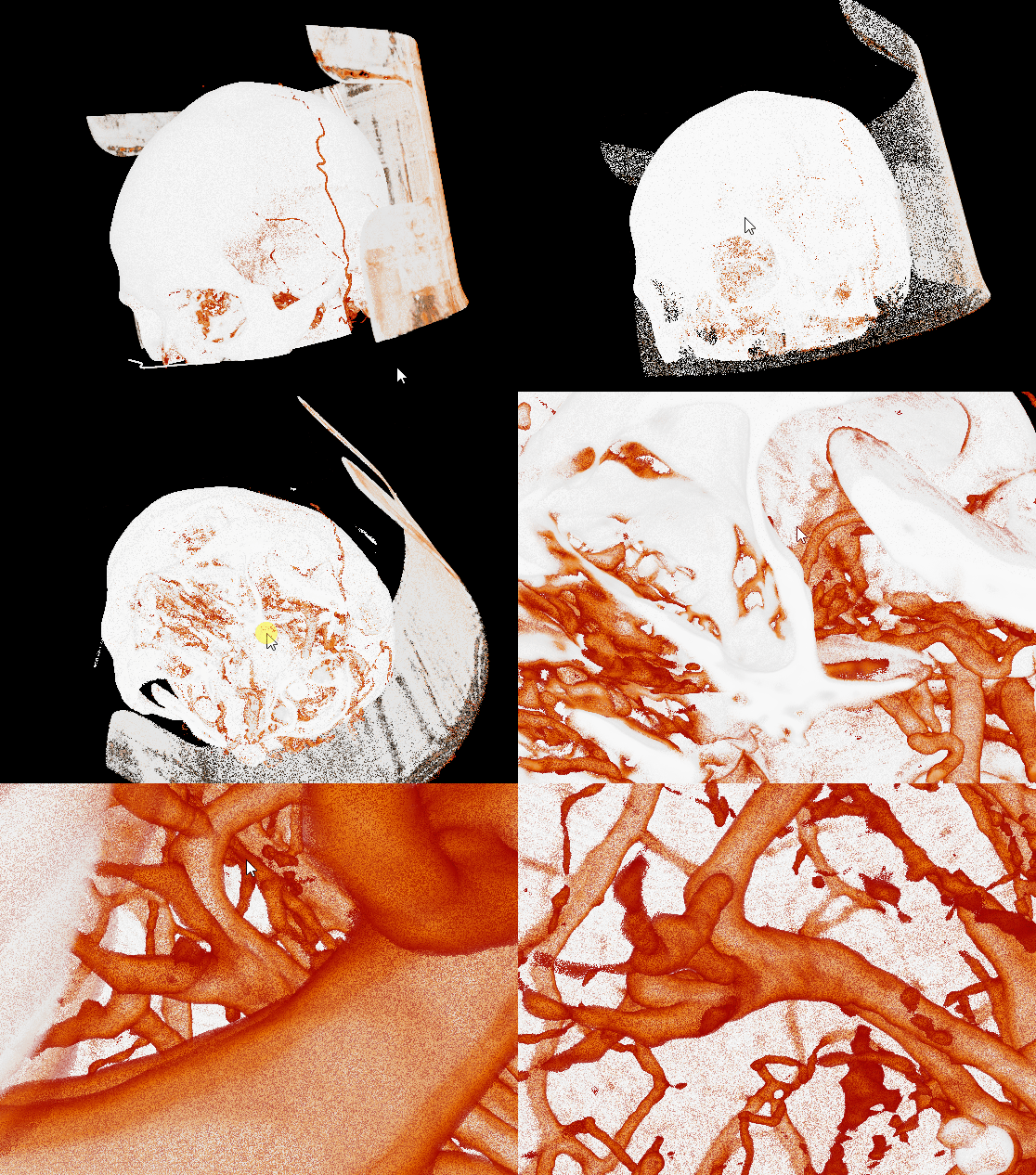
As the scene shows, the two volumes can render at the same time. But the color seems to be wrong, like light is not correct. Is there something I have not consider?
![multi_volume3](https://discourse.vtk.org/uploads/default/original/2X/a/a660028ebccc2b88bacb8a8f1334f3e0bad341ed.gif)

---

<div class="post-metadata">

### Author: ![lassoan](https://discourse.vtk.org/user_avatar/discourse.vtk.org/lassoan/32/50_2.png) [@lassoan](https://discourse.vtk.org/u/lassoan)
#### Post date: [January 31, 2021, 1:43pm UTC](https://discourse.vtk.org/t/multi-vtkvolume-rendering-problem/5060/4 "2021-01-31T13:43:55Z")

</div>

The video you attached shows that renderer provides some output but I cannot guess what inputs you provided and what output you expected, so it is not helpful in identifying any issues. If you provide complete code and data (you can use public data sets) then we might be able to have a closer look.

Does multi-volume rendering of the same data work as expected in 3D Slicer? If it does, then you can copy over all the necessary code that works around bugs in the VTK multi-volume renderer to your code or use Slicer as is. Or, you could fix the issues in VTK.

---

<div class="post-metadata">

### Author: ![yuhuimoon](https://discourse.vtk.org/letter_avatar_proxy/v4/letter/y/c6cbf5/32.png) [@yuhuimoon](https://discourse.vtk.org/u/yuhuimoon)
#### Post date: [February 1, 2021, 4:20am UTC](https://discourse.vtk.org/t/multi-vtkvolume-rendering-problem/5060/5 "2021-02-01T04:20:20Z")

</div>

I will try the same data in 3D Slicer later. The output I expect is like that the first two pictures show. The multi-volume I get seems to have no shading, like that the **vtkVolumeProperty** has been set **ShadeOff()**. I have tried to set the properties to vtkMultiVolume and also tried to set them to vtkVolume, but I get the same result as the viedo shows.

```
multiVolume->GetProperty()->ShadeOn();
multiVolume->GetProperty()->SetInterpolationTypeToLinear();
multiVolume->GetProperty()->SetAmbient(0.2);
multiVolume->GetProperty()->SetDiffuse(1.0);
multiVolume->GetProperty()->SetSpecular(0.0);
multiVolume->GetProperty()->SetSpecularPower(1.0);
multiVolume->GetProperty()->SetScalarOpacityUnitDistance(0.8919);

```

If I set only one volume for the **vtkMultiVolume** (using **SetVolume()**), I can get the correct bone or vessel shading as the first two pictures shows.

---

<div class="post-metadata">

### Author: ![lassoan](https://discourse.vtk.org/user_avatar/discourse.vtk.org/lassoan/32/50_2.png) [@lassoan](https://discourse.vtk.org/u/lassoan)
#### Post date: [February 1, 2021, 7:15am UTC](https://discourse.vtk.org/t/multi-vtkvolume-rendering-problem/5060/6 "2021-02-01T07:15:32Z")

</div>

We added shading to multi-volume rendering 6 months ago, so it was not included in VTK-8.2. It is in 3D Slicer’s VTK 8.2 branch (because we got the multi-VR shading merged into VTK master but then backported the commit). So, you can either use that [branch](https://github.com/Slicer/VTK/tree/slicer-v8.2.0-2018-10-02-74d9488523), or backport the [commit](https://gitlab.kitware.com/vtk/vtk/-/commit/451b68c010cd7af74b73fddf786604f0bdf62273) to your own VTK fork, or upgrade to VTK9.

---

<div class="post-metadata">

### Author: ![yuhuimoon](https://discourse.vtk.org/letter_avatar_proxy/v4/letter/y/c6cbf5/32.png) [@yuhuimoon](https://discourse.vtk.org/u/yuhuimoon)
#### Post date: [February 3, 2021, 7:33am UTC](https://discourse.vtk.org/t/multi-vtkvolume-rendering-problem/5060/7 "2021-02-03T07:33:52Z")

</div>

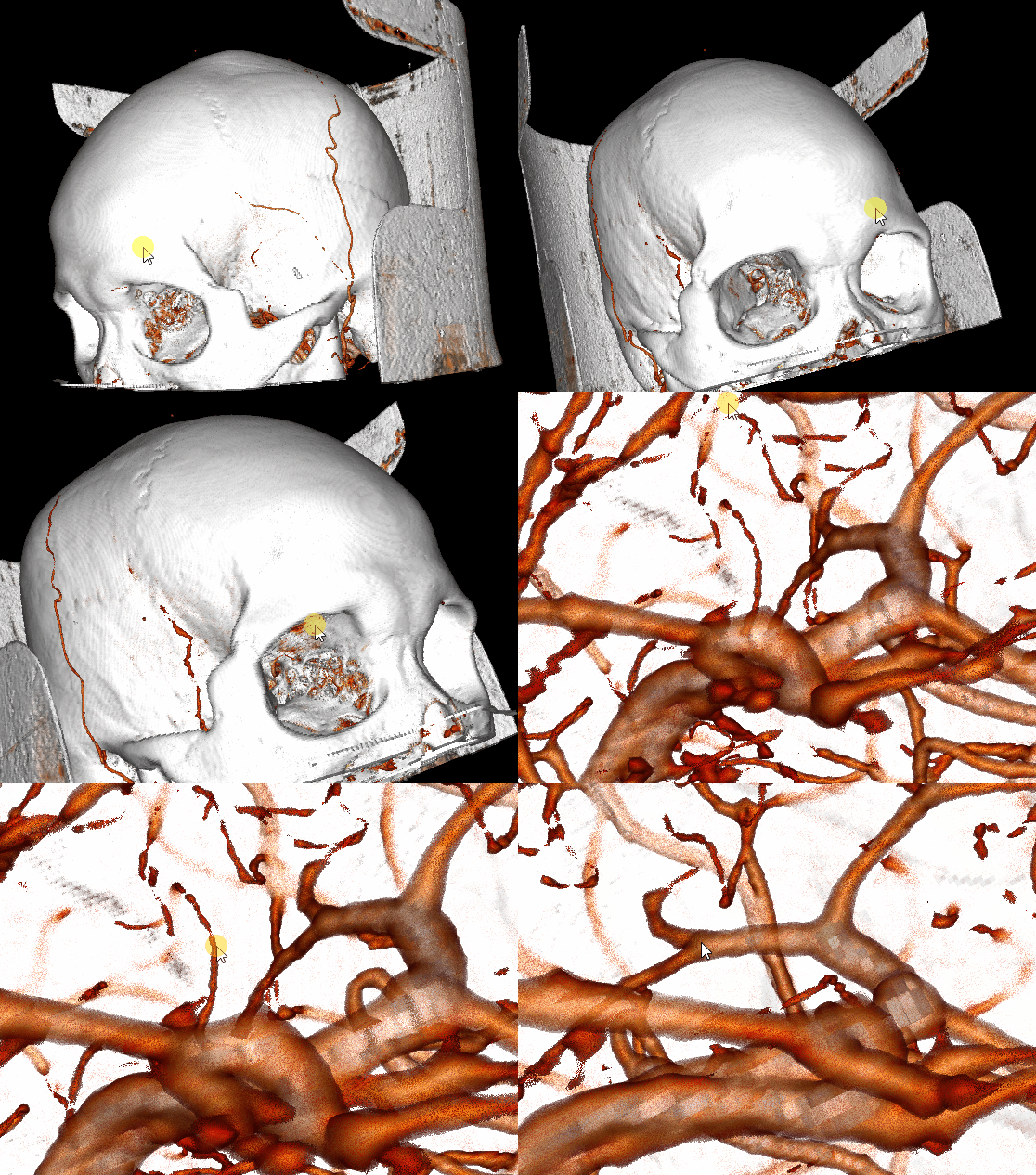
I test my app with VTK9 (the lastest master version, the release version 9.0.1 does not support). It works with the rendering result I want. The multi-volume shading looks not very smooth comparing to the single volume and I will check my code to improve it. Thanks!
![multi_volume_vtk9](https://discourse.vtk.org/uploads/default/original/2X/9/9e42f88dcbd81e19367f37be122cc676f31f30aa.gif)

---

<div class="post-metadata">

### Author: ![Dawid](https://discourse.vtk.org/user_avatar/discourse.vtk.org/dawid/32/5605_2.png) [@Dawid](https://discourse.vtk.org/u/Dawid)
#### Post date: [August 8, 2022, 3:11am UTC](https://discourse.vtk.org/t/multi-vtkvolume-rendering-problem/5060/8 "2022-08-08T03:11:44Z")

</div>

Hi, Harrison!  
Recently I researched multi-volume rendering.  
I use vtkGPUVolumeRayCastMapper in VTK 9.1.0.  
When I used the method of vtkMultiVolume, the position and focus of the light are fixed.  
I hope the light to move with the camera when I use the method of vtkMultiVolume.  
Could you give me some advice? Thanks in advance.
